Introduction: Ten Rooms, One Machine
Imagine you have to calculate the area of ten rooms. Length times width, length times width, ten times.
Or you build one machine that calculates an area, and then you just call it.
In this part we build our own machine. It is called a method.
After this part, you will be able to:
- Create your own method and call it many times.
- Send material in through parameters and get a result back through
return. - Explain why a variable inside a method cannot be seen from outside.
Answer to the Part 9 Challenge
The question: the array a holds 5, 10, 15, then println(a[a.length - 1]). What is the output?
The answer is B: 15.
The length is 3. Minus one is 2. Locker number 2 is the last locker, and it holds 15.
If you answered B, well done!
1. The Problem: The Same Steps in Many Places
As a program grows, the same steps often appear in many places. If those steps need a fix, you must find and change them one by one.
It is better to wrap the steps once, give them a name, and call them whenever you need them. That wrapper is called a method.
In fact, you have used methods from the start. main is a method. println is a method too.
2. A Method Is a Machine
Picture a method as a machine.
- On top there is a funnel where material goes in. This funnel is called a parameter.
- At the bottom there is a door where the result comes out. This door is called return.
The machine luas ("area") has two funnels: panjang (length) and lebar (width). Inside, panjang is multiplied by lebar. The result comes out through the return door.
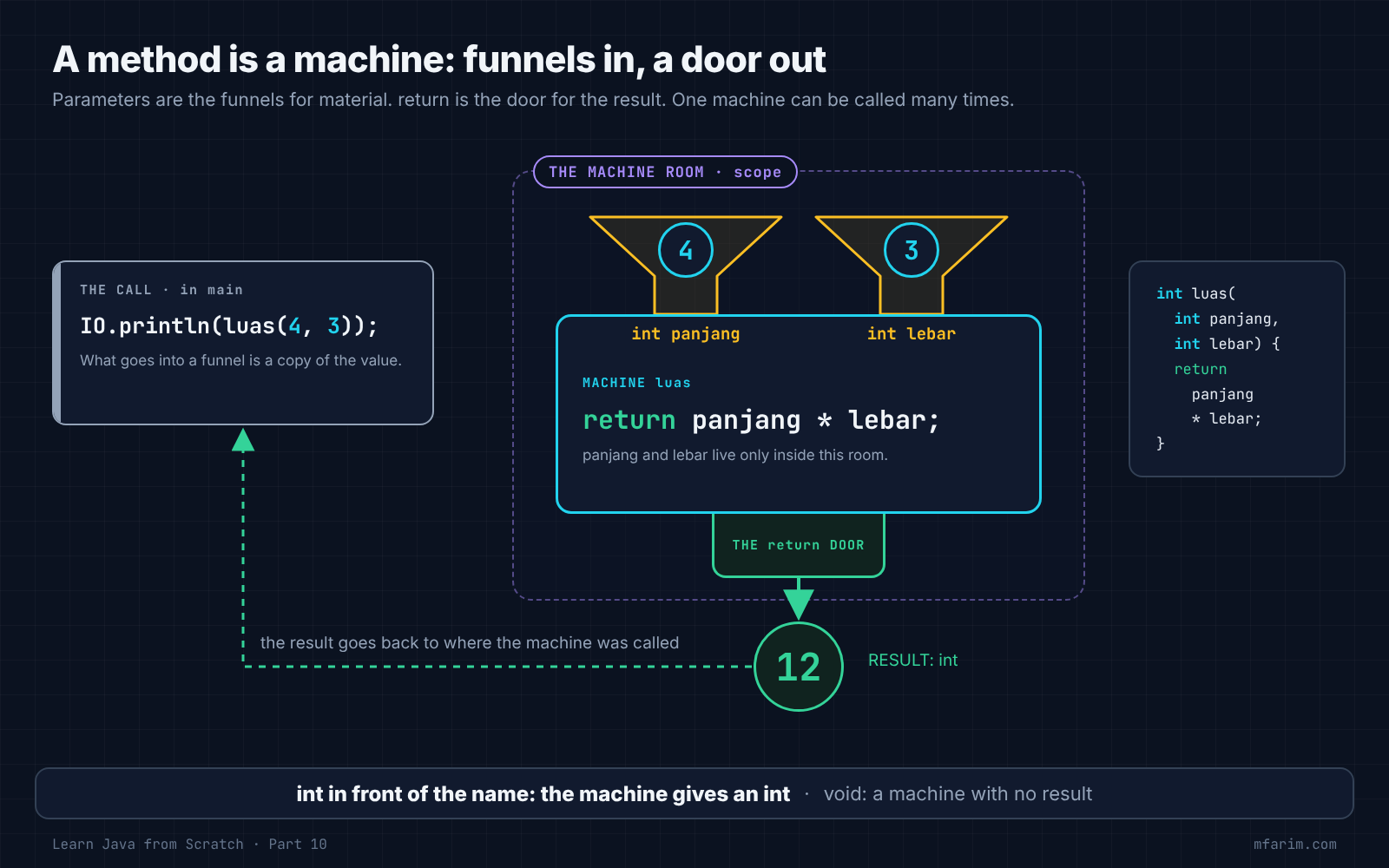
Click the diagram to open it in full size.
3. Building and Calling a Machine
Create a file named Mesin.java, which means "machine". A new method is written outside main:
int luas(int panjang, int lebar) {
    return panjang * lebar;
}

void main() {
    IO.println(luas(4, 3));
    IO.println(luas(5, 2));
}
12
10
Let us look at the first line:
| Piece | Meaning |
|---|---|
int at the front | The type of the result that comes out of the door |
luas | The name of the machine |
(int panjang, int lebar) | Two funnels, each with its type |
return panjang * lebar; | Calculate, then send the result out through the door |
Now follow the call luas(4, 3):
4goes into thepanjangfunnel and3goes into thelebarfunnel.- The machine works:
4 * 3. 12comes out of the door, andprintlnprints it at once.
Call it again with 5 and 2, and the result is 10. One machine, used again and again.
4. A Machine with No Result: void
Not every machine gives a result. The machine sapa ("greet") only shows a greeting.
For a machine like this, write void at the front. It means: nothing comes out of the door.
void sapa(String nama) {
    IO.println("Halo, " + nama + "!");
}

void main() {
    sapa("Rani");
    sapa("Budi");
}
Halo, Rani!
Halo, Budi!
Now you know the meaning of void in void main(), which we left open in Part 2. main is a machine that gives nothing back.
| Type in front of the name | Meaning |
|---|---|
int, double, String and others | The machine gives a result of that type |
void | The machine gives no result |
5. A Look into Memory: Every Machine Has Its Own Room
Every time a machine is called, Java prepares a room with a door. The funnels and the variables inside the machine live only in that room.
That is why main cannot see the variable panjang, which belongs to the machine luas:
int luas(int panjang, int lebar) {
    return panjang * lebar;
}

void main() {
    IO.println(luas(4, 3));
    IO.println(panjang);
}
Mesin.java:7: error: cannot find symbol
    IO.println(panjang);
               ^
  symbol:   variable panjang
  location: class Mesin
1 error
The area where a variable lives is called its scope.
There is one more thing. When we send a number into a funnel, what goes in is a copy, like a photocopy. The machine can write all over its copy, but the original box in main does not change. The challenge at the end of this part tests exactly that.
6. A Real Example: A Temperature Converter
Create a file named Suhu.java. Suhu means "temperature".
double keFahrenheit(double celsius) {
    return celsius * 9 / 5 + 32;
}

void main() {
    IO.println(keFahrenheit(30));
    IO.println(keFahrenheit(100));
}
86.0
212.0
Thirty degrees Celsius is 86 degrees Fahrenheit. One hundred degrees, the boiling point of water, is 212.
Notice that we put the int number 30 into a double funnel. That is safe. As in Part 3, a small box can go into a big box.
The formula is written only once. If the formula is ever wrong, you fix it in one place.
7. Three Method Traps
Trap one: forgetting return.
If a machine promises to give an int, every path through it must end with return.
int luas(int panjang, int lebar) {
    int hasil = panjang * lebar;
}
Mesin.java:3: error: missing return statement
}
^
1 error
Trap two: the wrong number or type of materials.
The machine luas has two funnels. Calling it with only one number is rejected:
Mesin.java:6: error: method luas in class Mesin cannot be applied to given types;
    IO.println(luas(4));
               ^
  required: int,int
  found:    int
  reason: actual and formal argument lists differ in length
1 error
Read the lines required and found. The machine needs int,int, but it got only int.
Trap three: the result type does not match the promise.
String label(int nomor) {
    return nomor;
}
Mesin.java:2: error: incompatible types: int cannot be converted to String
    return nomor;
           ^
1 error
The machine promises a String, but it returns a number. The fix: return "" + nomor;, so the number is joined into text.
Summary
- A method is a machine with a name. Parameters are the funnels going in, and
returnis the door going out. - The type in front of the method name is the type of its result.
voidmeans there is no result. - Every variable lives only inside its own room, which is called its scope.
Challenge
Look at this code:
void tambah(int x) {
    x = x + 10;
}

void main() {
    int a = 5;
    tambah(a);
    IO.println(a);
}
Tambah means "add". What is the output?
- A.
15 - B.
5 - C. An error.
Try to answer before you run it. I explain the answer at the start of Part 11.
Conclusion & What's Next
Well done, you have finished the beginner level!
Look at what is now in your toolbox:
| Part | What you can do |
|---|---|
| 1 and 2 | The JVM, main, compile and run |
| 3 and 4 | Variables, primitive types and strings |
| 5 and 6 | Operators and input |
| 7 and 8 | Branching and loops |
| 9 and 10 | Arrays and methods |
In Part 11, we move up to the intermediate level: we make a cookie cutter and its cookies. Classes and objects.
Before you move on, build a machine named keliling that calculates the perimeter of a room, and call it with a few sizes.
See you in Part 11. Get your coffee ready. Hot chocolate is fine too.

Written by Muhammad Fari Madyan
Senior Backend Engineer and co-founder of LampungDev. I write up what I build so others can learn from it.