Introduction: A Program That Listens
All our programs so far are like a speech: they talk and never listen.
In this part we build a program that asks a question, waits, and then answers based on what you type.
After this part, you will be able to:
- Read what the user types with
IO.readln. - Turn that text into a number with
Integer.parseInt. - Recognise
Scanner, the older way that you still see in many books and courses.
Answer to the Part 5 Challenge
The question: println(10 / 4 * 2). What is the output?
The answer is B: 4.
Division and multiplication are equally strong, so they are done from the left. 10 / 4 is an int division: 2.5 loses its decimals and becomes 2. Then 2 * 2 is 4.
If you answered B, well done!
1. The Problem: A Program That Never Changes
A program that cannot take anything in can only do the same thing every time it runs.
- A calculator needs your numbers.
- A game needs your guess.
- A form needs your name.
What the user gives to a program is called input.
2. Input Is a Funnel on Top of a Machine
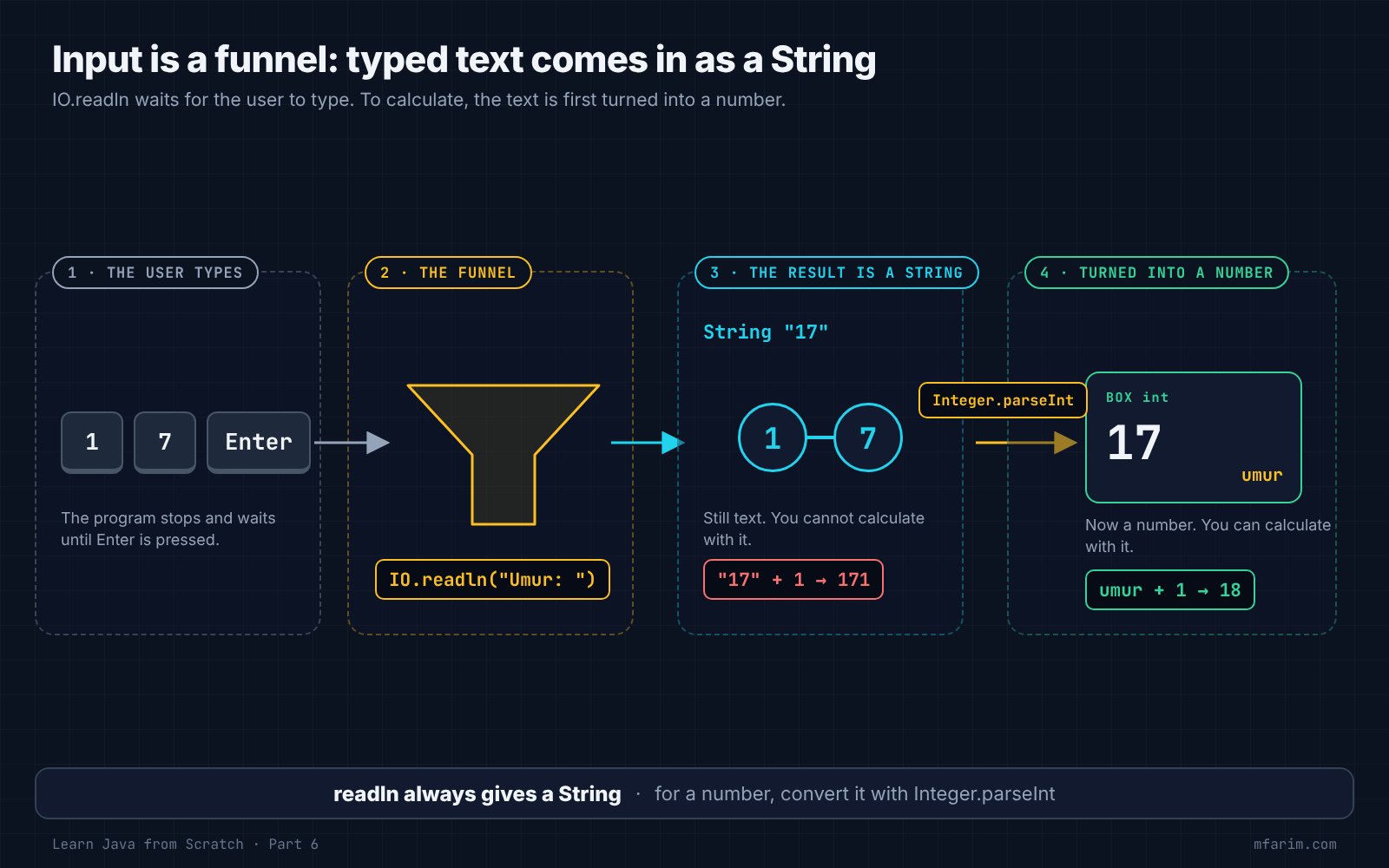
Picture a program as a machine with a funnel on top.
The user pours typed text into the funnel. The program catches it in a box, which is a variable.
In Java 25, the simplest funnel is IO.readln. When the execution arrow reaches it, three things happen:
- The program stops and waits.
- The user types and then presses Enter.
- The typed text is given back as a string.
Click the diagram to open it in full size.
3. Asking and Answering
Create a file named Sapa.java. Sapa means "greet".
void main() {
    String nama = IO.readln("Siapa namamu? ");
    IO.println("Halo, " + nama + "!");
}
The text inside the brackets of readln is the question. Here it means "What is your name?". Run the program with java Sapa.java. It shows the question and then waits quietly.
Type Rani and press Enter:
Siapa namamu? Rani
Halo, Rani!
The word Rani goes into the nama box. Then it is joined with the + sign, as in Part 4.
Run it again and type a different name. It is one program, but the result is different for every person who runs it.
4. When You Ask for a Number
What if you ask for a number, for example an age?
Be careful. readln always gives a string. The typed 17 comes in as text beads, not as a number.
To turn it into an int, use Integer.parseInt:
void main() {
    int umur = Integer.parseInt(IO.readln("Umur: "));
    IO.println("Tahun depan umurmu " + (umur + 1));
}
Umur: 17
Tahun depan umurmu 18
The program asks for the age (umur) and answers "Next year your age is 18".
Read the first line from the inside to the outside:
| Order | Code | What happens |
|---|---|---|
| 1 | IO.readln("Umur: ") | Waits for typed text. The result is the string "17" |
| 2 | Integer.parseInt(...) | The text necklace "17" is turned into the number 17 |
| 3 | int umur = ... | The number 17 goes into an int box |
Now you can calculate with umur. umur + 1 is 18.
5. The Classic Funnel: Scanner
In many books and courses, you will meet an older but very popular funnel: Scanner.
void main() {
    Scanner pindai = new Scanner(System.in);

    IO.print("Umur: ");
    int umur = pindai.nextInt();
    IO.println("Tahun depan umurmu " + (umur + 1));
}
Umur: 17
Tahun depan umurmu 18
The first line creates a Scanner that reads from the keyboard. I named it pindai, which means "scan". You do not need to think about the word new yet. We cover it in the part about classes and objects.
| Code | Its job |
|---|---|
pindai.nextInt() | Reads one whole number |
pindai.nextLine() | Reads one line of text |
For a one-file program like this, Java 25 lets you use Scanner directly, without an import line. In other tutorials, you may see import java.util.Scanner; on the first line.
So when you see Scanner somewhere else, you now know what it is: a funnel with the same job.
6. A Real Example: Guess the Birth Year
Create a file named Lahir.java. Lahir means "born".
void main() {
    String nama = IO.readln("Nama: ");
    int umur = Integer.parseInt(IO.readln("Umur: "));
    int lahir = 2026 - umur;

    IO.println(nama + " lahir sekitar tahun " + lahir);
}
Nama: Rani
Umur: 17
Rani lahir sekitar tahun 2009
The last line says "Rani was born around the year 2009". The word "around" matters. Our program does not know yet if Rani has already had her birthday this year.
The number 2026 is the year when I wrote this article. Change it to the year when you read it.
7. Three Input Traps
Trap one: forgetting that input is a string.
void main() {
    String angka = IO.readln("Angka: ");
    IO.println(angka + 1);
}
Angka: 5
51
The user types 5, we add 1, but the result is not 6. Remember Part 4: as soon as there is a string, the + sign joins.
Trap two: parseInt gets text that is not a number.
If the user types the age in words, such as tujuh belas ("seventeen"), the program stops:
Umur: tujuh belas
Exception in thread "main" java.lang.NumberFormatException: For input string: "tujuh belas"
	at java.base/java.lang.NumberFormatException.forInputString(NumberFormatException.java:67)
	at java.base/java.lang.Integer.parseInt(Integer.java:565)
	at java.base/java.lang.Integer.parseInt(Integer.java:662)
	at Umur.main(Umur.java:2)
The message is long, but you only need to read two lines. The first line names the problem: NumberFormatException, the text is not a number. The last line gives the address: Umur.java, line 2. We learn how to handle this in Part 18.
Trap three, only for Scanner: nextInt() followed by nextLine().
void main() {
    Scanner pindai = new Scanner(System.in);

    IO.print("Umur: ");
    int umur = pindai.nextInt();
    IO.print("Nama: ");
    String nama = pindai.nextLine();

    IO.println("Nama: [" + nama + "], umur: " + umur);
}
Umur: 17
Nama: Nama: [], umur: 17
The program does not wait for the name. Why?
nextInt() takes only the number. The Enter key is left in the funnel. The next nextLine() picks up that Enter at once, so the name is read as empty.
The fix: call pindai.nextLine(); one time right after nextInt(), to throw away the leftover Enter.
Summary
- Input is a funnel.
IO.readlnwaits for the user to type, then gives the result as a string. - For a number, convert that string with
Integer.parseInt. Scanneris the classic funnel. Watch out for the leftover Enter afternextInt().
Challenge
Look at this code:
void main() {
    int a = Integer.parseInt(IO.readln());
    String b = IO.readln();
    IO.println(a + 1 + b);
}
The user types 7, then 3. What is the output?
- A.
11 - B.
83 - C.
713
Try to answer before you run it. I explain the answer at the start of Part 7.
Conclusion & What's Next
Your program can now listen. If you remember only one thing, remember that readln always gives a string. A number must be converted first with parseInt.
In Part 7, our program starts to choose a path. There is a road junction with a sign, and a lift with floor buttons.
See you in Part 7. Get your coffee ready. Hot chocolate is fine too.

Written by Muhammad Fari Madyan
Senior Backend Engineer and co-founder of LampungDev. I write up what I build so others can learn from it.