Introduction: Where Did the Half Go?
Seven divided by two. Three and a half, right?
Ask Java, and the answer is three.
Where did the half go? In this part we meet operators. They are the tools Java uses to calculate and to compare.
After this part, you will know:
- How to calculate with arithmetic operators, including modulo.
- How to compare two values, and why the result is always
trueorfalse. - How to combine several conditions with AND, OR and NOT.
Answer to the Part 4 Challenge
The question: println("Skor: " + 2 + 3). What is the output?
The answer is B: Skor: 23.
Java reads from the left. "Skor: " is a string, so 2 is joined as text. The result is still a string, so 3 is joined too.
If you want the numbers to be added first, use brackets:
IO.println("Skor: " + (2 + 3));
Skor: 5
If you answered B, well done!
1. The Problem: A Program Must Calculate and Decide
A useful program almost always calculates and decides.
- What is the total price after the discount?
- Is the exam score high enough to pass?
- Is the user logged in and allowed to enter?
For all of this, Java gives us operators: symbols that work on the values in our boxes. We learn three groups here.
2. Group One: Arithmetic Operators
Create a file named Hitung.java. Hitung means "calculate".
void main() {
    IO.println(7 + 2);
    IO.println(7 - 2);
    IO.println(7 * 2);
    IO.println(7 / 2);
    IO.println(7 % 2);
}
9
5
14
3
1
| Operator | Meaning | Example | Result |
|---|---|---|---|
+ | Add | 7 + 2 | 9 |
- | Subtract | 7 - 2 | 5 |
* | Multiply | 7 * 2 | 14 |
/ | Divide | 7 / 2 | 3 |
% | Modulo, which is the remainder of a division | 7 % 2 | 1 |
The one that few people know is %. Seven divided by two is three, with one left over. That leftover is the result of modulo.
Modulo is useful to check if a number is even or odd. If the remainder after dividing by two is 0, the number is even.
As in maths, multiplication and division are done first. If you want the addition first, use brackets.
| Code | Result |
|---|---|
2 + 3 * 4 | 14 |
(2 + 3) * 4 | 20 |
3. The Mystery of Seven Divided by Two
Now back to the mystery from the introduction. Why is 7 / 2 equal to 3?
Remember the box rule from Part 3. 7 and 2 are both int. So the result also goes into an int box.
An int box has no room for digits after the decimal point. So the half is thrown away. It is not rounded.
If one of the two numbers is a double, the result goes into a double box:
| Code | Type of the result | Result |
|---|---|---|
7 / 2 | int | 3 |
7 / 2.0 | double | 3.5 |
4. Group Two: Comparison Operators
Picture a pair of scales. You put one value on the left and one value on the right, and you ask: which one is heavier?
| Operator | Meaning |
|---|---|
> | Greater than |
< | Less than |
>= | Greater than or equal to |
<= | Less than or equal to |
== | Equal to |
!= | Not equal to |
Look at ==. To check if two values are equal, use two equals signs.
The result of a comparison is always a boolean: true or false.
void main() {
    int nilai = 80;
    boolean lulus = nilai >= 75;
    IO.println(lulus);
}
true
Here nilai is the exam score and lulus means "passed". The score is 80 and the limit is 75. The scales tip, and the lulus box holds true.
5. Group Three: Logical Operators
Logical operators combine several conditions. Picture two kinds of gates.
The AND gate, written &&, has two locks. It opens only when both conditions are true.
The OR gate, written ||, has two doors. One true condition is enough.
Then there is the exclamation mark !, which is called NOT. It flips a value: true becomes false, and false becomes true.
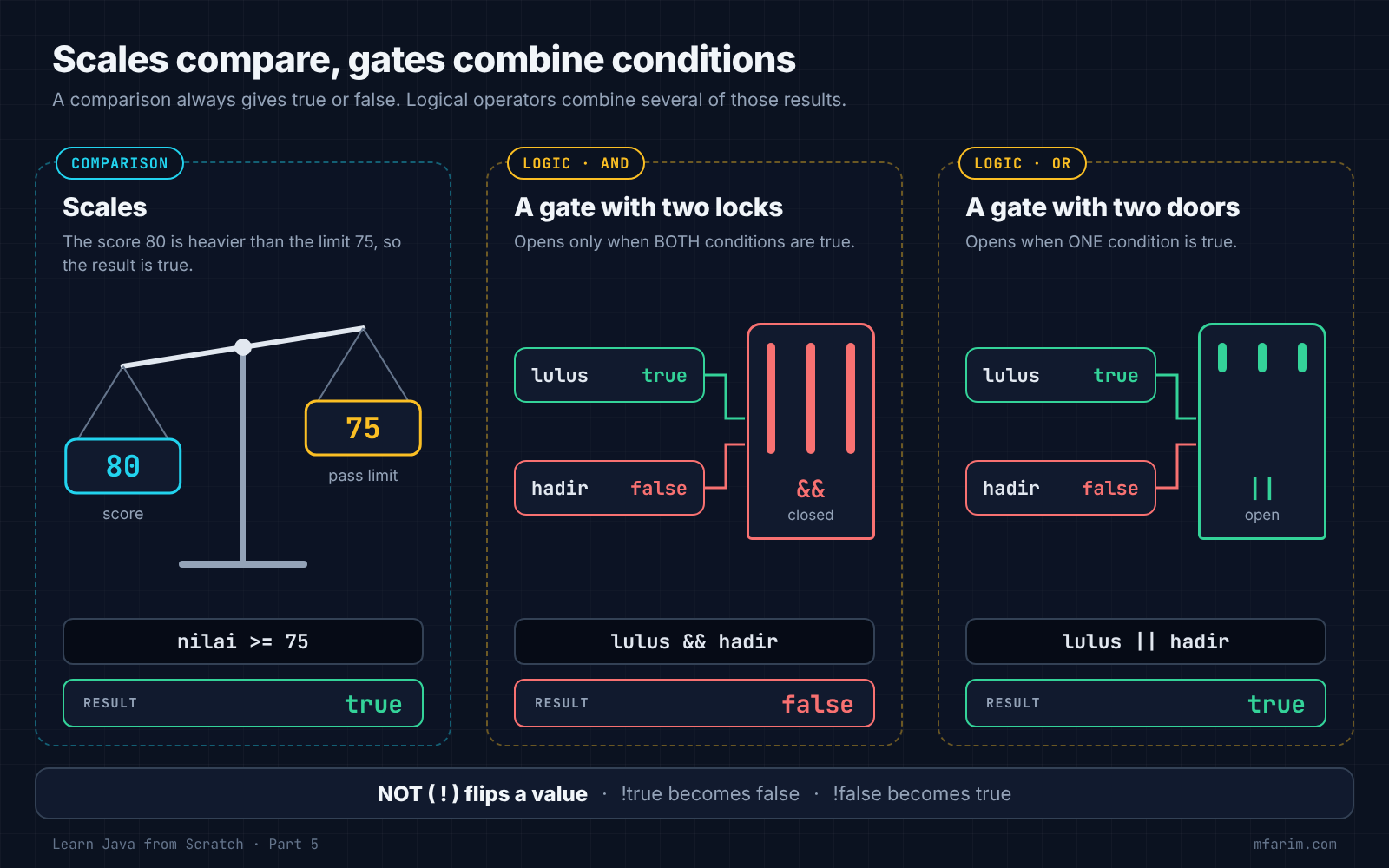
Click the diagram to open it in full size.
void main() {
    boolean lulus = true;
    boolean hadir = false;

    IO.println(lulus && hadir);
    IO.println(lulus || hadir);
    IO.println(!lulus);
}
false
true
false
The variable hadir means "present in class".
| Code | Read as | Result |
|---|---|---|
lulus && hadir | passed and present | false, because hadir is false |
lulus || hadir | passed or present | true, because lulus is true |
!lulus | not passed | false |
A bonus: two short forms that you will see very often.
void main() {
    int skor = 10;
    skor += 5;
    IO.println(skor);
    skor++;
    IO.println(skor);
}
15
16
skor += 5 means: add five to skor. skor++ means: add one to skor.
6. A Real Example: Shopping with a Discount
An item costs 85,000 rupiah and the discount is 20 percent. Shipping is free when the payment is at least 50,000 rupiah.
Create a file named Belanja.java, which means "shopping":
void main() {
    int harga = 85_000;
    int diskon = harga * 20 / 100;
    int bayar = harga - diskon;
    boolean gratisOngkir = bayar >= 50_000;

    IO.println("Diskon: " + diskon);
    IO.println("Bayar: " + bayar);
    IO.println("Gratis ongkir: " + gratisOngkir);
}
Diskon: 17000
Bayar: 68000
Gratis ongkir: true
The names mean: harga is the price, diskon is the discount, bayar is the amount to pay, and gratisOngkir means "free shipping".
Three groups of operators work together here: arithmetic to calculate, comparison to decide, and the + from Part 4 to join text.
Now look at the order in the diskon line. If 20 / 100 is calculated first, the result is 0, because int division throws away the decimals.
| Code | Result |
|---|---|
harga * 20 / 100 | 17000 |
harga * (20 / 100) | 0 |
The discount becomes zero rupiah. So multiply first, then divide.
7. Three Operator Traps
Trap one: int division throws away the decimals.
If you need a decimal result, make sure one of the numbers is a double. Write 7 / 2.0, not 7 / 2.
Trap two: one equals sign for a comparison.
One = puts a value into a box. Two == compare two values. If you mix them up, javac complains:
void main() {
    int nilai = 80;
    boolean sempurna = nilai = 100;
    IO.println(sempurna);
}
Hitung.java:3: error: incompatible types: int cannot be converted to boolean
    boolean sempurna = nilai = 100;
                             ^
1 error
The correct line is boolean sempurna = nilai == 100;. The name sempurna means "perfect".
Trap three: dividing by zero.
void main() {
    int kue = 10;
    int orang = 0;
    IO.println(kue / orang);
}
This one is different. javac does not catch it, so the code compiles. But when the program runs, it stops at once:
Exception in thread "main" java.lang.ArithmeticException: / by zero
	at Hitung.main(Hitung.java:4)
The message still gives you the address: the file Hitung.java, line 4. A mistake that only appears while the program runs, like this one, is called an exception. We cover exceptions in Part 18.
Summary
- Arithmetic operators calculate, including modulo for the remainder.
intdivision throws away the decimals. - Comparison operators work like scales, and the result is always
trueorfalse. To check if two values are equal, use==. - AND needs both conditions, OR needs only one, and NOT flips the value.
Challenge
Look at this code:
void main() {
    IO.println(10 / 4 * 2);
}
What is the output?
- A.
5 - B.
4 - C.
5.0
Try to answer before you run it. I explain the answer at the start of Part 6.
Conclusion & What's Next
Your program can now calculate, compare, and combine conditions. If you remember only one thing, remember int division: the digits after the decimal point are thrown away, not rounded.
All our programs so far are like a speech: they talk and never listen. In Part 6, our program starts to have a conversation. We add a funnel, so the user can type an answer and the program can read it.
Before you move on, change the price and the discount in Belanja.java, and guess the result before you run it.
See you in Part 6. Get your coffee ready. Hot chocolate is fine too.

Written by Muhammad Fari Madyan
Senior Backend Engineer and co-founder of LampungDev. I write up what I build so others can learn from it.