Introduction: Pass or Retake?
Your exam score is 82. Did you pass, or must you take the exam again?
You know the answer at once. But a program must be taught how to decide.
In this part, our program learns to choose a path.
After this part, you will be able to:
- Make a program choose one of two paths with
ifandelse. - Chain many choices with
else if. - Use
switchto choose based on one exact value.
Answer to the Part 6 Challenge
The question: a holds the number 7, b holds the string "3", then println(a + 1 + b). What is the output?
The answer is B: 83.
Java reads from the left. a + 1 is still a number, and the result is 8. Then 8 meets the string "3", so they are joined into 83.
If you answered B, well done!
1. The Problem: An Arrow That Only Goes Straight
So far the execution arrow always moves straight from top to bottom. Every line runs.
But a real program often has to choose:
- If the balance is enough, the payment goes through.
- If not, the payment is rejected.
A choice like this is called branching.
2. Branching Is a Junction with a Sign
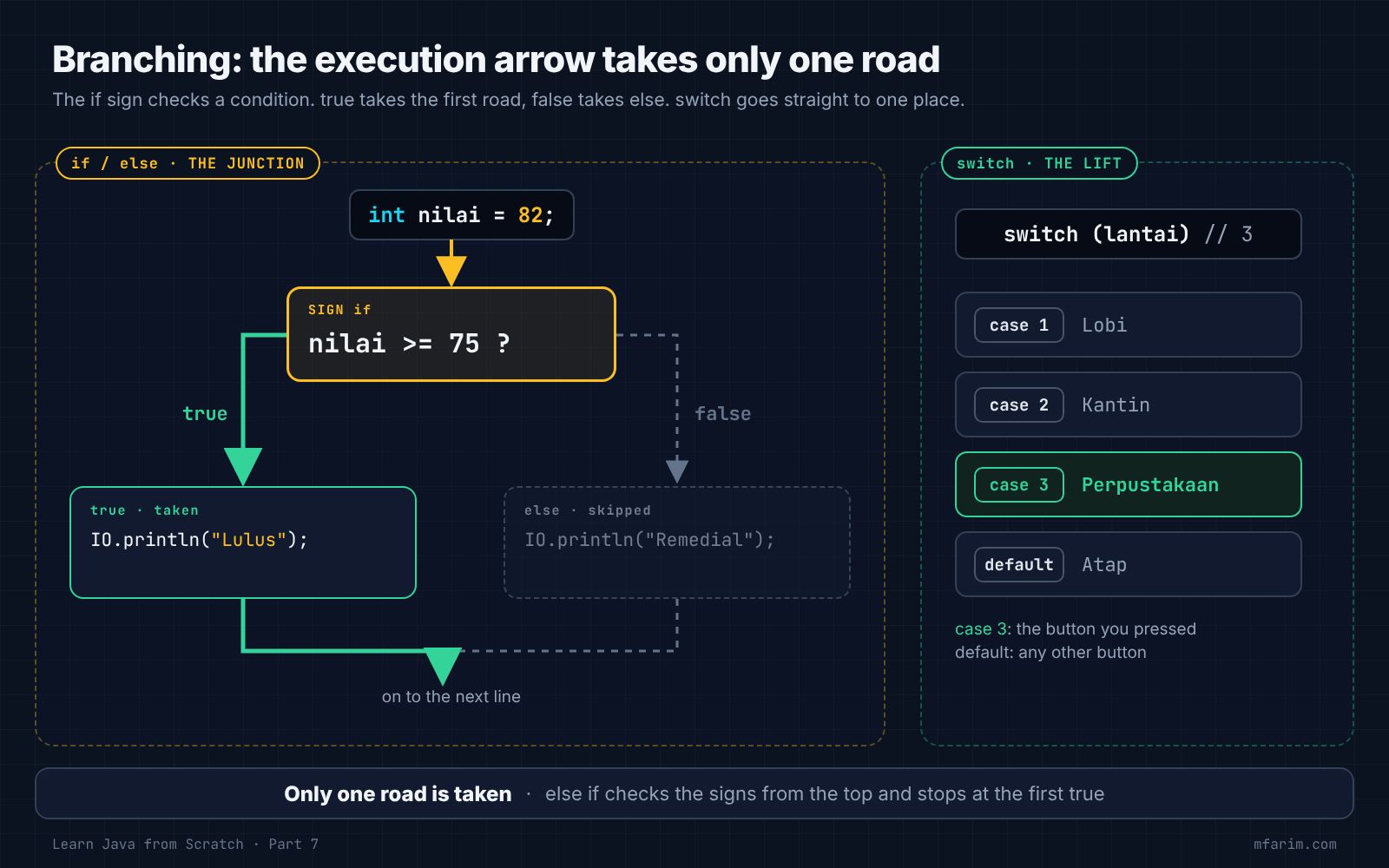
Picture the execution arrow arriving at a road junction. There is a sign with a question, for example: is the score greater than or equal to 75?
- If the answer is
true, the arrow turns into the first road. - If the answer is
false, the arrow turns into the second road.
Only one road is taken.
Click the diagram to open it in full size.
In Java, the sign is written as if, followed by a condition in brackets. The road for true is inside curly braces. The other road comes after the word else.
3. if and else
Create a file named Nilai.java. Nilai means "score".
void main() {
    int nilai = 82;

    if (nilai >= 75) {
        IO.println("Lulus");
    } else {
        IO.println("Remedial");
    }
}
Lulus
Lulus means "passed". Remedial means the student must take the exam again.
Follow the arrow:
- The arrow reaches the sign and checks:
82 >= 75? The result istrue. - The arrow enters the first road and prints
Lulus. - The
elseroad is skipped.
Change nilai to 60 and run it again. Now it prints Remedial.
The condition can use every operator from Part 5, including && and ||. The only rule: the result must be true or false.
4. More Than Two Choices: else if
What if there are more than two choices? For example a letter grade: A, B, C or D.
We chain the junctions with else if:
void main() {
    int nilai = 82;

    if (nilai >= 90) {
        IO.println("A");
    } else if (nilai >= 80) {
        IO.println("B");
    } else if (nilai >= 70) {
        IO.println("C");
    } else {
        IO.println("D");
    }
}
B
The arrow checks the signs one by one from the top. As soon as it finds one that is true, it enters that road and skips all the rest.
| Sign | For the score 82 | What happens |
|---|---|---|
nilai >= 90 | false | Go on to the next sign |
nilai >= 80 | true | Print B, then finish |
nilai >= 70 | Not checked | Skipped |
else | Not checked | Skipped |
Look at the third row. 82 >= 70 is also true. But that sign is never checked, because the arrow already found its road at the second sign. So the order of the signs matters.
5. switch: A Lift with Floor Buttons
When the choice depends on one exact value, there is a tidier way: switch.
Picture a lift. You press a floor button, and the lift takes you straight to that floor. It does not stop at every junction.
In modern Java, switch is written with an arrow ->:
void main() {
    int lantai = 3;

    switch (lantai) {
        case 1 -> IO.println("Lobi");
        case 2 -> IO.println("Kantin");
        case 3 -> IO.println("Perpustakaan");
        default -> IO.println("Atap");
    }
}
Perpustakaan
Here lantai is the floor. The four places are the lobby, the canteen, the library (perpustakaan) and the roof (atap).
case 3 means: when the value is 3. default is the road for every other button.
| Use | When |
|---|---|
if and else if | The condition is a range or a combination, such as nilai >= 80 |
switch | The choice depends on one exact value, such as 1, 2 or 3 |
6. A Real Example: Odd or Even
This example combines three parts: input from Part 6, modulo from Part 5, and if from this part.
Create a file named GanjilGenap.java. Ganjil means "odd" and genap means "even".
void main() {
    int angka = Integer.parseInt(IO.readln("Angka: "));

    if (angka % 2 == 0) {
        IO.println(angka + " genap");
    } else {
        IO.println(angka + " ganjil");
    }
}
Angka: 7
7 ganjil
Remember modulo: the remainder of a division. 7 % 2 is 1, not 0. So the sign answers false, and the arrow takes the else road.
Run it again and type 10:
Angka: 10
10 genap
7. Three Branching Traps
Trap one: a semicolon after the if brackets.
void main() {
    int nilai = 60;

    if (nilai >= 75); {
        IO.println("Lulus");
    }
}
Lulus
The score is 60, but the program prints Lulus. And javac does not complain at all.
The reason: that semicolon ends the if. So the curly braces below it always run, whatever the condition says. This is one of the hardest bugs to see, because there is no error message.
Trap two: one equals sign inside the if.
Nilai.java:4: error: incompatible types: int cannot be converted to boolean
    if (nilai = 75) {
              ^
1 error
To compare, use ==. This is the same trap as in Part 5.
Trap three: the old switch style with a colon.
In older code, you will see switch written like this:
void main() {
    int lantai = 2;

    switch (lantai) {
        case 1:
            IO.println("Lobi");
        case 2:
            IO.println("Kantin");
        case 3:
            IO.println("Perpustakaan");
        default:
            IO.println("Atap");
    }
}
Kantin
Perpustakaan
Atap
We pressed button 2, but three places are printed. In the old style, without the word break, the arrow keeps falling into the case below.
Use switch with the arrow ->, and this problem is gone.
Summary
ifandelseare like a junction. Atruecondition takes the first road,falsetakeselse, and only one road is taken.else ifchecks the signs from the top and stops at the first one that istrue.switchis like a lift. Use the arrow style so you do not fall into another floor.
Challenge
Look at this code:
void main() {
    int jam = 7;
    boolean hujan = true;

    if (jam < 8 && !hujan) {
        IO.println("Jalan kaki");
    } else if (hujan) {
        IO.println("Bawa payung");
    } else {
        IO.println("Naik ojek");
    }
}
The names mean: jam is the hour and hujan means "raining". The three texts are "Walk", "Bring an umbrella" and "Take a motorbike taxi".
What is the output?
- A.
Jalan kaki - B.
Bawa payung - C.
Naik ojek
Try to answer before you run it. I explain the answer at the start of Part 8.
Conclusion & What's Next
Your program can now choose a path. If you remember only one thing, remember the junction: of all the roads you write, only one is taken.
In Part 8, our program learns to repeat work without getting tired. There is a conveyor belt, and there is an emergency stop button.
See you in Part 8. Get your coffee ready. Hot chocolate is fine too.

Written by Muhammad Fari Madyan
Senior Backend Engineer and co-founder of LampungDev. I write up what I build so others can learn from it.