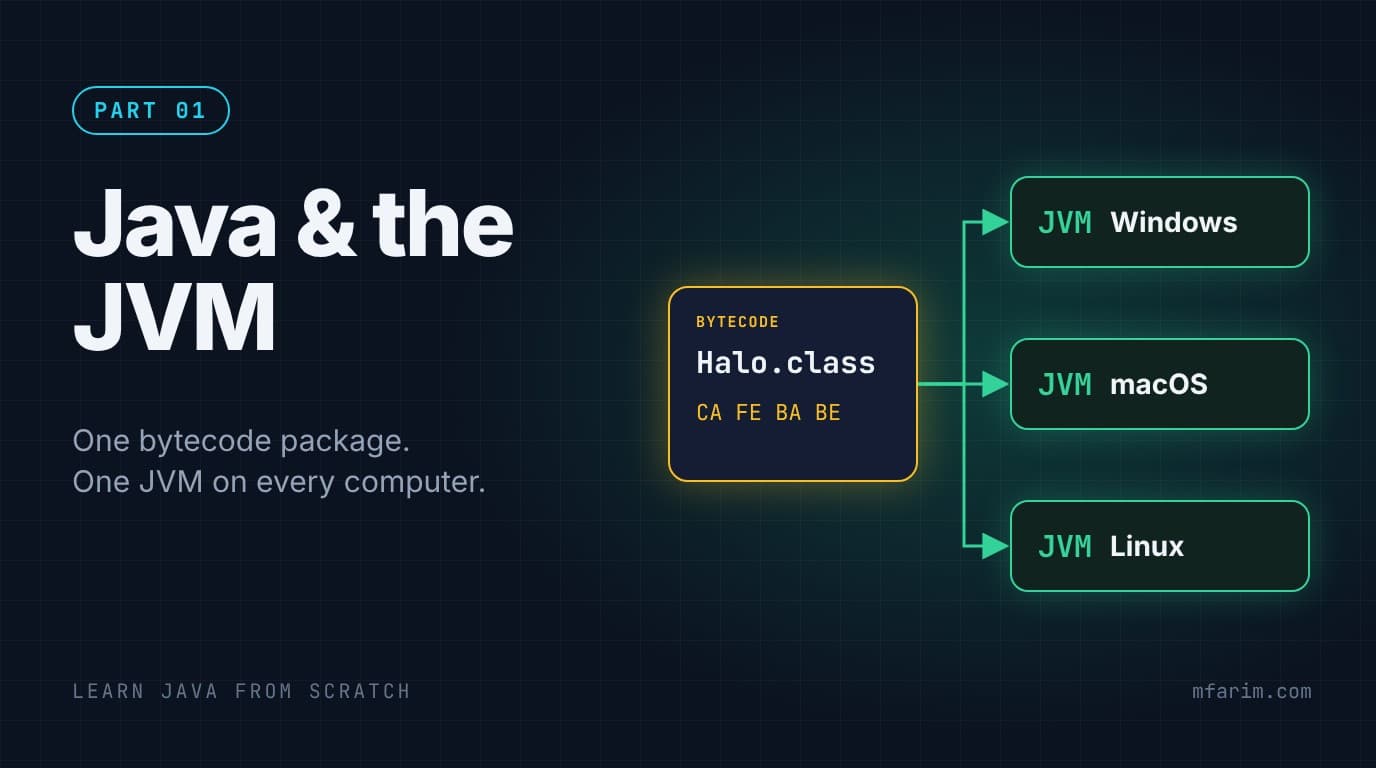
Introduction: One Program, Three Operating Systems
One program. Written one time. Then it runs on Windows, on Mac and on Linux, and you do not change a single letter.
But every computer is different inside. So how is this possible?
Java has a trick for this, and in this part I show you how it works. You do not need to install anything yet. Just read and understand the picture first. We start typing code in Part 2.
After this part, you will know:
- Why a Java program can run on many operating systems.
- What bytecode and the JVM are.
- How the JDK, JRE and JVM differ.
1. A Short Introduction to Java
Java was released in 1995 by a team at Sun Microsystems, led by James Gosling. Today Oracle develops Java.
The name comes from Java coffee. Yes, Java is an island in Indonesia, my home country. The language itself was born in the United States.
Java is still used in many places today:
- banking systems,
- the backend of online shops, which is the part of an app that runs on a server,
- Android apps,
- the Java edition of the game Minecraft.
So in this series you are not learning an old language that nobody uses. Java still runs large systems every day.
2. The Problem: Computers Only Understand Machine Language
A computer does not understand the code we write. It only understands machine language: a long list of numbers that the processor reads directly.
So our code must be translated into machine language first. This translation step is called compiling.
Here is the problem. The translated result usually works on only one kind of processor and one operating system. A program translated for Windows does not run on a Mac.
So if you want your program to run on three systems, you must:
- translate it three times,
- then send three different versions.
That is a lot of work. The Java team had a smarter idea.
3. Java's Trick: One Package, One Adapter at Every House
Imagine you send a package to three houses: a Windows house, a Mac house and a Linux house. Each house has a different door.
Java does not make three packages. It makes one universal package. Inside the package there is no machine language. There is a middle language called bytecode.
Then one adapter is placed at the door of every house. The adapter opens the bytecode package and translates it into the machine language of that house.
The adapter is called the JVM, short for Java Virtual Machine.
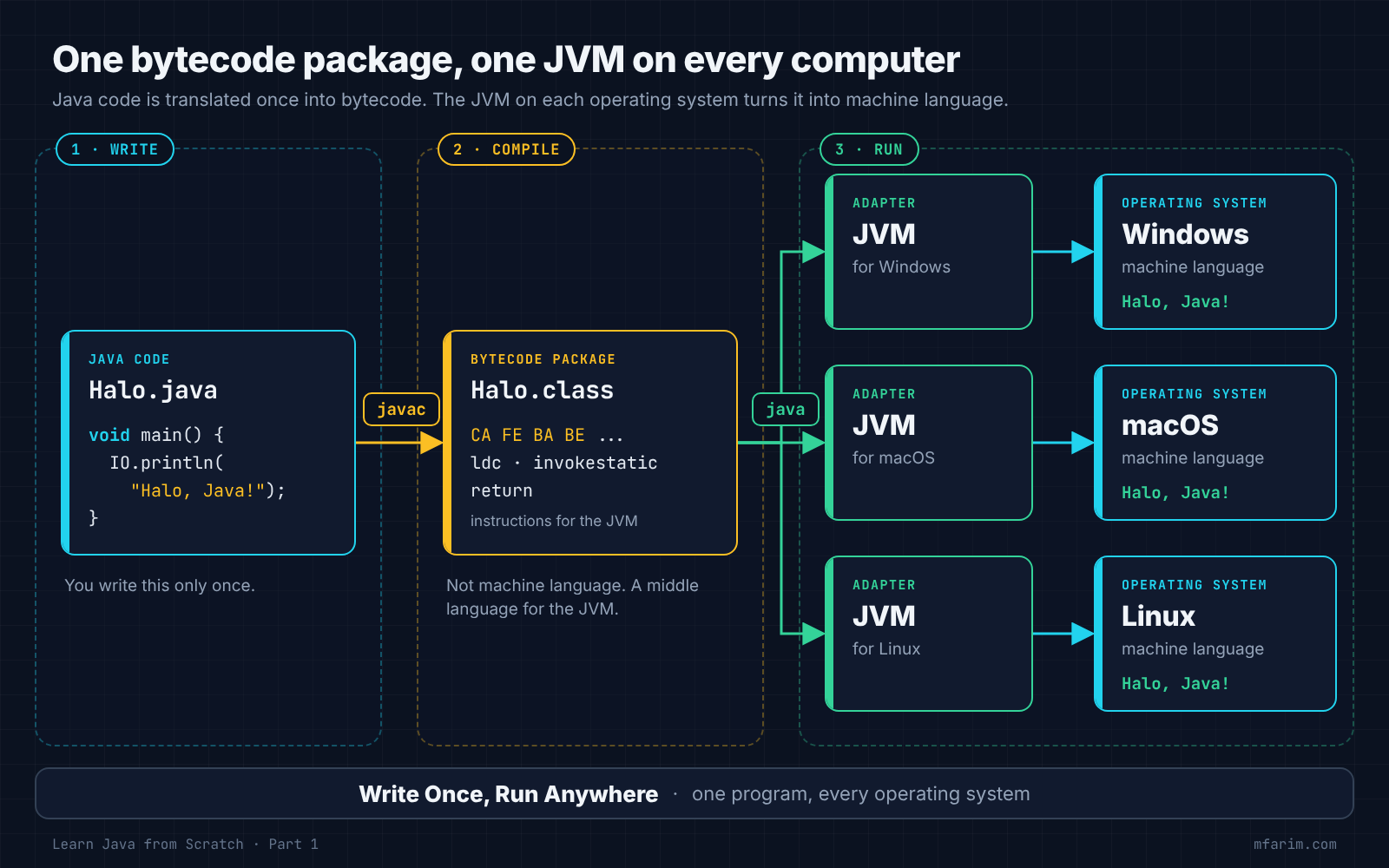
Click the diagram to open it at full size.
So you need only one package. Only the adapter is different.
This is where Java's famous slogan comes from: Write Once, Run Anywhere. There is one condition: the computer must have a JVM.
| The usual way | The Java way |
|---|---|
| Code is translated straight into machine language | Code is translated into bytecode |
| One result for one system | One bytecode file for every system |
| Three systems need three versions of the program | Three systems need three JVMs, and the program stays the same |
4. JDK, JRE and JVM: Three Names That Look Alike
You will see these three names very often. The letters are almost the same, so it is normal to mix them up. Let me explain them one by one.
The thing you install on your laptop to learn Java is the JDK, the Java Development Kit. Think of it as a programmer's toolbox. It has three important things inside:
| Inside the JDK | What it does | In our picture |
|---|---|---|
javac | Translates Java code into bytecode | The package maker |
| JVM | Runs the bytecode | The adapter at the door |
| Library | Thousands of ready-made parts | The shelf of tools |
The JRE, the Java Runtime Environment, is a package that can only run programs. It has no tools to build them.
To learn Java, you only need the JDK, because it already has everything.
In this series I use Java 25. It is an LTS version. LTS means Long-Term Support: this version gets updates for many years.
In short: the JDK is the toolbox, javac makes the package, and the JVM is the adapter.
5. The Journey of the Code: from Halo.java to Your Screen
Now let us follow the journey with real code. For now, just read. You will type it yourself in Part 2.
This is the simplest Java program. The code is saved in a file named Halo.java. Halo means "hello" in Indonesian.
void main() {
    IO.println("Halo, Java!");
}
It has only one instruction: show the text Halo, Java!.
Step one: translate. In the terminal, type:
javac Halo.java
The translator works, and a new file appears: Halo.class. This is our bytecode package.
Step two: run. Type:
java Halo
The JVM opens the package, runs it, and the result appears on the screen:
Halo, Java!
The order is always the same:
| Step | Command | Result |
|---|---|---|
| 1. Write the code | (in an editor) | Halo.java |
| 2. Compile | javac Halo.java | Halo.class, which holds the bytecode |
| 3. Run | java Halo | The text Halo, Java! on the screen |
6. A Look Inside the .class File
Halo.class is not text that we can read. It is a row of bytes. A byte is a small unit of data in a computer.
There is a fun detail here. The first four bytes of every .class file are always the same:
CA FE BA BE
Read it out loud: cafe babe. It sounds like the name of a coffee shop, right? It is written in hexadecimal, a short way to write bytes. The creators of Java chose it as a small joke, and it is still used today to mark a .class file.
After this mark come the instructions for the JVM. The instruction "show Halo" needs only 6 bytes:
| Instruction | Meaning | Size |
|---|---|---|
ldc | Take the text Halo, Java! | 2 bytes |
invokestatic | Call println | 3 bytes |
return | Finish | 1 byte |
You do not need to remember these names. The idea is what matters: the JVM reads the instructions one by one and translates them into machine language.
There is one more smart thing. When a part of the program runs again and again, the JVM translates that whole part once and keeps the result, so the next run is faster. This feature is called the JIT, the Just-In-Time compiler.
So the longer a program runs, the faster the adapter becomes.
7. Two Beginner Mistakes
Mistake one: thinking that Java and JavaScript are the same.
They are not. The names look alike, but they are two different languages with different rules and different uses. Learning Java does not teach you JavaScript, and learning JavaScript does not teach you Java.
Mistake two: running the program with java Halo.class.
You get an error like this:
Error: Could not find or load main class Halo.class
Caused by: java.lang.ClassNotFoundException: Halo.class
The reason: the java command looks for a class name, not a file name. The correct command is java Halo, without .class.
| Command | Result |
|---|---|
java Halo.class | Error |
java Halo | Works |
Almost every beginner makes this mistake. So if it happens to you later, do not worry.
Summary
javactranslates Java code into bytecode, which is saved in a.classfile.- The JVM runs that bytecode on Windows, Mac or Linux. Write once, run anywhere.
- The JDK is the programmer's toolbox. It contains
javac, the JVM and the library.
Challenge
You have a Halo.class file. It was compiled on a Windows laptop. Your friend uses a Mac. What must your friend do to run the program?
- A. Compile it again on the Mac.
- B. Just install a JVM.
- C. Write the code again.
Try to answer before you continue. I explain the answer at the start of Part 2.
Conclusion & What's Next
If you remember only one thing from this part, remember the picture of the package and the adapter. Java code is not translated straight into machine language. It is translated into bytecode first, and then the JVM on each computer does the rest.
In Part 2, it is your turn to type. We install the JDK, write your first program, and see how a program always enters through one door called main.
See you in Part 2. Get your coffee ready. Hot chocolate is fine too.
- Already comfortable with Java? See it in a real project in the series Rebuilding Laravel E-Learning to Java Spring Boot & React.

Written by Muhammad Fari Madyan
Senior Backend Engineer and co-founder of LampungDev. I write up what I build so others can learn from it.