Introduction: One Cookie Cutter, One Hundred Cookies
One cookie cutter. One hundred cookies. Different flavours, different prices, but exactly the same shape.
This is how Java builds large programs: make the cutter once, then make as many cookies as you want.
Welcome to the intermediate level! In this part we meet classes and objects.
After this part, you will be able to:
- Write your own class, with fields and methods.
- Make objects from that class with
new. - Read the "long version" of Java code that you often see in other tutorials.
Answer to the Part 10 Challenge
The question: the machine tambah adds 10 to x, and then we print a. What is the output?
The answer is B: 5.
Only a photocopy of a goes into the funnel. The machine changes its photocopy to 15, but the box a in main stays 5.
If you answered B, well done!
1. The Problem: Data All Over the Place
Imagine you are building an app for a cake shop. Every cake has a flavour and a price.
With what we know so far, you need the variables rasa1, harga1, rasa2, harga2, and so on. (Rasa means "flavour" and harga means "price".) Data that should be one package is spread all over the place.
We need a way to wrap data and its behaviour in one container.
2. A Class Is the Cutter, an Object Is the Cookie
Picture a cookie cutter. The cutter itself is not a cookie, and you cannot eat it. It is only a design: the shape, plus a place for the flavour and the price.
- In Java, this cutter is called a class.
- Every cookie made from that cutter is called an object.
One class can produce many objects, and each object has its own content. One is chocolate, another is cheese.
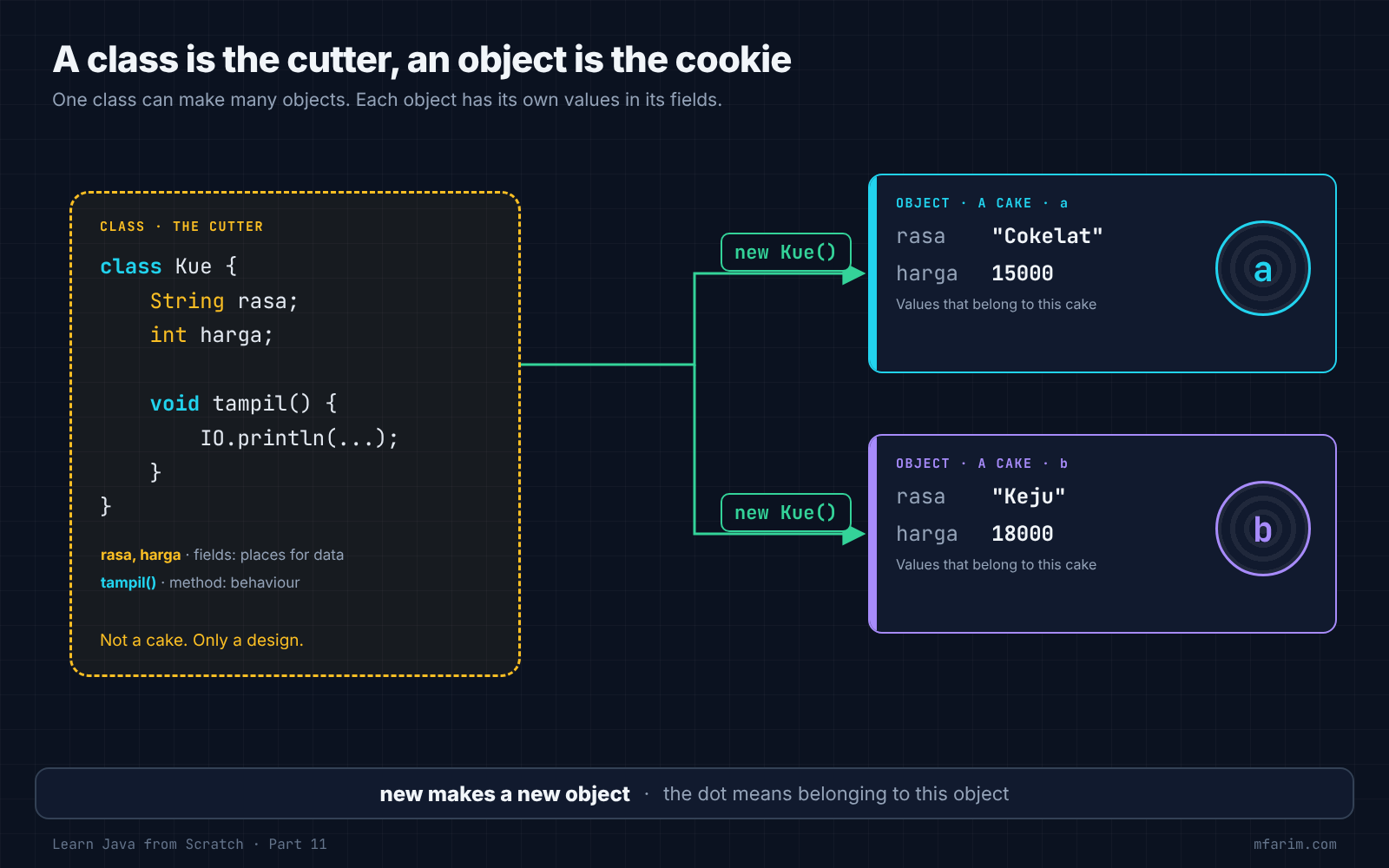
Click the diagram to open it in full size.
3. Writing the Cutter
Create a file named TokoKue.java. Toko kue means "cake shop". The first part is the cutter. Kue means "cake":
class Kue {
    String rasa;
    int harga;

    void tampil() {
        IO.println("Kue " + rasa + ", Rp" + harga);
    }
}
| Piece | Its name | Meaning |
|---|---|---|
class Kue | Class | A cutter named Kue |
String rasa; and int harga; | Fields | The data that every cake has |
void tampil() | Method | A behaviour of every cake. Tampil means "show" |
Variables that belong to a class, such as rasa and harga, are called fields. Some people call them attributes.
Notice that the class name starts with a capital letter: Kue with a capital K. Remember String with a capital S in Part 4? That was a promise we left open for a long time. String is also a class. That is why it starts with a capital letter, and that is why a string has methods such as length().
4. Making the Cookies with new
The cutter is ready. Now add main below it, in the same file:
void main() {
    Kue a = new Kue();
    a.rasa = "Cokelat";
    a.harga = 15_000;

    Kue b = new Kue();
    b.rasa = "Keju";
    b.harga = 18_000;

    a.tampil();
    b.tampil();
}
Run it with java TokoKue.java:
Kue Cokelat, Rp15000
Kue Keju, Rp18000
Cokelat is chocolate and keju is cheese. Let us look at the important lines:
| Code | What happens |
|---|---|
new Kue() | Java makes one new cake in memory, with a place for the flavour and the price |
Kue a = ... | The variable a holds that cake |
a.rasa = "Cokelat"; | Fill in the flavour of cake a |
a.tampil(); | Ask cake a to show itself |
The dot means: belonging to this object. a.rasa is the flavour of cake a, not of cake b.
The word new is the command to make one. This also answers Part 6, where we wrote new Scanner(...). At that moment we were making one Scanner object.
Two cakes, two different contents, from the same cutter.
5. Reading the "Long Version" of Java
In other tutorials, you have surely seen a program like this:
public class Halo {
    public static void main(String[] args) {
        System.out.println("Halo, Dunia!");
    }
}
Halo, Dunia!
Now you can read it:
| Piece | Meaning |
|---|---|
class Halo | The cutter for our program |
void main(...) | The entry door you know since Part 2 |
String[] args | An array of strings, holding extra words typed when the program starts |
System.out.println | The older way to print. It does the same job as IO.println |
public and static | We explain them in Part 12 and Part 14 |
Java 25 lets us write the short version that we have used so far. But behind the scenes, Java still wraps it in a class.
6. A Real Example: Student Data
Create a file named Sekolah.java, which means "school":
class Siswa {
    String nama;
    int nilai;

    boolean lulus() {
        return nilai >= 75;
    }
}

void main() {
    Siswa rani = new Siswa();
    rani.nama = "Rani";
    rani.nilai = 88;

    Siswa budi = new Siswa();
    budi.nama = "Budi";
    budi.nilai = 60;

    IO.println(rani.nama + " lulus? " + rani.lulus());
    IO.println(budi.nama + " lulus? " + budi.lulus());
}
Rani lulus? true
Budi lulus? false
Siswa means "student", nilai is the score, and lulus means "passed".
Look at the method lulus(). Inside it, nilai means the score of the student we are asking. When it is called through rani, it checks Rani's score. When it is called through budi, it checks Budi's score.
The data and its rule live in one place. If the pass mark changes, you change one method.
7. Three Class and Object Traps
The three examples below use the same Kue class as above. Only the content of main changes.
Trap one: forgetting new.
void main() {
    Kue a;
    a.rasa = "Cokelat";
}
TokoKue.java:12: error: variable a might not have been initialized
    a.rasa = "Cokelat";
    ^
1 error
The variable a exists, but the cake has not been made yet. Add = new Kue().
Trap two: forgetting to fill in the fields.
void main() {
    Kue a = new Kue();
    a.tampil();
}
Kue null, Rp0
A new cake can be used right away. But a field that was never filled has a default value: null for a String, which means empty, and 0 for an int. There is no error, so this trap is easy to miss.
Trap three: calling a method through the class name.
void main() {
    Kue.tampil();
}
TokoKue.java:11: error: non-static method tampil() cannot be referenced from a static context
    Kue.tampil();
       ^
1 error
tampil() belongs to each cake, not to the cutter. The cutter has no flavour, so it cannot show anything. Call it through a cake: a.tampil().
The word "static" in that message will make sense in Part 12.
Summary
- A class is the cutter. An object is a cookie made with the cutter.
- A class has fields for data and methods for behaviour. You make an object with
new. - Every object has its own content, and you reach that content with a dot.
Challenge
Look at this code:
class Kue {
    int harga;
}

void main() {
    Kue x = new Kue();
    x.harga = 10_000;
    Kue y = new Kue();
    y.harga = 20_000;

    x.harga = x.harga + y.harga;
    IO.println(x.harga + " " + y.harga);
}
What is the output?
- A.
30000 30000 - B.
10000 20000 - C.
30000 20000
Try to answer before you run it. I explain the answer at the start of Part 12.
Conclusion & What's Next
You can now create your own kind of data. If you remember only one thing, remember the difference: a class is the cutter, an object is the cookie. There is one cutter, and there can be as many cookies as you like.
But filling in each cake by hand is tiring. In Part 12, we build an assembly line, so every cake comes out of the cutter complete.
See you in Part 12. Get your coffee ready. Hot chocolate is fine too.

Written by Muhammad Fari Madyan
Senior Backend Engineer and co-founder of LampungDev. I write up what I build so others can learn from it.