Introduction: Thirty Students, Thirty Variables?
There are thirty students in your class. To store their scores, do you need thirty variables? nilai1, nilai2, nilai3, and so on?
Luckily, no. One variable is enough. In this part we meet the array.
After this part, you will be able to:
- Store many values in one array.
- Read and change its content with an index, which starts at zero.
- Visit every value in an array with a loop.
Answer to the Part 8 Challenge
The question: total starts at 0, and then i is added to it, from 1 to 4. What is the output?
The answer is B: 10.
| Round | i | total after the round |
|---|---|---|
| 1 | 1 | 1 |
| 2 | 2 | 3 |
| 3 | 3 | 6 |
| 4 | 4 | 10 |
If you answered B, well done!
1. The Problem: Data Comes in Groups
A normal variable stores only one value. But data often comes in groups:
- the scores of one class,
- the temperature on seven days,
- the scores of ten players.
We need one container that holds many values of the same type, in order, and that is easy to walk through with a loop.
2. An Array Is a Row of Numbered Lockers
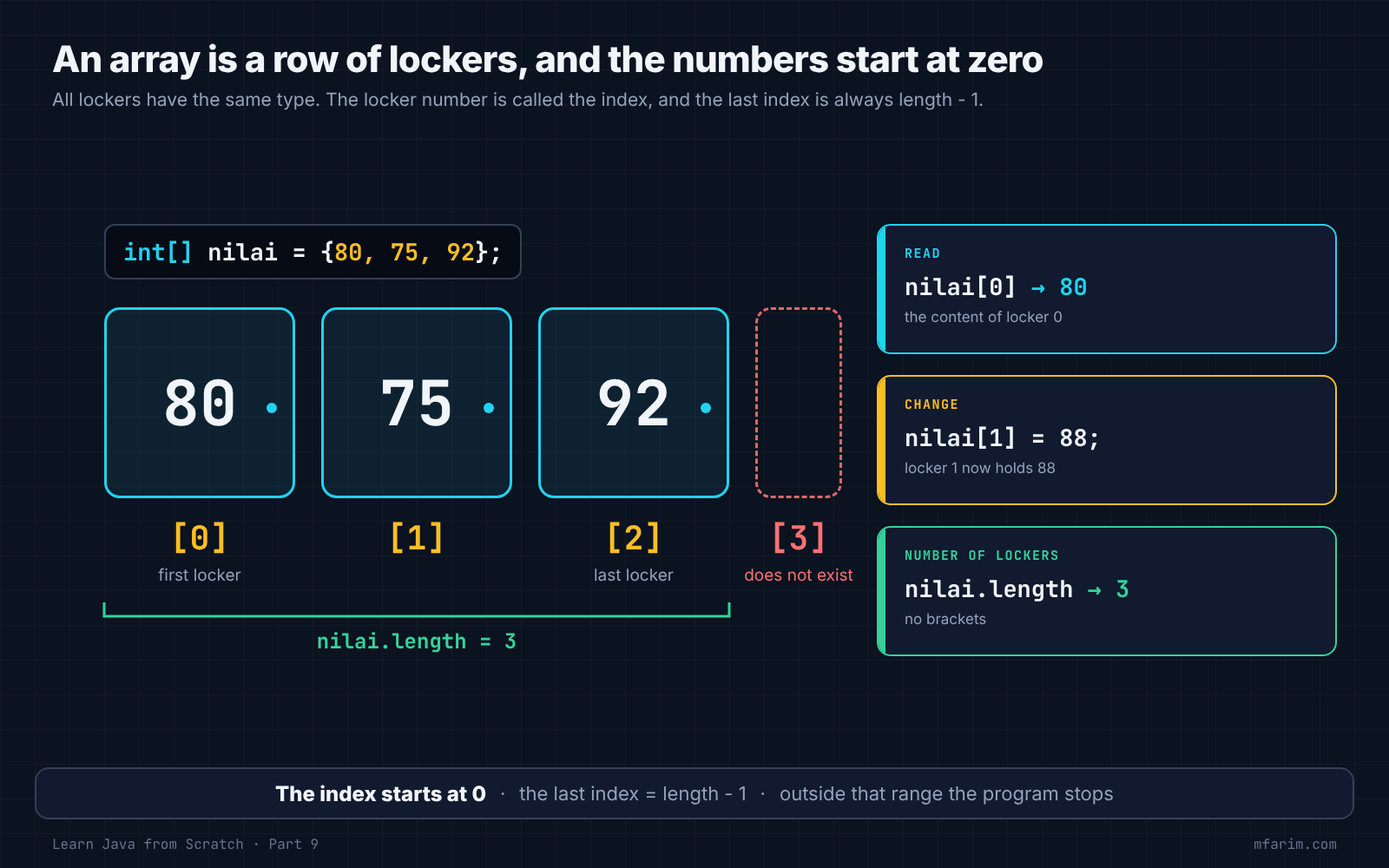
Picture a row of lockers. They all have the same size, and each locker has a number. That is an array.
There is one important thing: the locker numbers start at zero, not at one.
- The first locker has the number
0. - The second locker has the number
1. - And so on.
This number is called the index. An array with three lockers has the indexes 0, 1 and 2.
Click the diagram to open it in full size.
3. Creating, Reading and Changing
Create a file named Loker.java, which means "locker":
void main() {
    int[] nilai = {80, 75, 92};

    IO.println(nilai[0]);

    nilai[1] = 88;
    IO.println(nilai[1]);

    IO.println(nilai.length);
}
80
88
3
| Code | Meaning |
|---|---|
int[] nilai | Not one int box, but a row of int boxes |
{80, 75, 92} | The starting values, in order |
nilai[0] | Read locker number 0. It holds 80 |
nilai[1] = 88 | Change the content of locker number 1 to 88 |
nilai.length | The number of lockers, which is 3 |
The square brackets [] are the mark of an array. Inside them you write the index of the locker you mean.
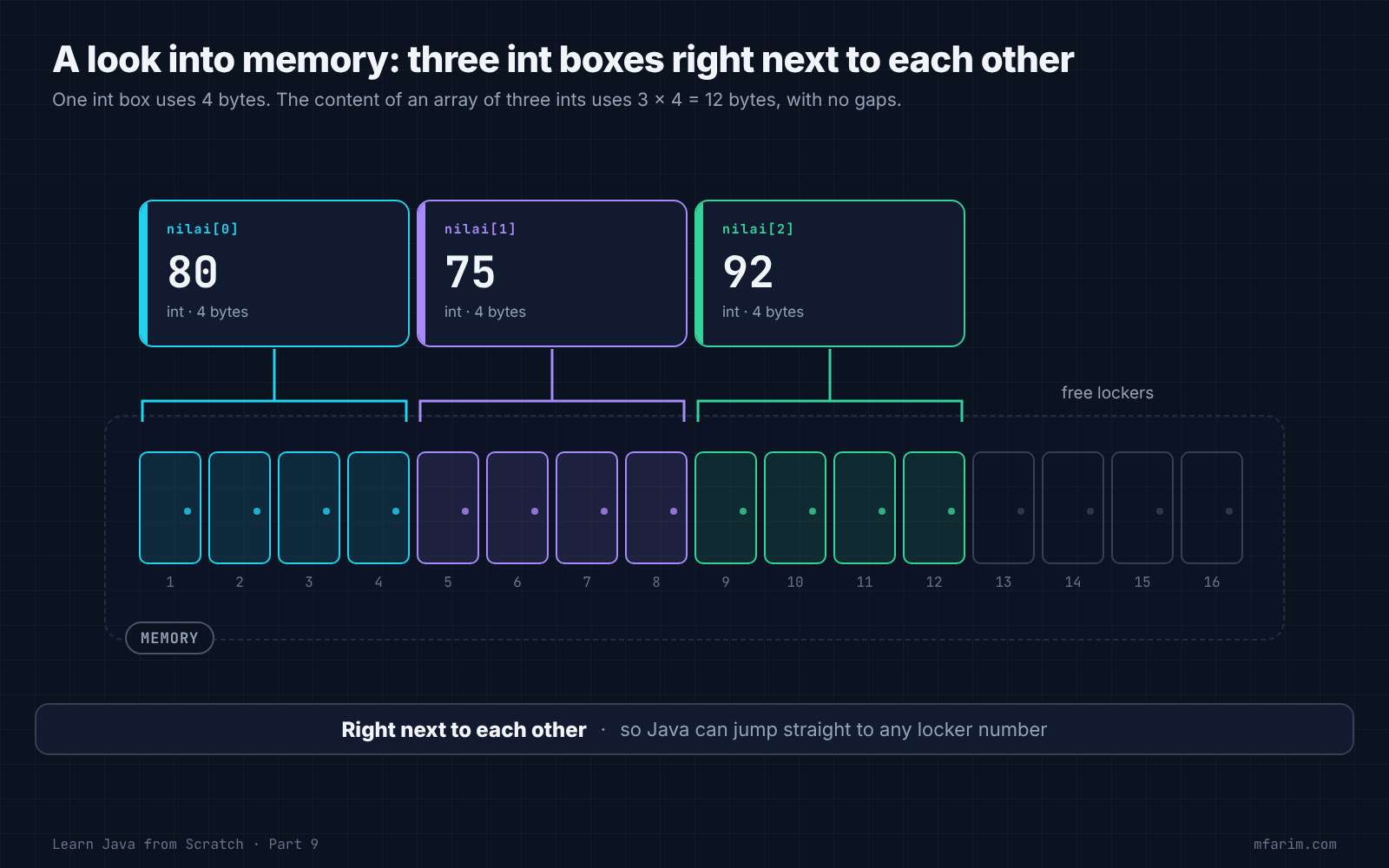
Now we look into memory. Remember Part 3: one int box uses 4 bytes. For this array, Java prepares three int boxes that sit right next to each other. So the content uses 3 × 4 = 12 bytes.
Click the diagram to open it in full size.
4. Arrays and Loops: A Perfect Pair
This is where arrays and the loops from Part 8 become a perfect pair.
void main() {
    int[] nilai = {80, 88, 92};

    for (int i = 0; i < nilai.length; i++) {
        IO.println("Loker " + i + ": " + nilai[i]);
    }
}
Loker 0: 80
Loker 1: 88
Loker 2: 92
Look at two things in the for brackets: i starts at 0, and the condition is i < nilai.length. The arrow visits lockers 0, 1 and 2, and stops exactly at the end of the row.
There is also a short form of for, called for-each:
void main() {
    int[] nilai = {80, 88, 92};

    int total = 0;
    for (int n : nilai) {
        total += n;
    }
    IO.println("Total: " + total);
}
Total: 260
Read for (int n : nilai) as: for each n in nilai. There is no index, so there is no risk of counting wrong.
| Form | Use it when |
|---|---|
for with an index | You need the locker number |
| for-each | You only need the content |
5. Empty Lockers and a Fixed Size
If you do not know the values yet, create empty lockers with the word new:
void main() {
    int[] skor = new int[5];

    IO.println(skor[0]);
    IO.println(skor.length);
}
0
5
new int[5] creates five int lockers. All of them hold 0 at the start.
But remember: the size of an array is set when it is created, and it cannot change. A row of three lockers stays a row of three lockers. If you need a container that can grow, wait for Part 19 about collections.
6. A Real Example: A Small Report Card
Create a file named Rapor.java, which means "report card":
void main() {
    int[] nilai = {80, 88, 92, 67, 75};

    int total = 0;
    int tertinggi = nilai[0];

    for (int n : nilai) {
        total += n;
        if (n > tertinggi) {
            tertinggi = n;
        }
    }

    IO.println("Total: " + total);
    IO.println("Tertinggi: " + tertinggi);
    IO.println("Rata-rata: " + total * 1.0 / nilai.length);
}
Total: 402
Tertinggi: 92
Rata-rata: 80.4
Tertinggi means "highest" and rata-rata means "average".
With one for-each loop we do two jobs at the same time: we add up all the scores, and we keep the highest score. When n is greater than tertinggi, the content of tertinggi is replaced by n.
For the average, remember the int division trap from Part 5:
| Code | Result |
|---|---|
total / nilai.length | 80 |
total * 1.0 / nilai.length | 80.4 |
Multiplying total by 1.0 first turns it into a double, so the decimals are not lost.
7. Three Array Traps
Trap one: taking a locker that does not exist.
An array with three lockers ends at index 2. Writing nilai[3] passes javac, but the program stops when it runs:
Exception in thread "main" java.lang.ArrayIndexOutOfBoundsException: Index 3 out of bounds for length 3
	at Loker.main(Loker.java:3)
The message is quite clear: index 3 is out of bounds for length 3. The last index is always length - 1.
Trap two: length with brackets.
For a string, use brackets: nama.length(). For an array, use no brackets: nilai.length. If you mix them up:
Loker.java:3: error: cannot find symbol
    IO.println(nilai.length());
                    ^
  symbol:   method length()
  location: variable nilai of type int[]
1 error
Trap three: printing an array directly.
void main() {
    int[] nilai = {80, 75, 92};
    IO.println(nilai);
    IO.println(Arrays.toString(nilai));
}
[I@60438a68
[80, 75, 92]
The first line does not show the content. It shows a strange code with a square bracket, the letter I, and some random letters and digits. The code on your computer can be different. To see the content, use Arrays.toString(...).
Summary
- An array is a row of lockers of the same type, and the index starts at zero.
- Read and fill a locker with square brackets. The number of lockers is in
.length, without brackets. - The size of an array is fixed. Taking an index outside the row stops the program.
Challenge
Look at this code:
void main() {
    int[] a = {5, 10, 15};
    IO.println(a[a.length - 1]);
}
What is the output?
- A.
10 - B.
15 - C. An error.
Try to answer before you run it. I explain the answer at the start of Part 10.
Conclusion & What's Next
One variable can now store many values. If you remember only one thing, remember the locker numbers: they start at zero and end at length - 1.
In Part 10, we build our own machine. You put material in through a funnel, and the result comes out through a door. One machine, used again and again.
See you in Part 10. Get your coffee ready. Hot chocolate is fine too.

Written by Muhammad Fari Madyan
Senior Backend Engineer and co-founder of LampungDev. I write up what I build so others can learn from it.