Introduction: From One to One Million
Write the numbers 1 to 5. Easy.
Now write the numbers 1 to 1,000,000. You would need days.
A program needs three lines of code, and it finishes in seconds. The secret is the loop.
After this part, you will be able to:
- Repeat work with
forandwhile. - Stop a loop or skip one round with
breakandcontinue. - Avoid a loop that never stops.
Answer to the Part 7 Challenge
The question: jam holds 7 and hujan holds true. What is the output?
The answer is B: Bawa payung ("Bring an umbrella").
The first sign needs two conditions. jam < 8 is true. !hujan is false. The && gate needs both, so the first sign is false.
The second sign checks hujan, which is true. So the program prints Bawa payung.
If you answered B, well done!
1. The Problem: The Same Work, Many Times
Many tasks in a program are the same work, repeated many times:
- adding up the total of one hundred items,
- sending a reminder to one thousand users,
- checking every letter in a password.
Writing the same line one thousand times is clearly not the answer.
2. A Loop Is a Conveyor Belt
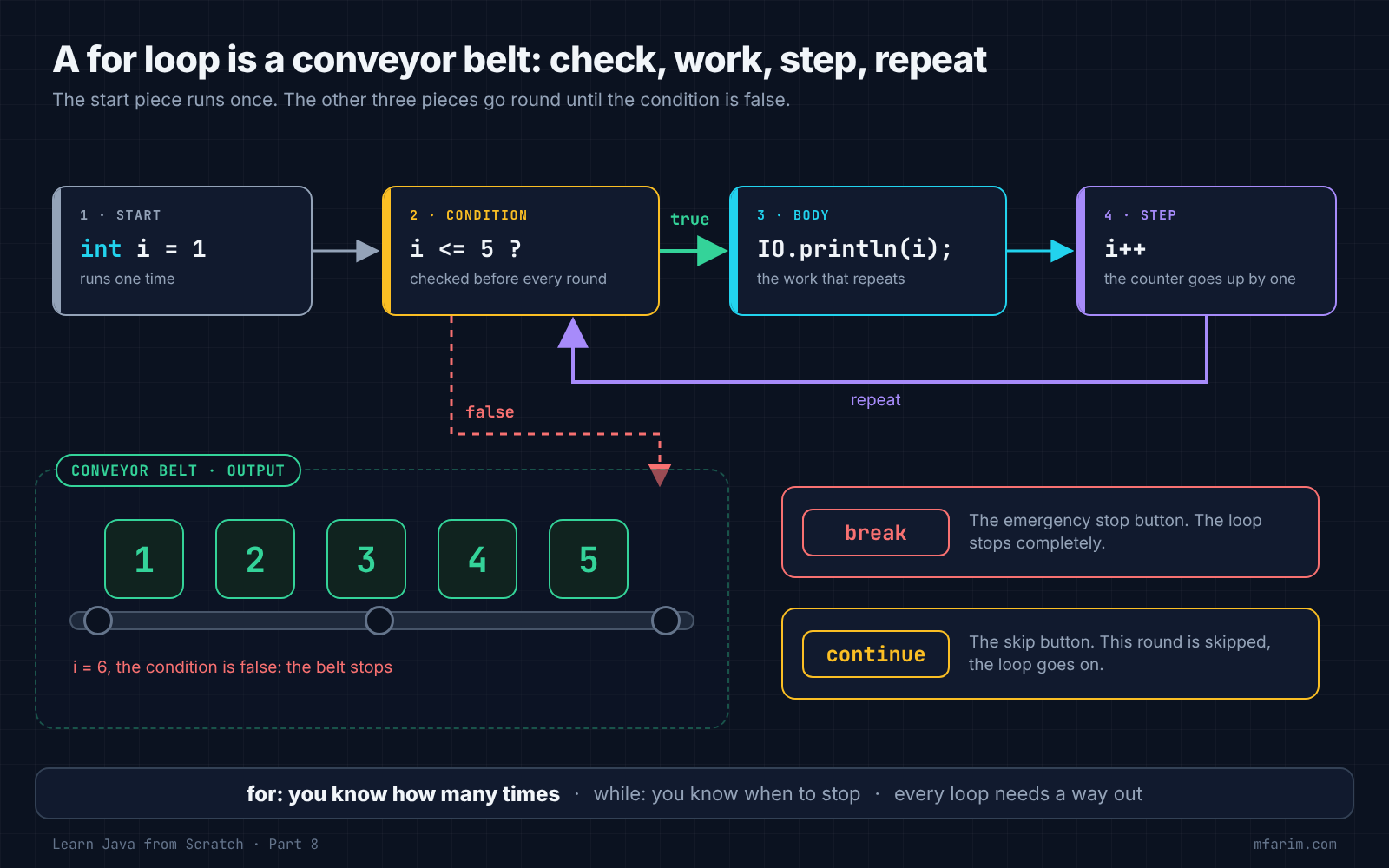
Picture a conveyor belt in a factory. Items arrive one by one, they are handled in the same way, and they move on. The belt keeps moving until its stop condition is met.
In Java, this conveyor belt is called a loop. There are two main kinds:
| Kind | Use it when |
|---|---|
for | You know how many times to repeat |
while | You only know when to stop |
Click the diagram to open it in full size.
3. for: You Know How Many Times
Create a file named Hitung.java:
void main() {
    for (int i = 1; i <= 5; i++) {
        IO.println(i);
    }
}
1
2
3
4
5
The for brackets hold three pieces, separated by semicolons:
| Piece | Code | Meaning |
|---|---|---|
| Start | int i = 1 | The counter starts at 1 |
| Condition | i <= 5 | Keep going while this is true |
| Step | i++ | The counter goes up by one after each round |
Follow the arrow:
iholds1. The condition1 <= 5istrue. Print1. Thenigoes up to2.- The same happens for
2,3,4and5. ibecomes6. The condition6 <= 5isfalse. The belt stops.
The name i is a habit among programmers for a counter. You can use another name.
4. while: You Know When to Stop
A while loop has only a condition. While the condition is true, the code inside the curly braces repeats.
Create a file named Roket.java, which means "rocket":
void main() {
    int hitung = 3;

    while (hitung > 0) {
        IO.println(hitung);
        hitung--;
    }
    IO.println("Meluncur!");
}
3
2
1
Meluncur!
hitung-- means: subtract one from hitung. After printing 1, hitung becomes 0. The condition 0 > 0 is false, so the loop ends and the arrow moves on to the line Meluncur! ("Lift off!").
5. Two Special Buttons: break and continue
The conveyor belt also has two special buttons.
break is the emergency stop button. The belt stops at once, even if the condition is still true.
void main() {
    for (int i = 1; i <= 10; i++) {
        if (i == 4) {
            break;
        }
        IO.println(i);
    }
}
1
2
3
continue is the skip button. This item is skipped, and the belt moves on to the next item.
void main() {
    for (int i = 1; i <= 5; i++) {
        if (i % 2 == 0) {
            continue;
        }
        IO.println(i);
    }
}
1
3
5
Even numbers are skipped, so only odd numbers are printed.
| Button | Effect |
|---|---|
break | The loop stops completely |
continue | This round is skipped, and the loop goes on to the next round |
6. A Real Example: The Seven Times Table
Create a file named Perkalian.java, which means "multiplication":
void main() {
    for (int i = 1; i <= 10; i++) {
        IO.println("7 x " + i + " = " + (7 * i));
    }
}
7 x 1 = 7
7 x 2 = 14
7 x 3 = 21
7 x 4 = 28
7 x 5 = 35
7 x 6 = 42
7 x 7 = 49
7 x 8 = 56
7 x 9 = 63
7 x 10 = 70
Ten lines from one loop. Change the number 7, and you have any times table you want.
The brackets in (7 * i) are not really needed, because multiplication is always done first. But make brackets a habit. See what happens when the operation is addition:
Code, when i holds 3 | Result |
|---|---|
"7 + " + i + " = " + 7 + i | 7 + 3 = 73 |
"7 + " + i + " = " + (7 + i) | 7 + 3 = 10 |
Without brackets, 7 and i are joined as text, as in Part 4.
7. Three Loop Traps
Trap one: a loop that never ends.
while (hitung > 0) {
    IO.println(hitung);
}
The line hitung-- is missing. The value of hitung never changes, so the condition is true forever. The program prints 3 again and again and never stops.
If this happens, press Ctrl+C in the terminal to stop it.
Trap two: one round too many, or one too few.
for (int i = 0; i <= 3; i++) {
    IO.println(i);
}
0
1
2
3
That is four numbers, not three. Always check two things: the start number, and the sign in the condition.
| Code | Number of rounds |
|---|---|
i = 0; i < 3 | 3 |
i = 0; i <= 3 | 4 |
i = 1; i <= 3 | 3 |
Trap three: a semicolon after the for brackets.
void main() {
    for (int i = 1; i <= 3; i++); {
        IO.println("Halo");
    }
}
Halo
We expect Halo three times, but it appears only once. As with if in Part 7, that semicolon ends the loop. The loop runs three times with nothing inside, and then the curly braces below it run one time. Again, javac does not complain.
Summary
- A loop is like a conveyor belt: it repeats the same work.
- Use
forwhen you know the number of rounds. Usewhileto repeat while a condition istrue. breakstops the loop, andcontinueskips one round. Make sure every loop has a way out.
Challenge
Look at this code:
void main() {
    int total = 0;

    for (int i = 1; i <= 4; i++) {
        total += i;
    }
    IO.println(total);
}
What is the output?
- A.
4 - B.
10 - C.
15
Try to answer before you run it. I explain the answer at the start of Part 9.
Conclusion & What's Next
Your program can now repeat work without getting tired. If you remember only one thing, remember the way out: every loop needs something that changes, so that its condition becomes false at some point.
In Part 9, we learn to store many values at once in one row of lockers, and the locker numbers start at zero.
See you in Part 9. Get your coffee ready. Hot chocolate is fine too.

Written by Muhammad Fari Madyan
Senior Backend Engineer and co-founder of LampungDev. I write up what I build so others can learn from it.