Introduction: A Shoe in the Fruit Box
You have a box with a label: fruit only. Then someone puts a shoe inside. You only notice when you take it out to eat it.
In Java, this kind of accident can be stopped early, even before the program runs.
In this part we meet generics.
After this part, you will be able to:
- Read and write angle brackets, such as
List<String>. - Create your own generic classes and methods.
- Avoid raw types and the other traps around generics.
Answer to the Part 19 Challenge
The question: put("a", 1), put("b", 2), put("a", 3), then print size() and get("a"). What is the output?
The answer is C: 2 3.
The label a already exists, so put("a", 3) only replaces the content of its drawer. There are still two labels, and the drawer a now holds 3.
If you answered C, well done!
1. The Problem: Mistakes That Appear in Front of Users
In Part 19 we wrote List<String>. Why do we need the angle brackets?
In the past, before generics, a list could hold anything. You put text in, and your teammate took it out as a number. The program passed javac, but it fell over while running.
A mistake like this appears in front of users, not in front of programmers. We see an example in trap one.
2. Generics Is a Box with a Label Slot
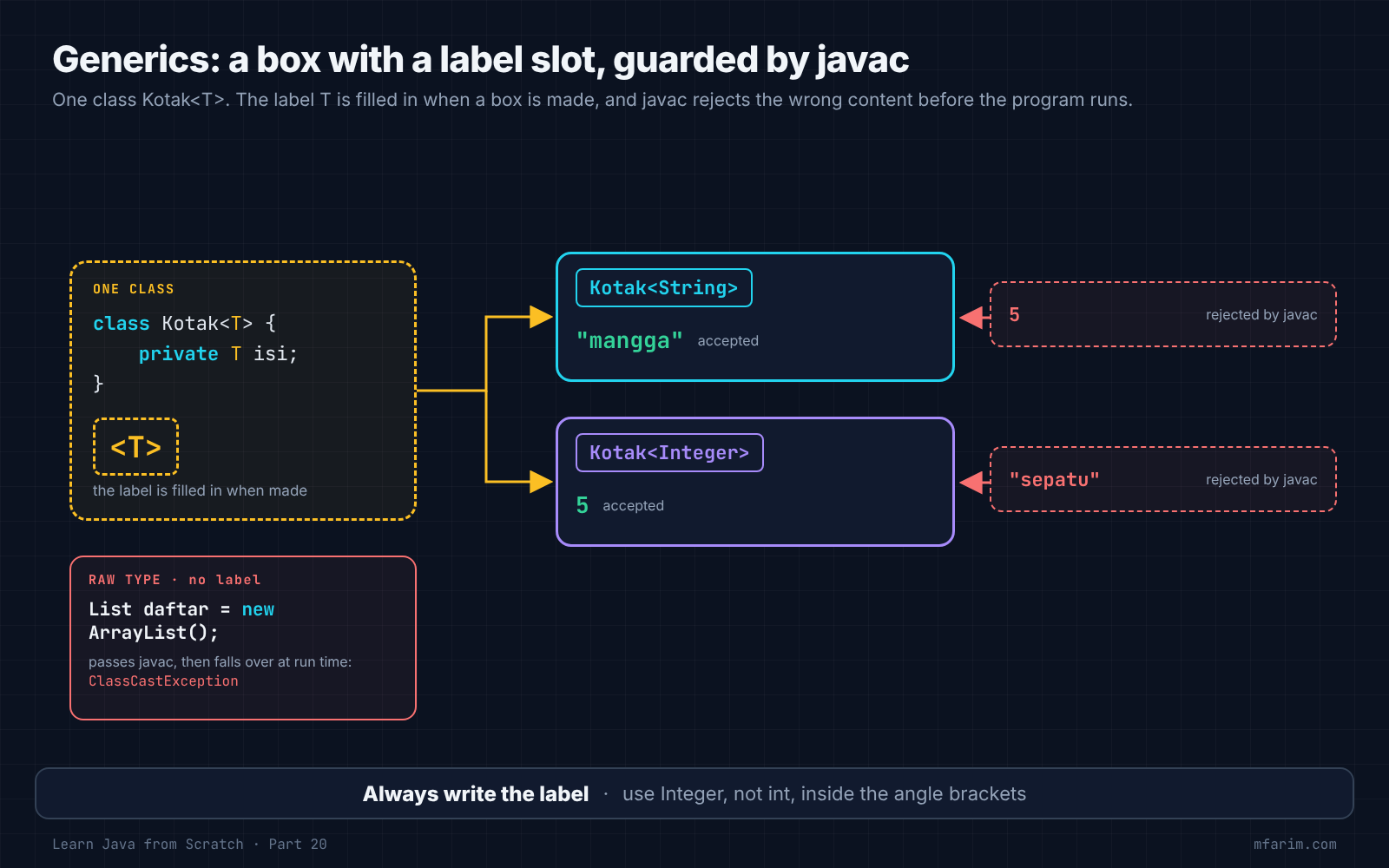
Picture a box with an empty label slot. When the box is made, you write the label: fruit only, or books only.
Once the label is written, the "guard" javac watches the box. Anything that does not match the label is rejected at the door, while you are still writing the program.
In Java, that label slot is a letter inside angle brackets. Usually it is the letter T, short for "type".
Click the diagram to open it in full size.
3. Writing a Generic Class
The file Kotak.java. Kotak means "box", isi means "content", simpan means "store", barang means "item" and ambil means "take":
public class Kotak<T> {
    private T isi;

    public void simpan(T barang) {
        isi = barang;
    }

    public T ambil() {
        return isi;
    }
}
T has no meaning yet. It is filled in when a box is made.
The file Main.java:
void main() {
    Kotak<String> buah = new Kotak<>();
    buah.simpan("mangga");
    IO.println(buah.ambil().toUpperCase());

    Kotak<Integer> angka = new Kotak<>();
    angka.simpan(5);
    IO.println(angka.ambil() + 1);

    Kotak<String> teks = new Kotak<>();
    teks.simpan("5");
    IO.println(teks.ambil() + 1);
}
MANGGA
6
51
| Box | T becomes | ambil() gives | The result |
|---|---|---|---|
Kotak<String> buah ("fruit") | String | "mangga" | You can call toUpperCase() at once |
Kotak<Integer> angka ("number") | Integer | 5 | + 1 adds: 6 |
Kotak<String> teks ("text") | String | "5" | + 1 joins: 51, as in Part 4 |
One Kotak class serves many types. And javac knows exactly what is inside each box.
The empty <> in new Kotak<>() means: Java, fill in the label from the left side. People often call it the diamond.
Trying to store a number in a String box is rejected at once:
void main() {
    Kotak<String> buah = new Kotak<>();
    buah.simpan(5);
}
Main.java:3: error: method simpan in class Kotak<T> cannot be applied to given types;
    buah.simpan(5);
        ^
  required: String
  found:    int
  reason: argument mismatch; int cannot be converted to String
  where T is a type-variable:
    T extends Object declared in class Kotak
1 error
error: compilation failed
The message is long, but the key is in the lines required and found. This box needs a String, but it got an int. The shoe is rejected at the door.
4. Two Labels and a Generic Method
Angle brackets can hold more than one label. The file Pasangan.java. Pasangan means "pair", kunci means "key" and nilai means "value":
public class Pasangan<K, V> {
    private K kunci;
    private V nilai;

    public Pasangan(K kunci, V nilai) {
        this.kunci = kunci;
        this.nilai = nilai;
    }

    public K getKunci() {
        return kunci;
    }

    public V getNilai() {
        return nilai;
    }
}
A method can be generic too. Its label is written before the result type. The file Main.java. Pertama means "first":
<T> T pertama(List<T> daftar) {
    return daftar.get(0);
}

void main() {
    Pasangan<String, Integer> rani = new Pasangan<>("Rani", 90);
    IO.println(rani.getKunci() + ": " + rani.getNilai());

    String huruf = pertama(List.of("a", "b", "c"));
    Integer angka = pertama(List.of(7, 8, 9));
    IO.println(huruf + " " + angka);
}
Rani: 90
a 7
pertama takes a list of T and gives back a T. Give it a list of letters, and a letter comes out. Give it a list of numbers, and a number comes out.
You can now read List<String> and Map<String, Integer> from Part 19. Both are generic classes whose labels are already filled in.
5. A Real Example: A Leaderboard
We need pairs of a name and a score. Instead of writing a new class, we use Pasangan<String, Integer>. Papan means "board" and juara means "winner".
void main() {
    List<Pasangan<String, Integer>> papan = new ArrayList<>();
    papan.add(new Pasangan<>("Rani", 90));
    papan.add(new Pasangan<>("Budi", 85));
    papan.add(new Pasangan<>("Sari", 95));

    Pasangan<String, Integer> juara = papan.get(0);
    for (Pasangan<String, Integer> p : papan) {
        if (p.getNilai() > juara.getNilai()) {
            juara = p;
        }
    }

    IO.println("Juara: " + juara.getKunci() + " dengan skor " + juara.getNilai());
}
Juara: Sari dengan skor 95
Because javac knows the values inside are Integer, the > comparison is safe without any conversion.
One generic class can hold a name and a score, a city and a temperature, or a product and a price.
6. Three Generics Traps
Trap one: a raw type.
A raw type is a generic class used without angle brackets. This is the old way, from before generics.
void main() {
    List daftar = new ArrayList();
    daftar.add("tujuh belas");

    Integer umur = (Integer) daftar.get(0);
    IO.println(umur);
}
Main.java:3: warning: [unchecked] unchecked call to add(E) as a member of the raw type List
    daftar.add("tujuh belas");
              ^
  where E is a type-variable:
    E extends Object declared in interface List
1 warning
Exception in thread "main" java.lang.ClassCastException: class java.lang.String cannot be cast to class java.lang.Integer (java.lang.String and java.lang.Integer are in module java.base of loader 'bootstrap')
	at Main.main(Main.java:5)
javac only gives a warning, and the program still runs. Text goes in, it is taken out as a number, and the program falls over with a ClassCastException. Exactly the shoe in the fruit box.
Always write the label.
Trap two: a primitive type inside the angle brackets.
void main() {
    Kotak<int> angka = new Kotak<>();
}
Main.java:2: error: unexpected type
    Kotak<int> angka = new Kotak<>();
          ^
  required: reference
  found:    int
1 error
error: compilation failed
The same as in Part 19. Use the wrapper: Integer, Double or Boolean.
Trap three: thinking that List<Object> is the parent of List<String>.
void main() {
    List<String> buah = new ArrayList<>();
    List<Object> apaSaja = buah;
}
Main.java:3: error: incompatible types: List<String> cannot be converted to List<Object>
    List<Object> apaSaja = buah;
                           ^
1 error
error: compilation failed
Why is it rejected? If it were allowed, someone could put a number in through apaSaja ("anything"), even though the list is really for strings only. A fruit-only box must not be treated as an anything box, or someone will put a shoe in it.
Summary
- Generics are type labels inside angle brackets, so
javacrejects the wrong items before the program runs. - Classes and methods can be generic, so one class can serve many types.
- Avoid raw types, and use wrappers such as
Integerfor numbers.
Challenge
Using Kotak.java from section 3, look at this code:
void main() {
    Kotak<List<String>> k = new Kotak<>();
    k.simpan(new ArrayList<>());

    k.ambil().add("apel");
    k.ambil().add("jeruk");

    IO.println(k.ambil().size());
}
What is the output?
- A.
0 - B.
2 - C. An error.
A hint: remember the tickets in Part 13. I explain the answer at the start of Part 21.
Conclusion & What's Next
Well done, the intermediate level is complete!
| Part | What you can do |
|---|---|
| 11 and 12 | Classes, objects, constructors, this, static |
| 13 and 14 | Memory and references, encapsulation |
| 15 and 16 | Inheritance and polymorphism |
| 17 and 18 | Abstract classes, interfaces, exceptions |
| 19 and 20 | Collections and generics |
In Part 21, we enter the advanced level: wrapping a command into a package that can be sent anywhere. That is the arrow -> we skipped in Part 19.
See you in Part 21. Get your coffee ready. Hot chocolate is fine too.

Written by Muhammad Fari Madyan
Senior Backend Engineer and co-founder of LampungDev. I write up what I build so others can learn from it.