Introduction: A Shopping List That Grows
Today's shopping list: eggs, milk, bread. Oh, and sugar too.
With an array, that is a problem. Its size is locked when it is created.
In this part we meet a more flexible kind of container: collections.
After this part, you will be able to:
- Use an
ArrayListfor a list that can grow and shrink. - Use a
HashMapto find data by a label. - Use a
HashSetfor a group with no duplicates.
Answer to the Part 18 Challenge
The question: print 1, then 5 / 0, then print 2, with catch and finally. What is the output?
The answer is A: 1, 3, 4.
1 is printed. Then 5 / 0 throws an ArithmeticException ball. The line with 2 is skipped. The ball is caught and prints 3. Finally, finally always prints 4.
If you answered A, well done!
1. The Problem: Two Limits of Arrays
In Part 9 we learned about arrays. An array has two limits:
- Its size is fixed.
- You can only find its content by an index number.
But we often need a list that can grow and shrink. We also often want to find data by a name, for example the stock of apples, not the stock at number three.
Java gives us a set of ready-made containers for this, called collections. These are the three you will use most:
| Container | Picture | Good for |
|---|---|---|
ArrayList | A shelf that grows by itself | An ordered list that can grow |
HashMap | A filing cabinet with labelled drawers | Finding data by a label |
HashSet | A bag that refuses duplicates | Making sure nothing appears twice |
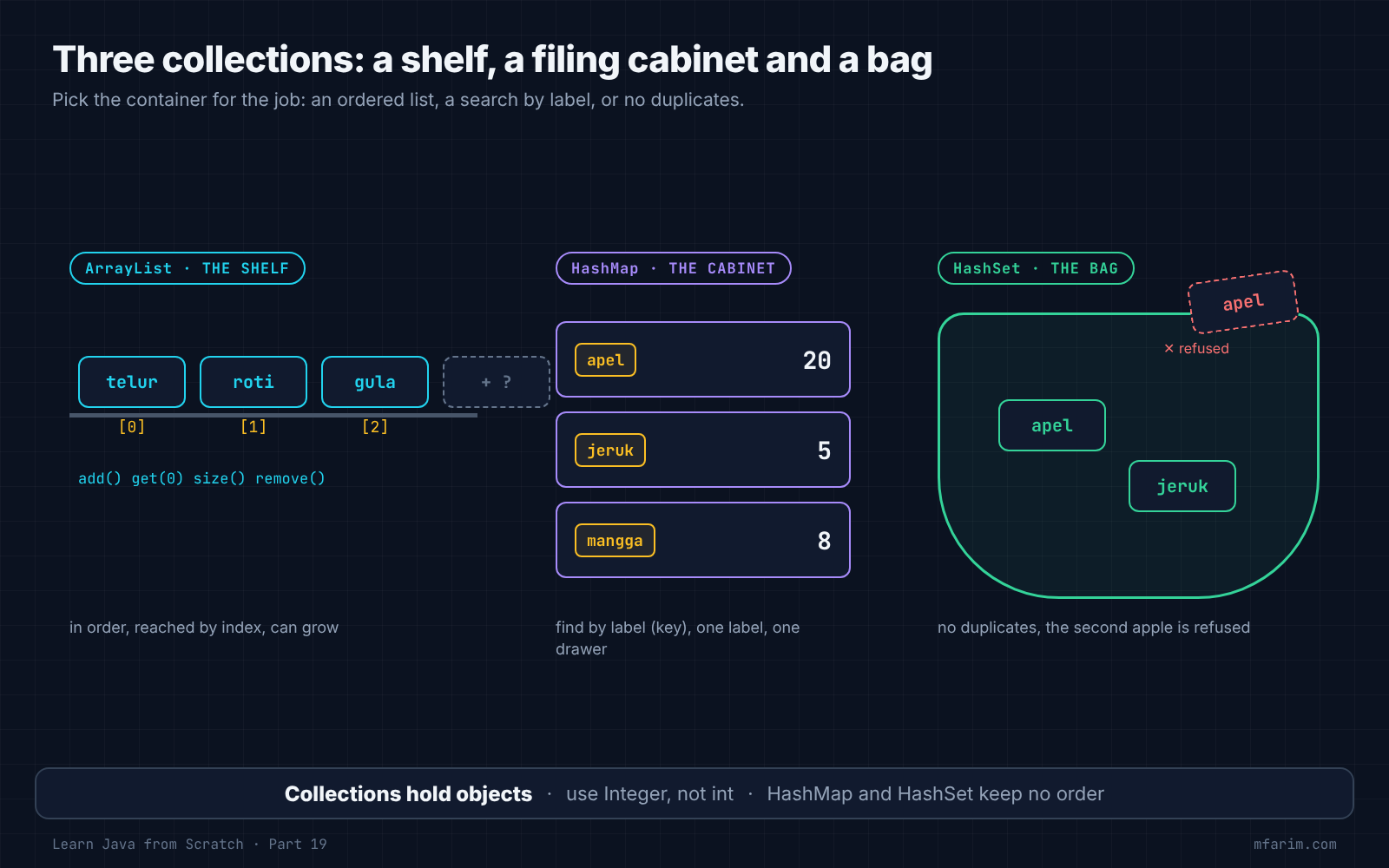
Click the diagram to open it in full size.
2. ArrayList: A Shelf That Grows
Every new item goes at the end of the shelf, and the shelf adjusts its own length. Belanja means "shopping", and the items are eggs, milk, bread and sugar.
void main() {
    List<String> belanja = new ArrayList<>();
    belanja.add("telur");
    belanja.add("susu");
    belanja.add("roti");
    belanja.add("gula");

    IO.println(belanja);
    IO.println(belanja.get(0));
    IO.println(belanja.size());

    belanja.remove("susu");
    IO.println(belanja);
    IO.println(belanja.contains("susu"));
}
[telur, susu, roti, gula]
telur
4
[telur, roti, gula]
false
| Code | Meaning |
|---|---|
add(...) | Put an item at the end of the shelf |
get(0) | Take the item at index 0, the first one |
size() | The number of items |
remove(...) | Take an item away |
contains(...) | Is this item there? |
List<String> means: this shelf is only for strings. We explain the angle brackets < > in Part 20.
For a one-file program like this, Java 25 lets you use List and ArrayList directly, without an import line. It is the same as Scanner in Part 6.
3. HashMap: A Filing Cabinet with Labels
Picture a filing cabinet where every drawer has a label. You do not look for drawer number three. You look for the drawer labelled apple. Stok means "stock", apel is apple and jeruk is orange.
void main() {
    Map<String, Integer> stok = new HashMap<>();
    stok.put("apel", 12);
    stok.put("jeruk", 5);

    IO.println(stok.get("apel"));

    stok.put("apel", 20);
    IO.println(stok.get("apel"));
    IO.println(stok.size());
}
12
20
2
The label is called the key, and the content is called the value. Map<String, Integer> means the labels are strings and the contents are numbers.
One label has only one drawer. When we put("apel", 20), the content of the apple drawer is replaced. There are still two drawers.
4. HashSet: A Bag with No Duplicates
Kantong means "bag":
void main() {
    Set<String> kantong = new HashSet<>();
    kantong.add("apel");
    kantong.add("jeruk");
    kantong.add("apel");

    IO.println(kantong.size());
    IO.println(kantong.contains("jeruk"));
}
2
true
The apple goes in twice, but the bag still holds two items. The duplicate is refused quietly.
To check for duplicates, a HashSet uses equals and hashCode. This is the reason for the rule in Part 16: if you rewrite equals, rewrite hashCode too. String and Integer already have both.
5. A Look into Memory: Why Integer and Not int?
You may wonder why we write Integer, with a capital I and the full word.
Collections cannot hold primitive types such as int directly. Their content is always objects in the warehouse, and what sits on the shelf is a ticket, as in Part 13.
Integer is a wrapper for int. Java wraps and unwraps it automatically, so you can still write normal numbers such as 12.
| Primitive type | Its wrapper |
|---|---|
int | Integer |
double | Double |
boolean | Boolean |
char | Character |
6. When to Use Which?
| You need | Use |
|---|---|
| An ordered list that can grow | ArrayList |
| To find things by a label | HashMap |
| To make sure nothing appears twice | HashSet |
One note: HashMap and HashSet do not keep any order. Look at this (mangga is mango):
void main() {
    Map<String, Integer> stok = new HashMap<>();
    stok.put("apel", 12);
    stok.put("jeruk", 5);
    stok.put("mangga", 8);
    IO.println(stok);
}
{jeruk=5, apel=12, mangga=8}
The apple went in first, but it is not printed first. If order matters, there is a sibling, TreeMap, which always sorts the labels alphabetically.
7. A Real Example: Counting Words
The sentence means "I like coffee and I like milk". Kalimat means "sentence", kata means "word" and hitung means "count".
void main() {
    String kalimat = "saya suka kopi dan saya suka susu";
    Map<String, Integer> hitung = new TreeMap<>();

    for (String kata : kalimat.split(" ")) {
        hitung.put(kata, hitung.getOrDefault(kata, 0) + 1);
    }

    IO.println(hitung);
}
{dan=1, kopi=1, saya=2, suka=2, susu=1}
Let us look at the important lines:
| Code | Meaning |
|---|---|
kalimat.split(" ") | Split the sentence into an array of words, at every space |
hitung.getOrDefault(kata, 0) | Take the old count, or 0 if this word has not appeared yet |
... + 1 | Add one |
hitung.put(kata, ...) | Store the new count in that word's drawer |
The result: saya twice, suka twice, and the rest once. Because we used a TreeMap, the labels are in alphabetical order.
The same idea counts votes, the most popular words, or the best-selling products.
8. Three Collections Traps
Trap one: using int inside the angle brackets.
void main() {
    List<int> angka = new ArrayList<>();
}
Main.java:2: error: unexpected type
    List<int> angka = new ArrayList<>();
         ^
  required: reference
  found:    int
1 error
error: compilation failed
required: reference means an object type is needed. Use Integer.
Trap two: get with a label that does not exist.
void main() {
    Map<String, Integer> stok = new HashMap<>();
    stok.put("apel", 12);

    int mangga = stok.get("mangga");
    IO.println(mangga);
}
Exception in thread "main" java.lang.NullPointerException: Cannot invoke "java.lang.Integer.intValue()" because the return value of "java.util.Map.get(Object)" is null
	at Main.main(Main.java:5)
There is no mangga drawer, so get gives null, the empty ticket from Part 13. Java tries to unwrap null into an int, and the program falls over. Use getOrDefault("mangga", 0).
Trap three: removing items from a list in the middle of a for-each loop.
void main() {
    List<Integer> angka = new ArrayList<>(List.of(1, 2, 3, 4, 5, 6));

    for (Integer n : angka) {
        if (n % 2 == 0) {
            angka.remove(n);
        }
    }
    IO.println(angka);
}
Exception in thread "main" java.util.ConcurrentModificationException
	at java.base/java.util.ArrayList$Itr.checkForComodification(ArrayList.java:1096)
	at java.base/java.util.ArrayList$Itr.next(ArrayList.java:1050)
	at Main.main(Main.java:4)
The shelf was changed while it was being walked through, and Java stops the program. To remove items by a condition, use removeIf:
void main() {
    List<Integer> angka = new ArrayList<>(List.of(1, 2, 3, 4, 5, 6));
    angka.removeIf(n -> n % 2 == 0);
    IO.println(angka);
}
[1, 3, 5]
Notice the arrow -> inside removeIf. For now, just read it as "remove every n that is even". We explain the arrow fully in Part 21.
Summary
- An
ArrayListis a shelf that grows, and you reach items by index. - A
HashMapis a filing cabinet with labels. AHashSetis a bag with no duplicates. - Collections hold objects, so use
Integerfor numbers.
Challenge
Look at this code:
void main() {
    Map<String, Integer> m = new HashMap<>();
    m.put("a", 1);
    m.put("b", 2);
    m.put("a", 3);
    IO.println(m.size() + " " + m.get("a"));
}
What is the output?
- A.
3 1 - B.
2 1 - C.
2 3
Try to answer before you run it. I explain the answer at the start of Part 20.
Conclusion & What's Next
You now have three containers that are far more flexible than arrays. If you remember only one thing, remember the table in section 6: a list, a label, or no duplicates.
In Part 20, we open up those angle brackets: a box labelled "fruit only", so nobody can put a shoe inside.
See you in Part 20. Get your coffee ready. Hot chocolate is fine too.

Written by Muhammad Fari Madyan
Senior Backend Engineer and co-founder of LampungDev. I write up what I build so others can learn from it.