Introduction: One Command, Many Answers
You press the same button: speak. The cat answers: meow. The dog answers: woof.
One command, many answers. In Java, this ability has a name that sounds complicated, but the idea is simple: polymorphism.
After this part, you will be able to:
- Rewrite a parent method with
@Override. - Use one variable of the parent type for many child objects.
- Tell override and overload apart.
Answer to the Part 15 Challenge
The question: the constructor of A prints A, the constructor of B prints B, then new B(). What is the output?
The answer is A: A, then B.
On new B(), Java builds the parent layer first. The constructor of A runs and prints A. Only then does the constructor of B print B.
If you answered A, well done!
1. The Problem: A Chain of if That Never Ends
Imagine a zoo with one hundred animals of twenty kinds. You want every animal to make its sound.
Do we check them one by one? If it is a cat, print meow. If it is a dog, print woof. And so on, for twenty branches.
Every time a new kind of animal arrives, that chain of if grows again. After a while, nobody dares to touch it.
2. Polymorphism Is One Remote for Many TVs
Picture one universal remote control. It has the same button: power on. But every TV responds in its own way.
The remote does not need to know the brand of the TV. It just presses the button, and the TV decides what happens.
| In real life | In Java |
|---|---|
| The universal remote | A variable of the parent type, for example Hewan ("animal") |
| The button | A method of the parent, for example suara() ("sound") |
| Each TV | A child object, for example Kucing ("cat") or Anjing ("dog") |
| How the TV responds | The method that each child rewrites |
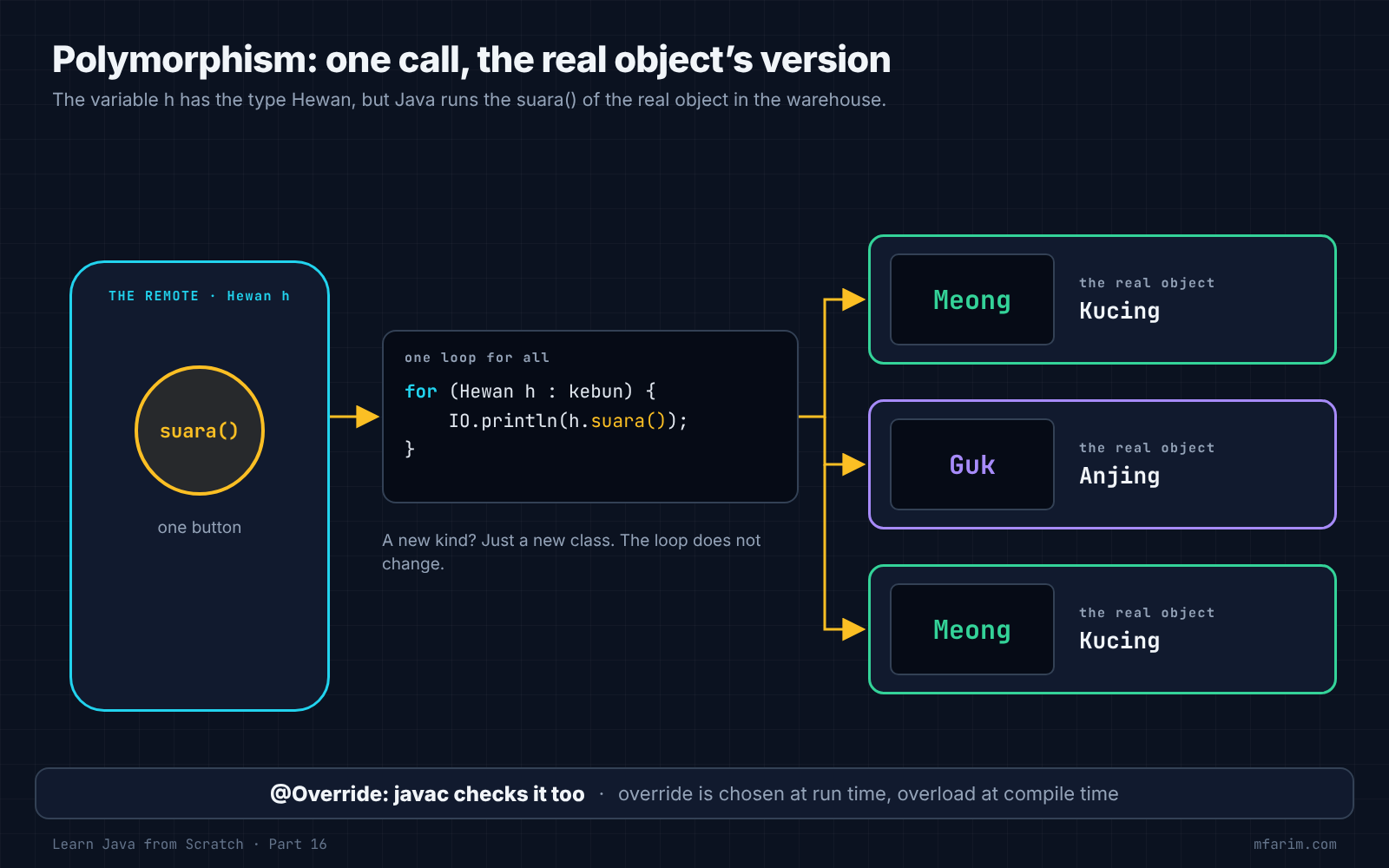
Click the diagram to open it in full size.
3. Rewriting a Method with @Override
One folder, four files. The file Hewan.java:
public class Hewan {
    public String suara() {
        return "...";
    }
}
The file Kucing.java. Cakar means "scratch":
public class Kucing extends Hewan {
    @Override
    public String suara() {
        return "Meong";
    }

    public void cakar() {
        IO.println("Kucing mencakar sofa");
    }
}
The file Anjing.java:
public class Anjing extends Hewan {
    @Override
    public String suara() {
        return "Guk";
    }
}
Rewriting a method of the parent is called overriding. We already did it in Part 15 with tampil(). The difference is that now we put the mark @Override above it.
That mark asks javac to check: does this method really rewrite a method of the parent? If not, javac complains at once. We see the proof in trap one.
4. The Magic: One Loop for Every Animal
The file Main.java. Kebun here means the zoo:
void main() {
    Hewan[] kebun = {new Kucing(), new Anjing(), new Kucing()};

    for (Hewan h : kebun) {
        IO.println(h.suara());
    }
}
Meong
Guk
Meong
Look closely: the array has the type Hewan, and the variable h also has the type Hewan. But the program does not print the parent's ....
Let us look into memory. The variable h has the type Hewan, but its ticket points to a real object in the warehouse. When a method is called, Java looks at the real object and runs that object's version.
This is polymorphism: one type, many forms.
Want to add a new kind of animal, such as Bebek ("duck")? Just create a new class that rewrites suara(). The loop does not change at all.
5. Override or Overload?
Two terms look alike and are often mixed up.
Overloading means several methods with the same name but different parameters. This example needs only one Main.java file in a new folder:
int luas(int sisi) {
    return sisi * sisi;
}

int luas(int panjang, int lebar) {
    return panjang * lebar;
}

void main() {
    IO.println(luas(4));
    IO.println(luas(5, 2));
}
16
10
Java picks the version of luas ("area") based on the ingredients you send. One number goes to the square version, and two numbers go to the rectangle version.
| Override | Overload | |
|---|---|---|
| Where | A child rewrites a parent method | Inside one class |
| Name and parameters | Exactly the same | Same name, different parameters |
| Java chooses based on | The real object, while the program runs | The ingredients sent, at compile time |
6. Keeping a Promise: Teaching equals
In Part 13, k1.equals(k3) said false even though both cakes were chocolate. I promised to show how to teach it later. The answer is overriding.
equals is a method of the class at the very top of Java, called Object. Every class inherits it quietly. We just need to rewrite it.
The file Kue.java:
public class Kue {
    private String rasa;

    public Kue(String rasa) {
        this.rasa = rasa;
    }

    @Override
    public boolean equals(Object lain) {
        return lain instanceof Kue k && rasa.equals(k.rasa);
    }

    @Override
    public int hashCode() {
        return rasa.hashCode();
    }
}
The file Main.java:
void main() {
    Kue k1 = new Kue("Cokelat");
    Kue k3 = new Kue("Cokelat");
    Kue k4 = new Kue("Keju");

    IO.println(k1 == k3);
    IO.println(k1.equals(k3));
    IO.println(k1.equals(k4));
}
false
true
false
lain means "the other one". lain instanceof Kue k checks whether lain is a Kue. If it is, Java gives it the name k. Then we compare the flavours.
== is still false, because the tickets are still different. But now equals compares the content.
One rule: if you rewrite equals, rewrite hashCode too. The reason becomes clear in Part 19, when we use a HashSet.
7. A Real Example: The Total Area of Many Shapes
The file Bentuk.java. Bentuk means "shape":
public class Bentuk {
    public double luas() {
        return 0;
    }
}
The file Lingkaran.java. Lingkaran means "circle":
public class Lingkaran extends Bentuk {
    private double r;

    public Lingkaran(double r) {
        this.r = r;
    }

    @Override
    public double luas() {
        return 3.14 * r * r;
    }
}
The file Persegi.java. Persegi means "square" and sisi means "side":
public class Persegi extends Bentuk {
    private double sisi;

    public Persegi(double sisi) {
        this.sisi = sisi;
    }

    @Override
    public double luas() {
        return sisi * sisi;
    }
}
The file Main.java:
void main() {
    Bentuk[] semua = {new Lingkaran(10), new Persegi(4)};

    double total = 0;
    for (Bentuk b : semua) {
        total += b.luas();
    }
    IO.println("Total luas: " + total);
}
Total luas: 330.0
A circle with radius 10 has an area of 314. A square with side 4 has an area of 16. The total is 330.
That loop never asks which shape it is working on. Every shape knows how to calculate its own area.
8. Three Polymorphism Traps
Trap one: a typo in the method name when overriding.
public class Kucing extends Hewan {
    public String suaraa() {
        return "Meong";
    }
}
Without @Override, javac says nothing. suaraa() is treated as a new method, and the cat makes the parent's sound, ....
With @Override, javac complains at once:
Kucing.java:2: error: method does not override or implement a method from a supertype
    @Override
    ^
1 error
That is why you should always use @Override.
Trap two: calling a child-only method through a parent variable.
void main() {
    Hewan h = new Kucing();
    h.cakar();
}
Main.java:3: error: cannot find symbol
    h.cakar();
     ^
  symbol:   method cakar()
  location: variable h of type Hewan
1 error
error: compilation failed
The object really is a cat. But the Hewan remote has no cakar button. javac only sees the buttons of the variable's type.
Trap three: mixing up override and overload.
If the parameters are different, for example suara(String nada), it is a new method, not a rewrite. Calling h.suara() still runs the parent's version. @Override catches this mistake too.
Summary
- Overriding means a child rewrites a parent method. Always use
@Override. - A variable of the parent type can point to a child object, and Java runs the version of the real object.
- With polymorphism, new behaviour is added as a new class, without changing old code.
Challenge
The file X.java:
public class X {
    public String nama() {
        return "Induk";
    }
}
The file Y.java:
public class Y extends X {
    @Override
    public String nama() {
        return "Anak";
    }
}
The file Main.java:
void main() {
    X x = new Y();
    IO.println(x.nama());
}
Induk means "parent" and anak means "child". What is the output?
- A.
Induk - B. An error.
- C.
Anak
Try to answer before you run it. I explain the answer at the start of Part 17.
Conclusion & What's Next
One line of code can now serve many kinds of objects. If you remember only one thing, remember the remote. The response is decided by the real TV, not by the remote.
But our Bentuk still has a problem: its area is 0, and anyone can create a plain Bentuk. In Part 17, we create a contract: a rule for the shape of a plug, so any device can be plugged in as long as it fits.
See you in Part 17. Get your coffee ready. Hot chocolate is fine too.

Written by Muhammad Fari Madyan
Senior Backend Engineer and co-founder of LampungDev. I write up what I build so others can learn from it.