Introduction: The Arrow We Skipped
Remember the small arrow in Part 19, when we removed the even numbers?
angka.removeIf(n -> n % 2 == 0);
At that time we skipped the arrow. In that line, we did not send a number or a piece of text to a method. We sent a command.
Welcome to the advanced level! In this part we learn to wrap a command into a package: the lambda.
After this part, you will be able to:
- Write a lambda and read the arrow
->. - Use Java's built-in functional interfaces, such as
PredicateandFunction. - Write a method that accepts a command, not just data.
Answer to the Part 20 Challenge
The question: a Kotak<List<String>>, then add("apel") and add("jeruk") through k.ambil(). What is the output?
The answer is B: 2.
The box stores only one ticket to an ArrayList. Every call to ambil() gives us the same ticket. So the apple and the orange go into the same list, and its size is 2.
If you answered B, well done!
1. The Problem: Sending a Way, Not Data
So far, what we send to a method has always been data: numbers, text, or objects.
But we often want to send a way of doing something:
- Which items should be removed?
- What should the list be sorted by?
- Which formula should be used?
In the past, Java forced us to wrap one small rule in a class with no name, called an anonymous class. Compare these two ways to write the rule "a plus b". Hitung means "calculate", tambah means "add" and jalankan means "run":
Hitung tambah = new Hitung() {
    @Override
    public int jalankan(int a, int b) {
        return a + b;
    }
};
Hitung tambah = (a, b) -> a + b;
For one small rule, the old way needs six lines. The rule is lost among the "ceremony". The second way is a lambda.
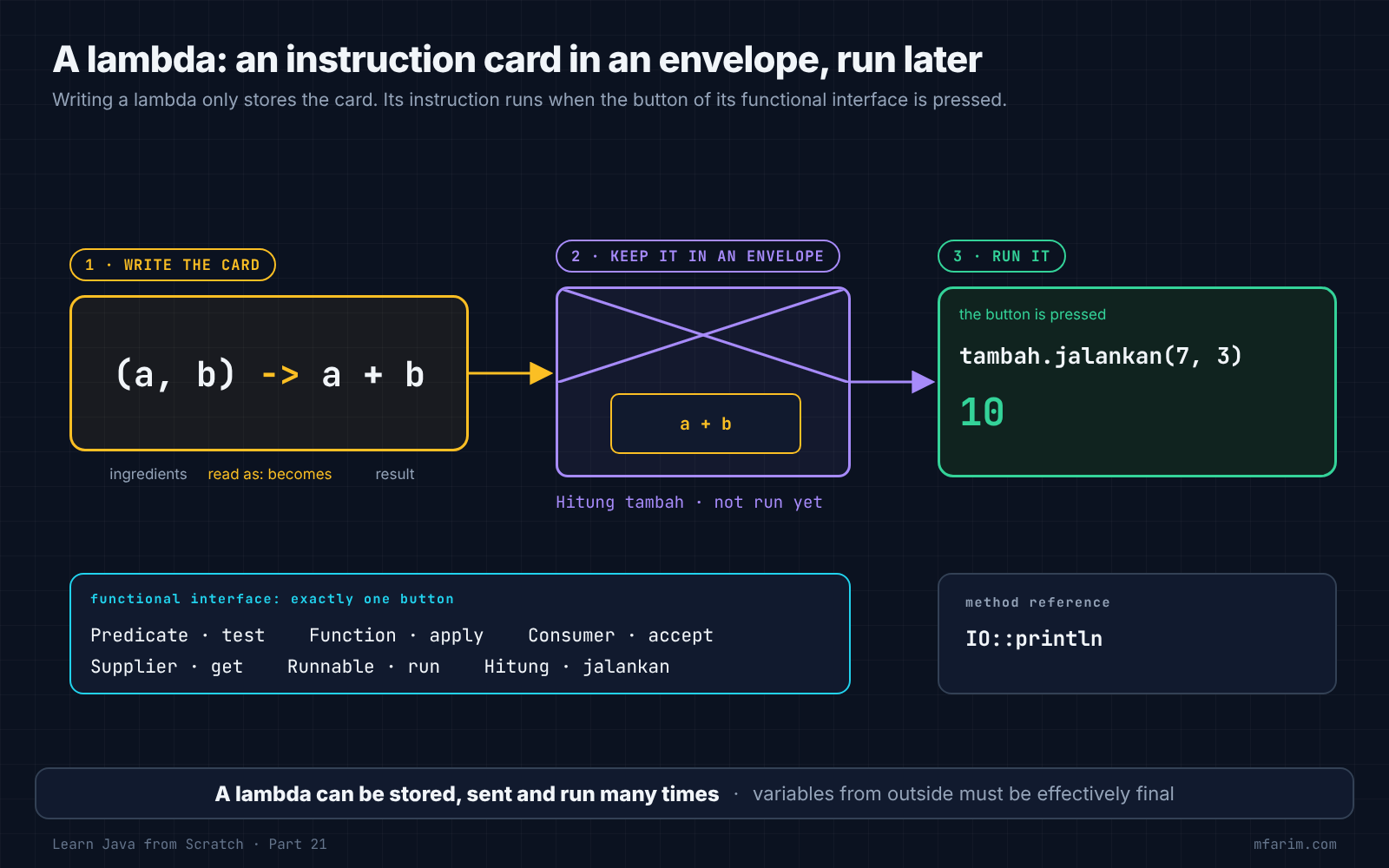
2. A Lambda Is an Instruction Card in an Envelope
Imagine you hand something to a courier. It is not a parcel, but a card with an instruction: "if a price is above one hundred thousand, throw it away."
The card goes into an envelope. The envelope can be kept, sent to another method, and then opened and carried out at any time, even many times.
In Java, this instruction card in an envelope is called a lambda: a method with no name that can be treated like data.
Real apps use this everywhere: a button that is pressed, data that is filtered, and tasks that run in the background.
Click the diagram to open it in full size.
3. The Envelope Needs a Shape: Functional Interfaces
Remember the interfaces in Part 17, contracts like a wall socket?
A lambda can only go into an interface that has exactly one abstract method. An interface like this is called a functional interface.
The file Hitung.java:
@FunctionalInterface
public interface Hitung {
    int jalankan(int a, int b);
}
Because there is only one button, Java knows exactly where the card's instruction belongs. The mark @FunctionalInterface asks javac to make sure there stays only one button.
4. Writing a Lambda
The file Main.java. Kali means "times":
void main() {
    Hitung tambah = (a, b) -> a + b;
    Hitung kali = (a, b) -> a * b;

    IO.println(tambah.jalankan(7, 3));
    IO.println(kali.jalankan(7, 3));
}
10
21
| Piece | Meaning |
|---|---|
(a, b) | The ingredients, on the left of the arrow |
-> | You can read it as "becomes" |
a + b | The result, on the right of the arrow |
So (a, b) -> a + b reads: a and b become a plus b.
We do not write the type int, and we do not write return. javac already knows them from the Hitung contract.
There are three variations:
| Form | Example |
|---|---|
| More than one ingredient | (a, b) -> a + b |
| Only one ingredient, the brackets can go | x -> x * 2 |
A body with more than one line, with curly braces and return | h -> { int hasil = h - 10_000; return hasil; } |
Now let us look into memory. When the lambda line runs, Java makes a small object in the warehouse that holds the instruction card. The variable tambah holds a ticket to that object, just like the ticket to the cake in Part 13.
The important point: writing a lambda does not run it. The card is only stored. Its instruction runs when the button is pressed, which is when jalankan is called.
5. The Built-In Toolbox: java.util.function
The good news: we rarely need to write our own interface. Java already gives us many ready-made functional interfaces. These are the five you will use most:
| Name | Takes | Gives | Its button |
|---|---|---|---|
Predicate<T> | One ingredient | true or false | test |
Function<T, R> | One ingredient | Another result | apply |
Consumer<T> | One ingredient | Nothing | accept |
Supplier<T> | Nothing | One result | get |
Runnable | Nothing | Nothing | run |
The names below mean: mahal "expensive", panjang "length", sapa "greet", menu "menu" and bel "bell".
void main() {
    Predicate<Integer> mahal = harga -> harga > 100_000;
    Function<String, Integer> panjang = teks -> teks.length();
    Consumer<String> sapa = nama -> IO.println("Halo, " + nama + "!");
    Supplier<String> menu = () -> "Kopi susu";
    Runnable bel = () -> IO.println("Ting!");

    IO.println(mahal.test(150_000));
    IO.println(panjang.apply("kopi"));
    sapa.accept("Rani");
    IO.println(menu.get());
    bel.run();
}
true
4
Halo, Rani!
Kopi susu
Ting!
An empty () means the lambda takes no ingredients.
6. Lambdas Meet Collections
harga means "prices" and nama means "names":
void main() {
    List<Integer> harga = new ArrayList<>(List.of(25_000, 150_000, 80_000, 300_000));
    harga.removeIf(h -> h > 100_000);
    IO.println(harga);

    List<String> nama = new ArrayList<>(List.of("Rahmat", "Ayu", "Budi"));
    nama.sort((a, b) -> a.length() - b.length());
    nama.forEach(n -> IO.println(n));
}
[25000, 80000]
Ayu
Budi
Rahmat
| Code | Takes | What happens |
|---|---|---|
removeIf(...) | A Predicate | Removes every item that gets the answer true |
sort(...) | A comparison rule | Sorts the names from the shortest |
forEach(...) | A Consumer | Runs the card for every item in the list |
Three jobs, and we wrote no loop ourselves.
7. A Method That Accepts a Command
Now it is our turn to write a method that accepts a card. Cetak jika means "print if", daftar means "list" and syarat means "condition":
void cetakJika(List<Integer> daftar, Predicate<Integer> syarat) {
    for (int angka : daftar) {
        if (syarat.test(angka)) {
            IO.print(angka + " ");
        }
    }
    IO.println();
}

void main() {
    List<Integer> angka = List.of(1, 2, 3, 4, 5, 6, 7, 8, 9, 10);

    cetakJika(angka, n -> n % 2 == 0);
    cetakJika(angka, n -> n > 7);
}
2 4 6 8 10
8 9 10
cetakJika does not know what the condition is. It only knows how to run the card: syarat.test(angka).
One method, two behaviours, just by changing the card. This is what sending a command means.
8. A Shortcut, and Variables from Outside
Method references. Sometimes a lambda only passes its ingredient to one existing method, for example n -> IO.println(n). For cases like this, Java has a shortcut with the sign ::. besar means "big", diskon is a discount and potong means "cut".
void main() {
    List<String> nama = List.of("Ayu", "Budi");
    nama.forEach(IO::println);

    Function<String, String> besar = String::toUpperCase;
    IO.println(besar.apply("kopi"));

    int diskon = 10_000;
    Function<Integer, Integer> potong = h -> h - diskon;
    IO.println(potong.apply(50_000));
}
Ayu
Budi
KOPI
40000
IO::println means: use the method println of IO as the card's instruction. Use this form when it reads more clearly, and keep a normal lambda when there is extra logic.
Capturing variables. Look at potong above. That lambda uses diskon, a variable from outside.
When the envelope is made, the value of diskon is copied into it, like the photocopy in Part 10. Now imagine that diskon could change afterwards. The envelope would hold 10,000, the box outside would hold 5,000, and nobody would know which one is right.
That is why Java has one rule: a variable used inside a lambda must not change again. A variable like this is called effectively final. It is not written as final, but it is treated as final.
9. A Real Example: A Mini Calculator
Operasi means "operation":
void main() {
    Map<String, BinaryOperator<Integer>> operasi = new HashMap<>();
    operasi.put("+", (a, b) -> a + b);
    operasi.put("-", (a, b) -> a - b);
    operasi.put("x", (a, b) -> a * b);
    operasi.put(":", (a, b) -> a / b);

    IO.println(operasi.get("x").apply(6, 7));
    IO.println(operasi.get("+").apply(6, 7));

    operasi.put("%", (a, b) -> a % b);
    IO.println(operasi.get("%").apply(17, 5));
}
42
13
2
BinaryOperator<Integer> is a Function that takes two numbers and gives one number.
We fill the filing cabinet from Part 19: the labels are operation signs, and the contents are instruction cards. operasi.get("x") takes the multiplication card, and .apply(6, 7) runs it.
There is no chain of if or switch. Want to add the remainder operation? Just one more put line.
This is the power of lambdas: behaviour can be stored in a cabinet, found by a label, and then run.
10. Three Lambda Traps
Trap one: a lambda for an interface with two abstract methods.
The file Alat.java. Alat means "device", nyalakan means "turn on" and matikan means "turn off":
public interface Alat {
    void nyalakan();
    void matikan();
}
void main() {
    Alat lampu = () -> IO.println("Lampu menyala");
}
Main.java:2: error: incompatible types: Alat is not a functional interface
    Alat lampu = () -> IO.println("Lampu menyala");
                 ^
    multiple non-overriding abstract methods found in interface Alat
1 error
error: compilation failed
javac is confused: which button is this card for? A lambda only fits an interface with exactly one button.
Trap two: changing a variable that a lambda uses.
void main() {
    int diskon = 10_000;
    Function<Integer, Integer> potong = h -> h - diskon;
    diskon = 5_000;
    IO.println(potong.apply(50_000));
}
Main.java:3: error: local variables referenced from a lambda expression must be final or effectively final
    Function<Integer, Integer> potong = h -> h - diskon;
                                                 ^
1 error
error: compilation failed
Notice that the error points at the lambda line, not at the line diskon = 5_000. Once diskon changes anywhere, it is no longer effectively final.
Trap three: forgetting return in a body with curly braces.
void main() {
    Function<Integer, Integer> potong = h -> {
        int hasil = h - 10_000;
    };
    IO.println(potong.apply(50_000));
}
Main.java:2: error: incompatible types: bad return type in lambda expression
    Function<Integer, Integer> potong = h -> {
                                        ^
    missing return value
1 error
error: compilation failed
Without curly braces, the result comes out automatically. With curly braces, you must write return hasil;.
Summary
- A lambda is an instruction card in an envelope: a command that can be stored, sent, and run later.
- A lambda can only go into a functional interface, which is an interface with exactly one
abstractmethod, such asPredicate,Function,Consumer,SupplierandRunnable. - A variable from outside that a lambda uses must be effectively final.
Challenge
Look at this code. Kopi is coffee and teh is tea.
void main() {
    Runnable r = () -> IO.println("kopi");
    IO.println("teh");
    r.run();
    r.run();
}
What is the output, from top to bottom?
- A.
teh,kopi,kopi - B.
kopi,teh,kopi - C.
teh,kopi
A hint: remember when the card's instruction really runs. I explain the answer at the start of Part 22.
Conclusion & What's Next
If you remember only one thing from this part, remember the envelope. Writing a lambda only stores the card. Its instruction runs when the button is pressed.
You have come through 21 parts, from "what is the JVM" to sending commands as data. Take a quick look at Part 1 again. What felt strange back then may feel normal now.
In the next part, we connect these lambdas into a factory pipeline. There is a filter, a converting machine, and a tidy result at the end. It is called the Stream API.
Part 22 is coming soon. While you wait, try to add a power operation to the mini calculator in section 9. Get your coffee ready. Hot chocolate is fine too.

Written by Muhammad Fari Madyan
Senior Backend Engineer and co-founder of LampungDev. I write up what I build so others can learn from it.