Introduction: A Promise from Part 6
The user types an age: tujuh belas ("seventeen"), in words. The program stops at once, and the screen fills with red text.
In Part 6, I promised to explain how to handle this. In this part I keep that promise: exceptions.
After this part, you will be able to:
- Read a stack trace, the red text you see when a program falls over.
- Catch problems with
try,catchandfinally. - Throw your own problems with
throw, and deal with checked exceptions.
Answer to the Part 17 Challenge
The question: an empty Robot meets the Sapa contract, and we call halo(). What is the output?
The answer is B: Halo.
A default method already has a body inside the interface. A Robot that meets the Sapa contract gets it for free, even though its class is empty.
If you answered B, well done!
1. The Problem: The World Is Not Tidy
Programs do not live in a tidy world:
- users make typing mistakes,
- files are not found,
- the internet goes down,
- numbers are divided by zero.
If every problem makes the program fall over, nobody can trust our app. We need a way to catch a problem and respond to it politely.
2. An Exception Is a Red Ball on the Pile of Trays
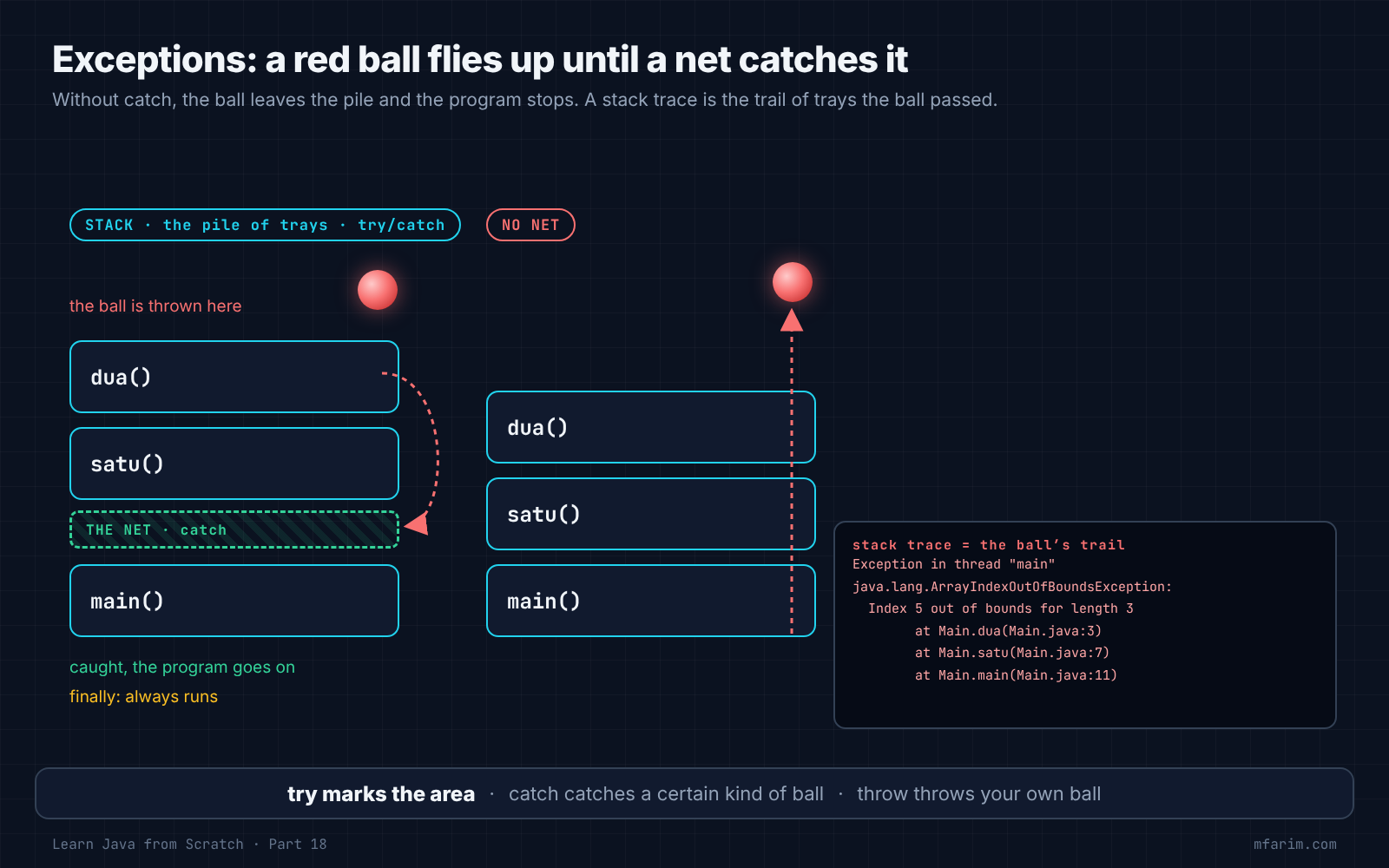
Remember the pile of trays from Part 13. main calls satu() ("one"), satu() calls dua() ("two"), and the trays pile up.
When something goes wrong in dua(), Java throws a red ball. That ball is called an exception.
- The red ball flies upward, past one tray after another.
- If a tray has a net, the ball is caught and the program goes on.
- If there is no net at all, the ball flies out of the pile, and the program stops with red text.
Click the diagram to open it in full size.
3. Reading the Red Text: The Stack Trace
The file Main.java. nilai means "scores":
void dua() {
    int[] nilai = {80, 75, 92};
    IO.println(nilai[5]);
}

void satu() {
    dua();
}

void main() {
    satu();
    IO.println("Selesai");
}
Exception in thread "main" java.lang.ArrayIndexOutOfBoundsException: Index 5 out of bounds for length 3
	at Main.dua(Main.java:3)
	at Main.satu(Main.java:7)
	at Main.main(Main.java:11)
This red text is called a stack trace. It looks scary, but it is very helpful.
| Line | Meaning |
|---|---|
| The first line | The kind of ball, ArrayIndexOutOfBoundsException, with its message |
at Main.dua(Main.java:3) | The ball was thrown in the method dua, line 3 |
at Main.satu(Main.java:7) | The ball flew past satu, line 7 |
at Main.main(Main.java:11) | Then past main, line 11, and out |
Read from the top. The first line that names your own code is usually where the problem happened.
Notice also that Selesai ("done") is never printed. Once the ball leaves the pile, the program stops.
4. Setting Up a Net: try, catch, finally
void main() {
    try {
        int umur = Integer.parseInt("tujuh belas");
        IO.println("Umur: " + umur);
    } catch (NumberFormatException e) {
        IO.println("Umur harus angka");
    } finally {
        IO.println("Pengecekan selesai");
    }
    IO.println("Program lanjut");
}
Umur harus angka
Pengecekan selesai
Program lanjut
The lines mean "The age must be a number", "The check is done" and "The program goes on".
| Piece | Its job |
|---|---|
try { ... } | The area with code that might cause a problem |
catch (NumberFormatException e) | The net, only for that kind of ball |
finally { ... } | The part that always runs, with or without a ball |
Follow the arrow:
parseIntthrows aNumberFormatExceptionball.- The rest of the
tryblock is skipped.Umur: ...is never printed. - The
catchnet catches the ball, and a polite message is printed. finallyruns.- The program goes on to the next line.
finally is good for cleaning up, for example closing a file, because it runs no matter what happens.
5. Throwing Your Own Ball: throw
We can also throw a ball ourselves, with throw. Tarik means "withdraw":
int saldo = 50_000;

void tarik(int jumlah) {
    if (jumlah > saldo) {
        throw new IllegalArgumentException("Saldo tidak cukup");
    }
    saldo -= jumlah;
}

void main() {
    try {
        tarik(20_000);
        IO.println("Sisa saldo: " + saldo);
        tarik(100_000);
        IO.println("Baris ini tidak dijalankan");
    } catch (IllegalArgumentException e) {
        IO.println("Gagal: " + e.getMessage());
    }
}
Sisa saldo: 30000
Gagal: Saldo tidak cukup
The output means "Remaining balance: 30000" and "Failed: Balance is not enough".
throw new IllegalArgumentException(...) makes a new ball with a message, then throws it. The caller catches the ball and reads its message with e.getMessage().
6. Balls You Must Handle: Checked Exceptions
Some balls must be handled from the start. They are called checked exceptions.
One example is Thread.sleep(1000), which tells the program to sleep for 1,000 milliseconds, which is 1 second. javac does not let your program run until this ball is handled in one of two ways:
- catch it with
tryandcatch, or - announce it with the word
throws, which means: "this method can throw this ball, and my caller deals with it".
void main() throws InterruptedException {
    IO.println("Tunggu sebentar...");
    Thread.sleep(1000);
    IO.println("Selesai");
}
Tunggu sebentar...
Selesai
Tunggu sebentar means "wait a moment".
Other balls, such as NumberFormatException and ArithmeticException, do not have to be handled. But if nobody catches them, the program still falls over.
7. A Real Example: Age Input That Survives Typing Mistakes
Now we combine input from Part 6, while from Part 8, and exceptions:
void main() {
    int umur = -1;

    while (umur < 0) {
        try {
            umur = Integer.parseInt(IO.readln("Umur: "));
        } catch (NumberFormatException e) {
            IO.println("Masukkan angka, ya.");
        }
    }

    IO.println("Umurmu " + umur + " tahun");
}
Umur: tujuh belas
Masukkan angka, ya.
Umur: 17
Umurmu 17 tahun
Masukkan angka, ya means "Please type a number". The user types tujuh belas. The program does not fall over. It just asks again. Then the user types 17, and the loop ends.
This is the difference between a friendly program and a fragile one.
8. Three Exception Traps
Trap one: an empty net.
try {
    umur = Integer.parseInt(teks);
} catch (NumberFormatException e) {
}
A catch with nothing inside swallows the problem quietly. Your program does not fall over, but nobody knows something went wrong either. At the very least, print the message.
Trap two: nets in the wrong order.
void main() {
    try {
        int umur = Integer.parseInt("tujuh belas");
    } catch (Exception e) {
        IO.println("Ada masalah");
    } catch (NumberFormatException e) {
        IO.println("Umur harus angka");
    }
}
Main.java:6: error: exception NumberFormatException has already been caught
    } catch (NumberFormatException e) {
      ^
1 error
error: compilation failed
Exception is a general net that catches almost every ball. If it comes first, the specific net below it never gets a chance. Put the more specific net first.
Trap three: ignoring a checked exception.
void main() {
    IO.println("Tunggu sebentar...");
    Thread.sleep(1000);
    IO.println("Selesai");
}
Main.java:3: error: unreported exception InterruptedException; must be caught or declared to be thrown
    Thread.sleep(1000);
                ^
1 error
error: compilation failed
The message already gives you two choices: catch it, or declare it with throws, as in section 6.
Summary
- An exception is a red ball that flies up the pile of trays. A stack trace is its trail.
trymarks the area,catchcatches a certain kind of ball, andfinallyalways runs.throwthrows your own ball. A checked exception must be caught or declared withthrows.
Challenge
Look at this code:
void main() {
    try {
        IO.println(1);
        IO.println(5 / 0);
        IO.println(2);
    } catch (ArithmeticException e) {
        IO.println(3);
    } finally {
        IO.println(4);
    }
}
What is the output, from top to bottom?
- A.
1,3,4 - B.
1,2,3,4 - C.
1,3
Try to answer before you run it. I explain the answer at the start of Part 19.
Conclusion & What's Next
Your program can now fail gracefully, or not fail at all. If you remember only one thing, remember that the red text is not your enemy. A stack trace is a map that shows where the ball was thrown.
In Part 19, our arrays move up a level: a shelf that grows by itself, a filing cabinet with labels, and a bag that refuses duplicates.
See you in Part 19. Get your coffee ready. Hot chocolate is fine too.

Written by Muhammad Fari Madyan
Senior Backend Engineer and co-founder of LampungDev. I write up what I build so others can learn from it.