Opening: The "Export All Transactions" Button
An admin asks for a simple feature: Export all transactions to CSV. The code is simple too:
const rows = await db.query('SELECT * FROM transactions');
res.send(toCsv(rows));
On staging with 2,000 transactions, it works fine. In production with a million, memory jumps by hundreds of MB, the event loop stalls while the CSV is built, and if two admins press the button at the same time, the instance dies.
Data that size does not need to be held all at once. It only needs to flow: take a little, send it, take some more. This part is about streams, and the one concept that makes them safe: backpressure.
Warm-Up Quiz: Do You Still Remember?
Answer first. All correct? Jump to the Summary. Missed one? Let's refresh the material.
Question 1. writable.write(chunk) returns false. What does that mean?
- A. The write failed and the data is lost
- B. The internal buffer is past its limit. The data was still accepted, but you should stop writing until the
'drain'event.
Show the answer to question 1
B. false is a "please slow down" signal, not an error. Ignore it and data keeps piling up in memory. That is backpressure: a slow destination telling the source to wait.
Question 2. source.pipe(transform).pipe(destination), and then transform throws an error. What happens to source and destination?
- A. Both are closed automatically
- B. They are not closed, and the error is not passed along
Show the answer to question 2
B. .pipe() neither forwards errors nor closes the other streams. You can end up with hanging connections or file descriptors. Use pipeline().
Question 3. A user closes the tab halfway through a CSV export streamed with pipeline(source, transform, res). What happens?
- A. The server keeps producing the rest of the CSV until it is done
- B.
pipelinestops with anERR_STREAM_PREMATURE_CLOSEerror, and the source stops too
Show the answer to question 3
B. pipeline notices the destination closed early and stops every stream in the chain. No more queries run for a user who has already left.
Question 4. What is the default highWaterMark for a regular (non-objectMode) stream in Node.js 22?
- A. 16 KiB
- B. 64 KiB
Show the answer to question 4
B: 64 KiB (65,536 bytes), and 16 objects for objectMode. I checked it directly with new Writable().writableHighWaterMark. Older Node.js versions used 16 KiB, so you may still see that number in older articles.
What did you score? Let's take them apart.
1. Streams: Flowing, Not Holding
Picture moving water from a tank to a garden.
- The giant bucket way: collect all the water in one bucket, then carry it to the garden. You need a bucket as big as the tank.
- The hose way: connect a hose. Water flows a bit at a time, and only a little is in the hose at any moment.
A stream is the hose. Node.js has four kinds:
| Kind | Examples |
|---|---|
| Readable (source) | a file being read, a request body, query results page by page |
| Writable (destination) | a file being written, an HTTP response, an upload to Cloud Storage |
| Transform | rows into CSV, gzip compression, encryption |
| Duplex | a TCP socket (read and write) |
What makes the hose safe is a valve: if the garden cannot soak up water that fast, the flow from the tank slows down. That valve is called backpressure.
2. Backpressure: When the Destination Is Slower Than the Source
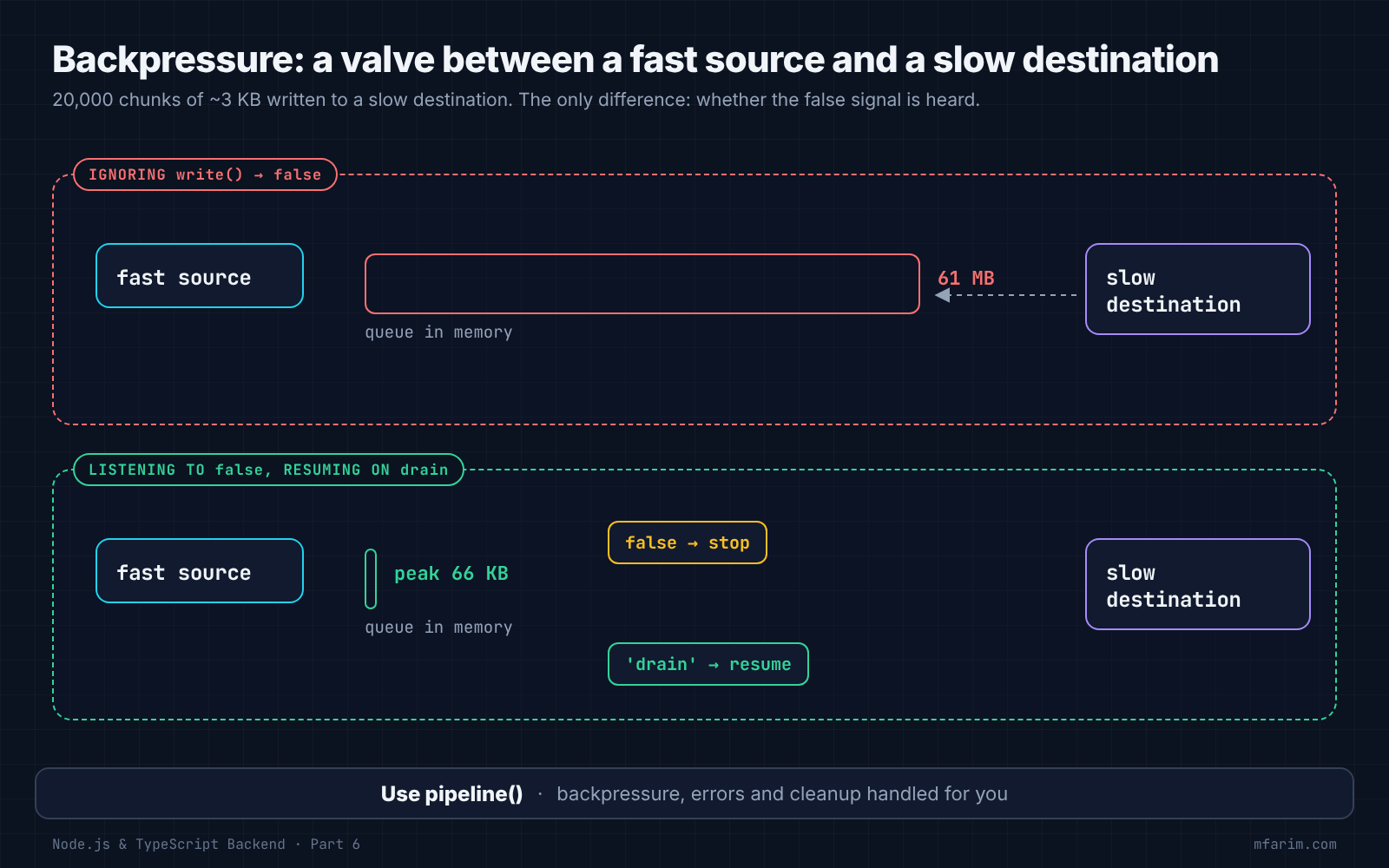
Click the diagram to see it full size.
I made a slow destination (think of a user on a weak signal), then wrote 20,000 chunks of about 3 KB to it, ignoring what write() returned:
const { Writable } = require('node:stream');

// A slow destination: for example a user's connection on a weak signal.
const lambat = new Writable({
  write(chunk, _enc, selesai) { setTimeout(selesai, 1); },
});

const baris = 'INV-0001,2026-11-29,150000,paid\n'.repeat(100); // ~3 KB per write
let i = 0;
function tulisTerus() {
  while (i < 20_000) {
    lambat.write(baris);           // the return value is ignored
    i++;
  }
}
tulisTerus();
console.log(`antre di memori: ${(lambat.writableLength / 1024 / 1024).toFixed(0)} MB`);
antre di memori: 61 MB
(lambat = slow, tulisTerus = keep writing, antre di memori = queued in memory.) Everything went straight into an in-memory queue, because the source never waited. Multiply that by ten users downloading at once.
Now a version that respects the false signal:
function tulisTerus() {
  while (i < 20_000) {
    const masihMuat = lambat.write(baris);   // "still has room"
    puncak = Math.max(puncak, lambat.writableLength);
    i++;
    if (!masihMuat) {
      lambat.once('drain', tulisTerus); // stop, carry on once the buffer has emptied
      return;
    }
  }
  lambat.end(() => console.log(`selesai, puncak antrean: ${(puncak / 1024).toFixed(0)} KB`));
}
selesai, puncak antrean: 66 KB
Same data, same destination. The queue peak dropped from 61 MB to 66 KB, roughly one highWaterMark (64 KiB, question 4) plus one chunk.
The good news: you rarely need to write this drain logic yourself. pipeline() and for await handle it for you.
3. pipeline(): The Right Way to Connect Streams
Here is question 2, run:
const { Readable, Transform, Writable } = require('node:stream');
const { pipeline } = require('node:stream/promises');

const buat = () => ({
  sumber: Readable.from(['a', 'b', 'c']),
  rusak: new Transform({ transform(c, _e, cb) { cb(new Error('baris rusak')); } }),
  tujuan: new Writable({ write(_c, _e, cb) { cb(); } }),
});

// 1. pipe(): the error is not forwarded, the other streams are not closed
{
  const { sumber, rusak, tujuan } = buat();
  rusak.on('error', (e) => console.log('pipe: error di transform:', e.message));
  sumber.pipe(rusak).pipe(tujuan);
}

// 2. pipeline(): one place catches the error, every stream is closed
const { sumber, rusak, tujuan } = buat();
try {
  await pipeline(sumber, rusak, tujuan);
} catch (e) {
  console.log('pipeline: tertangkap:', e.message);
}
pipe: error di transform: baris rusak
pipe: sumber ditutup? false | tujuan ditutup? false
pipeline: tertangkap: baris rusak | sumber ditutup? true | tujuan ditutup? true
(sumber = source, rusak = broken, tujuan = destination, ditutup = closed, tertangkap = caught.) pipeline from node:stream/promises:
- handles backpressure at every link,
- forwards an error from any part to a single
try/catch, - closes every stream in the chain when one fails or finishes.
The rule: do not use .pipe() in production code. Use pipeline().
4. A Real Example: Exporting a Million Rows to CSV
Two versions of an export to a file, a million rows each, with a heap peak monitor:
// All at once: fetch everything, build everything, write once.
async function sekaligus(tujuan) {
  const rows = ambilSemua();                                   // 1 million objects in memory
  const csv = rows.map((r) => `${r.id},${r.total},${r.status}`).join('\n');
  await fs.promises.writeFile(tujuan, csv);
}

// Streaming: fetch page by page, convert row by row, write as you go.
async function* ambilPerHalaman() {
  for (let mulai = 0; mulai < JUMLAH; mulai += 1000) {
    const halaman = Array.from({ length: 1000 }, (_, j) => ({ id: mulai + j, total: 150000, status: 'paid' }));
    yield* halaman;
  }
}

async function stream(tujuan) {
  await pipeline(
    Readable.from(ambilPerHalaman()),
    new Transform({
      objectMode: true,
      transform(r, _enc, selesai) { selesai(null, `${r.id},${r.total},${r.status}\n`); },
    }),
    fs.createWriteStream(tujuan),
  );
}
sekaligus: puncak heap 218 MB, 700 ms, file 18 MB
stream: puncak heap 32 MB, 1045 ms, file 18 MB
(sekaligus = all at once, puncak = peak.) The same 18 MB file. The all-at-once version needed at least 218 MB of heap (the monitor uses setInterval, which is also blocked while the CSV is built, so the real peak may be higher). The stream version holds steady at 32 MB, and that number does not grow with ten times the rows.
The stream version is a little slower in this test. That is a fair price: it never holds the event loop to build 18 MB of text in one go (remember Part 1), and its memory does not depend on the data size.
In real code, ambilPerHalaman (fetch per page) reads from the database page by page with keyset pagination (WHERE id > $last ORDER BY id LIMIT 1000) or uses a cursor such as pg-query-stream.
Straight to the HTTP response
An HTTP response is a Writable too, so you only swap the destination:
const server = http.createServer(async (req, res) => {
  res.setHeader('content-type', 'text/csv');
  res.setHeader('content-disposition', 'attachment; filename="transactions.csv"');
  try {
    await pipeline(
      Readable.from(ambilPerHalaman()),
      new Transform({ objectMode: true, transform(r, _e, cb) { cb(null, `${r.id},${r.total},${r.status}\n`); } }),
      res,
    );
  } catch (err) {
    console.log('ekspor berhenti:', err.code ?? err.message); // for example the user closed the tab
  }
});
I downloaded it twice: once to the end (200,000 rows), and once with curl --limit-rate 50k -m 1, which hangs up after one second:
200000
ekspor berhenti: ERR_STREAM_PREMATURE_CLOSE
(ekspor berhenti = export stopped.) When the client leaves, pipeline stops the generator. No query for the next page is wasted on someone who has already closed the tab. That is the answer to question 3.
5. for await: Reading Streams in Async Style
If you only need to read a stream and handle each chunk, for await is easier to read, and it still respects backpressure: the next chunk is only read once the current iteration finishes.
import { createReadStream } from 'node:fs';
import { createInterface } from 'node:readline';

const lines = createInterface({ input: createReadStream('transactions.csv') });
let total = 0;
for await (const line of lines) {
  total += Number(line.split(',')[1]);
}
This is a safe way to import a large CSV file from a user: read line by line, validate line by line (Part 8), save in batches.
6. Three Stream Traps
Trap 1: .pipe() in production code
Covered in section 3: errors are not forwarded and streams are not closed. Use pipeline().
Trap 2: ignoring a false from write()
If you write to a Writable by hand in a loop, check the return value and wait for 'drain'. Better still, wrap the source as a Readable and hand it to pipeline().
Trap 3: collecting a stream into an array
const chunks = [];
for await (const c of stream) chunks.push(c);
const all = Buffer.concat(chunks); // back to the giant bucket
Sometimes you have to (a small JSON body, say), but for data of unbounded size this throws away every benefit of streaming. If you must collect, put a size limit on it.
Summary
- Streams move data a bit at a time, so memory does not depend on data size.
- Backpressure: a
falsefromwrite()means wait for'drain'. In the test: ignored, 61 MB; respected, 66 KB. - The default
highWaterMarkin Node.js 22: 64 KiB, or 16 objects forobjectMode. - Use
pipeline(), not.pipe(): backpressure, errors and cleanup in one place. - Exporting a million rows: all at once ≥218 MB of heap, streaming 32 MB.
- A client leaving halfway:
pipelinestops withERR_STREAM_PREMATURE_CLOSEand the source stops too.
Closing & What's Next
The Export all transactions button from the opening can now be pressed by ten admins at once. Each export stays small in memory, and an abandoned export stops by itself.
This also closes the Node.js section of the series. From the next part we move to TypeScript, starting with two types that are often mixed up: unknown and any.
Grab your coffee, see you in the next part!

Written by Muhammad Fari Madyan
Senior Backend Engineer and co-founder of LampungDev. I write up what I build so others can learn from it.