Opening: jumlahTiket: -5
Picture a ticket ordering endpoint with neat types:
type BuatPesanan = { eventId: string; jumlahTiket: number; email: string };

app.post('/pesanan', (req, res) => {
  const body = req.body as BuatPesanan;
  // ...total = price * body.jumlahTiket
});
(BuatPesanan = create order, jumlahTiket = number of tickets, pesanan = order.) Then someone sends this from Postman:
{ "eventId": "abc", "jumlahTiket": -5, "email": "not-an-email", "role": "admin" }
The total comes out negative. The confirmation email never arrives. And if body is saved straight into the users table, the role column ends up as admin.
TypeScript cannot stop this. The previous part showed why: req.body is any, and as is not validation. This part is about the right way: runtime validation.
Warm-Up Quiz: Do You Still Remember?
Answer first. All correct? Jump to the Summary. Missed one? Let's refresh the material.
Question 1. After compiling, what is left of type BuatPesanan = { jumlahTiket: number } in the JavaScript file?
- A. An automatically generated checking function
- B. Nothing at all
Show the answer to question 1
B. TypeScript types are removed completely when compiling (type erasure). While the program runs, nothing knows that jumlahTiket should be a number.
Question 2. In zod, what is the difference between schema.parse(data) and schema.safeParse(data) when the data is wrong?
- A. There is none
- B.
parsethrows aZodError,safeParsereturns{ success: false, error }
Show the answer to question 2
B. parse fits when bad data means the program really must not continue, for example the config at startup. safeParse fits in a request handler, where you want to answer 400 cleanly.
Question 3. NestJS with new ValidationPipe({ whitelist: true, forbidNonWhitelisted: true }). The body contains a role: "admin" field that is not in the DTO. What happens?
- A.
roleends up in the DTO - B.
roleis silently dropped - C. The request is rejected with
400
Show the answer to question 3
C. With whitelist: true alone, role is silently dropped (B). Add forbidNonWhitelisted: true and the request is rejected with property role should not exist.
Question 4. The URL is /event?page=2. What is the type of req.query.page at runtime?
- A.
number - B.
string
Show the answer to question 4
B. Everything that comes from a URL is text. If you need a number, convert it first, for example with z.coerce.number().
Question 5. Which of these needs validating?
- A. The request body
- B. Environment variables
- C. The response from a payment gateway API
- D. All of them
Show the answer to question 5
D. The rule: all data that comes in from outside the program. Users make typos, config gets forgotten, and third-party APIs change without warning.
What did you score? Let's take them apart.
1. Types Disappear at Runtime
TypeScript works at compile time. After that, every type is erased, and what runs is plain JavaScript. It is like a building's floor plan: very useful for the builders, but a floor plan cannot stop someone climbing in through a window.
So there are two different kinds of checking:
| Type checking (TypeScript) | Runtime validation | |
|---|---|---|
| When | At compile time | While the program runs |
| Checks | The code you wrote | The data coming in from outside |
| Catches | Wrong function calls, field name typos | jumlahTiket: -5, fake emails, extra fields |
You need both. Neither one replaces the other.
2. Validate at the Door
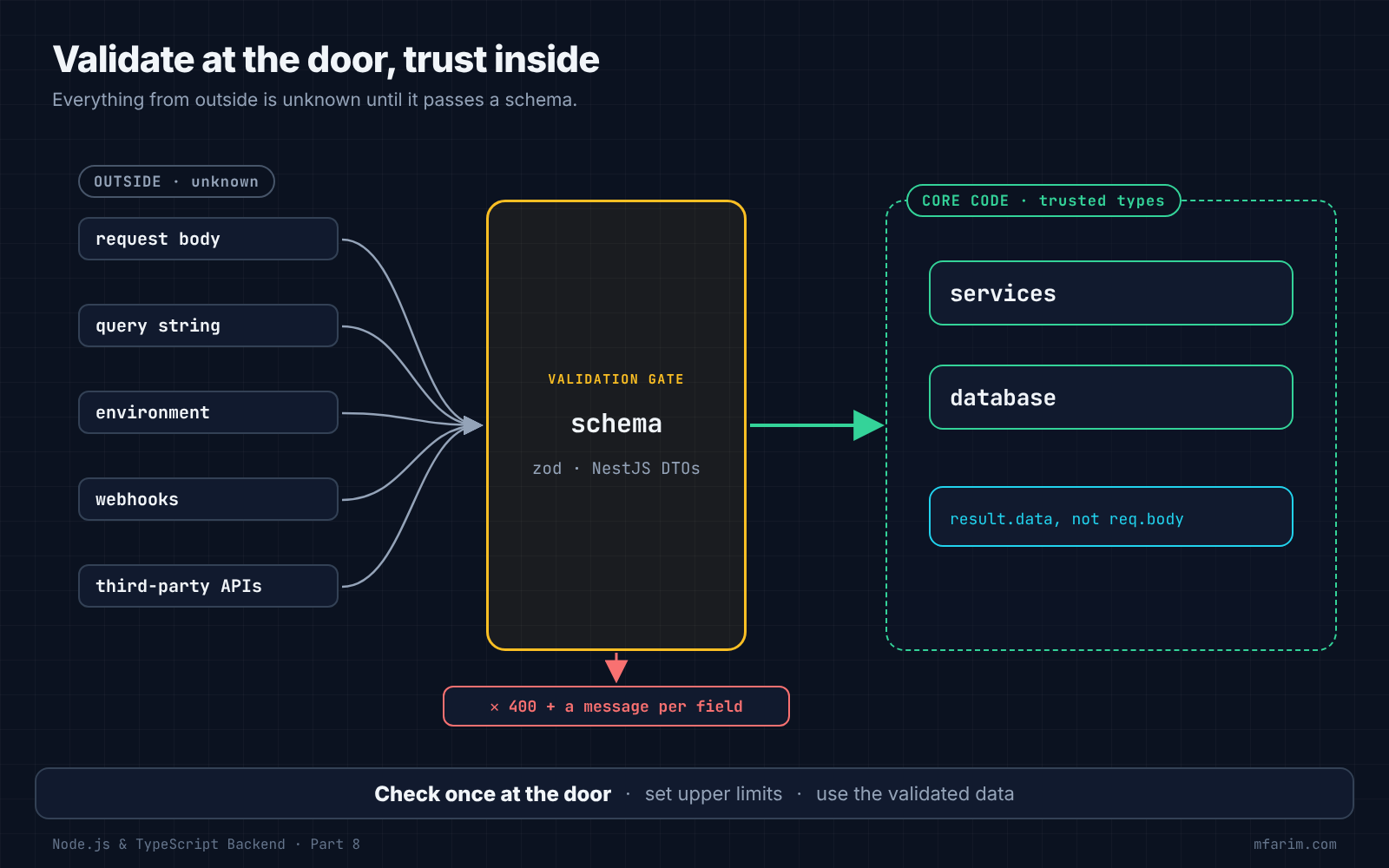
Click the diagram to see it full size.
The pattern is simple: check once at the door, then trust the data inside.
- Outside the gate: all data is treated as
unknown. - At the gate: a schema checks the shape and the basic business rules.
- Inside: services and the database receive data that is known to be right, with matching TypeScript types.
When validation is scattered everywhere (a bit in the controller, a bit in the service, a bit in the query), something always slips through.
3. zod: One Schema, Two Benefits
import { z } from 'zod';

const BuatPesanan = z.object({
  eventId: z.uuid(),
  jumlahTiket: z.number().int().min(1).max(10),
  email: z.email(),
  kodePromo: z.string().trim().toUpperCase().optional(),
});

type BuatPesanan = z.infer<typeof BuatPesanan>; // the type comes from the schema, not written twice

const kiriman: unknown[] = [
  { eventId: '7c9e6679-7425-40de-944b-e07fc1f90ae7', jumlahTiket: 2, email: '[email protected]', kodePromo: ' hemat10 ' },
  { eventId: 'abc', jumlahTiket: -5, email: 'bukan-email', role: 'admin' },
];

for (const body of kiriman) {
  const hasil = BuatPesanan.safeParse(body);
  if (!hasil.success) {
    console.log('400:', JSON.stringify(z.flattenError(hasil.error).fieldErrors));
    continue;
  }
  const pesanan: BuatPesanan = hasil.data;
  console.log('ok:', pesanan);
}
ok: {
  eventId: '7c9e6679-7425-40de-944b-e07fc1f90ae7',
  jumlahTiket: 2,
  email: '[email protected]',
  kodePromo: 'HEMAT10'
}
400: {"eventId":["Invalid UUID"],"jumlahTiket":["Too small: expected number to be >=1"],"email":["Invalid email address"]}
(kiriman = submissions, hasil = result, kodePromo = promo code.) Three things happen at once:
- Validation: bad data is rejected with a message per field, ready to send back as a
400. - Types:
z.inferbuilds theBuatPesanantype from the schema. You do not keep the type and the validation rules in two places that can drift apart. - Cleaning:
kodePromois tidied (' hemat10 'becomes'HEMAT10'), and unknown fields such asroleare dropped.
That last one can be stricter. By default, z.object drops unknown fields. If you want to reject them instead:
const Profil = z.object({ nama: z.string() });
console.log(Profil.parse({ nama: 'Fari', role: 'admin' }));
console.log(Profil.strict().safeParse({ nama: 'Fari', role: 'admin' }).error?.issues[0]?.message);
{ nama: 'Fari' }
Unrecognized key: "role"
Query strings: everything is text
const Halaman = z.object({
  page: z.coerce.number().int().min(1).default(1),
  limit: z.coerce.number().int().min(1).max(100).default(20),
});

// req.query always holds strings
console.log(Halaman.parse({ page: '2' }));
console.log(Halaman.safeParse({ page: '0', limit: '500' }).error?.issues.map((i) => `${i.path.join('.')}: ${i.message}`));
{ page: 2, limit: 20 }
[
  'page: Too small: expected number to be >=1',
  'limit: Too big: expected number to be <=100'
]
z.coerce.number() turns '2' into 2 before checking. The max(100) on limit matters too: without it, someone can ask for a million rows at once.
4. Environment Variables: Fail at Startup, Not at First Use
Better to find a bad config when the app starts than when the first payment comes in at 2 a.m.
import { z } from 'zod';

const Env = z.object({
  NODE_ENV: z.enum(['development', 'test', 'production']),
  PORT: z.coerce.number().int().default(3000),
  DATABASE_URL: z.url(),
  MIDTRANS_SERVER_KEY: z.string().min(10),
});

export const env = Env.parse(process.env); // failing here = the app does not start
Run with MIDTRANS_SERVER_KEY=short:
ZodError: [
  {
    "origin": "string",
    "code": "too_small",
    "minimum": 10,
    "inclusive": true,
    "path": [
      "MIDTRANS_SERVER_KEY"
    ],
    "message": "Too small: expected string to have >=10 characters"
  }
]
Here parse (not safeParse) is the right call. On Cloud Run, a new revision that fails to start never receives traffic, so the old version keeps serving users. After that, all code uses env.PORT, which is guaranteed to be a number, instead of process.env.PORT, which is string | undefined.
5. NestJS: DTOs and ValidationPipe
In NestJS, the most common way is a DTO class with decorators from class-validator:
import { IsEmail, IsInt, IsOptional, IsString, IsUUID, Max, Min } from 'class-validator';

class BuatPesananDto {
  @IsUUID()
  eventId!: string;

  @IsInt()
  @Min(1)
  @Max(10)
  jumlahTiket!: number;

  @IsEmail()
  email!: string;

  @IsOptional()
  @IsString()
  kodePromo?: string;
}

@Controller('pesanan')
class PesananController {
  @Post()
  buat(@Body() dto: BuatPesananDto) {
    return { diterima: dto, kelas: dto.constructor.name };
  }
}

// main.ts
app.useGlobalPipes(new ValidationPipe({ whitelist: true, forbidNonWhitelisted: true, transform: true }));
Four requests to that endpoint:
# valid data
{"diterima":{"eventId":"7c9e…0ae7","jumlahTiket":2,"email":"[email protected]"},"kelas":"BuatPesananDto"}

# bad data
{"message":["eventId must be a UUID","jumlahTiket must not be less than 1","email must be an email"],"error":"Bad Request","statusCode":400}

# an extra role field
{"message":["property role should not exist"],"error":"Bad Request","statusCode":400}

# jumlahTiket sent as "2"
{"message":["jumlahTiket must not be greater than 10","jumlahTiket must not be less than 1","jumlahTiket must be an integer number"],"error":"Bad Request","statusCode":400}
The three options:
whitelist: true: drop fields that have no decorator.forbidNonWhitelisted: true: do not drop them silently, reject the request. This is what closes therole: "admin"hole.transform: true: turn the body into aBuatPesananDtoinstance (see"kelas":"BuatPesananDto").
Look at the last request: "2" as text is rejected for a JSON body. Good. But for query strings, which are always text, you need @Type(() => Number) from class-transformer on the field, or the transformOptions: { enableImplicitConversion: true } option.
Using zod in NestJS
If your team prefers zod, one small pipe is enough:
@Injectable()
export class ZodPipe<T extends z.ZodType> implements PipeTransform<unknown, z.infer<T>> {
  constructor(private readonly schema: T) {}

  transform(value: unknown): z.infer<T> {
    const hasil = this.schema.safeParse(value);
    if (!hasil.success) {
      throw new BadRequestException({ message: 'Invalid data', errors: z.flattenError(hasil.error).fieldErrors });
    }
    return hasil.data;
  }
}

// in the controller
@Post()
buat(@Body(new ZodPipe(BuatPesanan)) body: BuatPesanan) { /* ... */ }
Pick one and use it everywhere. The library matters less than every door having a guard.
6. Three Validation Traps
Trap 1: validating only on the frontend
A browser form that refuses negative numbers is good for user experience, but it is not security. Anyone can send a request straight from curl or Postman. Server-side validation is required. Frontend validation is a bonus.
Trap 2: validating, then using req.body anyway
const hasil = BuatPesanan.safeParse(req.body);
if (!hasil.success) return res.status(400).json(/* ... */);
await simpanPesanan(req.body); // wrong: this is the raw data, not the validated result
req.body still has role: "admin" and the untidy kodePromo. Always use hasil.data.
Trap 3: no upper limits
z.string() without .max() accepts 50 MB of text. z.array(...) without .max() accepts a million items, each validated on the main thread (remember Part 1). Put a limit on every string, array and number.
Summary
- TypeScript types disappear at runtime. You still need runtime validation.
- Validate at the door: body, query, env, webhooks, third-party API responses. Inside, trust the data.
- zod: one schema for validation, types (
z.infer) and cleaning.safeParsein handlers,parsefor config at startup. - Query strings are always text:
z.coerce.number()or@Type(() => Number). - NestJS:
ValidationPipe({ whitelist: true, forbidNonWhitelisted: true, transform: true }). - Traps: frontend only, using
req.bodyafter validating, no upper limits.
Closing & What's Next
The jumlahTiket: -5 from the opening is now rejected at the door with a clear message, and role: "admin" never reaches the database.
Once data passes validation, we often have to treat it differently depending on what it holds. A pending, paid or failed payment has different fields. How do you get TypeScript to know which fields are safe in each branch, and warn you when a new status is added and forgotten? That is the next part: narrowing and discriminated unions.
Grab your coffee, see you in the next part!

Written by Muhammad Fari Madyan
Senior Backend Engineer and co-founder of LampungDev. I write up what I build so others can learn from it.