Opening: Rp15,000 Shipping, a Rp10 Billion Total
A ticket costs Rp100,000. Shipping for the merchandise is Rp15,000. The receipt says:
Total: Rp10,000,015,000
The code is TypeScript, and TypeScript did not complain once:
function totalBayar(harga: number, ongkir: number): number {
  return harga + ongkir;
}

const body: any = JSON.parse('{"harga":"100000","ongkir":15000}'); // from the request
const total = totalBayar(body.harga, body.ongkir);                  // no complaint
console.log(total);
console.log(typeof total);
10000015000
string
(totalBayar = total to pay, harga = price, ongkir = shipping.) The function promises to return a number. What comes out is a string. One word, any, on the third line is enough to switch off every TypeScript check along that path.
This part is about two types that people often mix up: any and unknown.
Warm-Up Quiz: Do You Still Remember?
Answer first. All correct? Jump to the Summary. Missed one? Let's refresh the material. Every snippet in this part was compiled with strict: true.
Question 1. What happens with this code?
const data: any = JSON.parse('{"total":"15000"}');
const total: number = data.total;   // no complaint
console.log(total.toFixed(2));
- A. A compile error
- B. It compiles, then crashes at runtime
- C. It prints
15000.00
Show the answer to question 1
B. any can be assigned to anything, including a variable typed number. At runtime, total turns out to be a string, and you get TypeError: total.toFixed is not a function.
Question 2. Now the type is unknown. What happens?
const data: unknown = JSON.parse('{"total":"15000"}');
console.log(data.total);
- A. It compiles and prints
15000 - B. A compile error
Show the answer to question 2
B. error TS18046: 'data' is of type 'unknown'. You may not use an unknown value before you check it.
Question 3. With strict: true, what is the type of err here?
try {
  JSON.parse('{rusak');
} catch (err) {
  console.log(err.message);
}
- A.
Error - B.
any - C.
unknown
Show the answer to question 3
C. The useUnknownInCatchVariables option (part of strict) makes err an unknown, so err.message is rejected with TS18046. That makes sense: JavaScript can throw anything, including a string or undefined.
Question 4. What does JSON.parse(...) return?
- A.
unknown - B.
any - C.
object
Show the answer to question 4
B: any. So do await res.json() from fetch and req.body in Express. These are the ways any gets in most often without anyone noticing.
Question 5. Does as User check the data while the program runs?
type User = { nama: string; email: string };
const user = JSON.parse('{"nama":"Fari"}') as User;
console.log(user.email.toLowerCase());
- A. Yes, you get a clear error if
emailis missing - B. No, the program crashes on the next line
Show the answer to question 5
B. as only tells TypeScript "just trust me". Nothing is checked at runtime. The result: TypeError: Cannot read properties of undefined (reading 'toLowerCase').
What did you score? Let's take them apart.
1. any: Sending the Guard Home
Think of TypeScript as a security guard at the door of a building. Every value that passes is checked: are you a number? Then you can go into the number room.
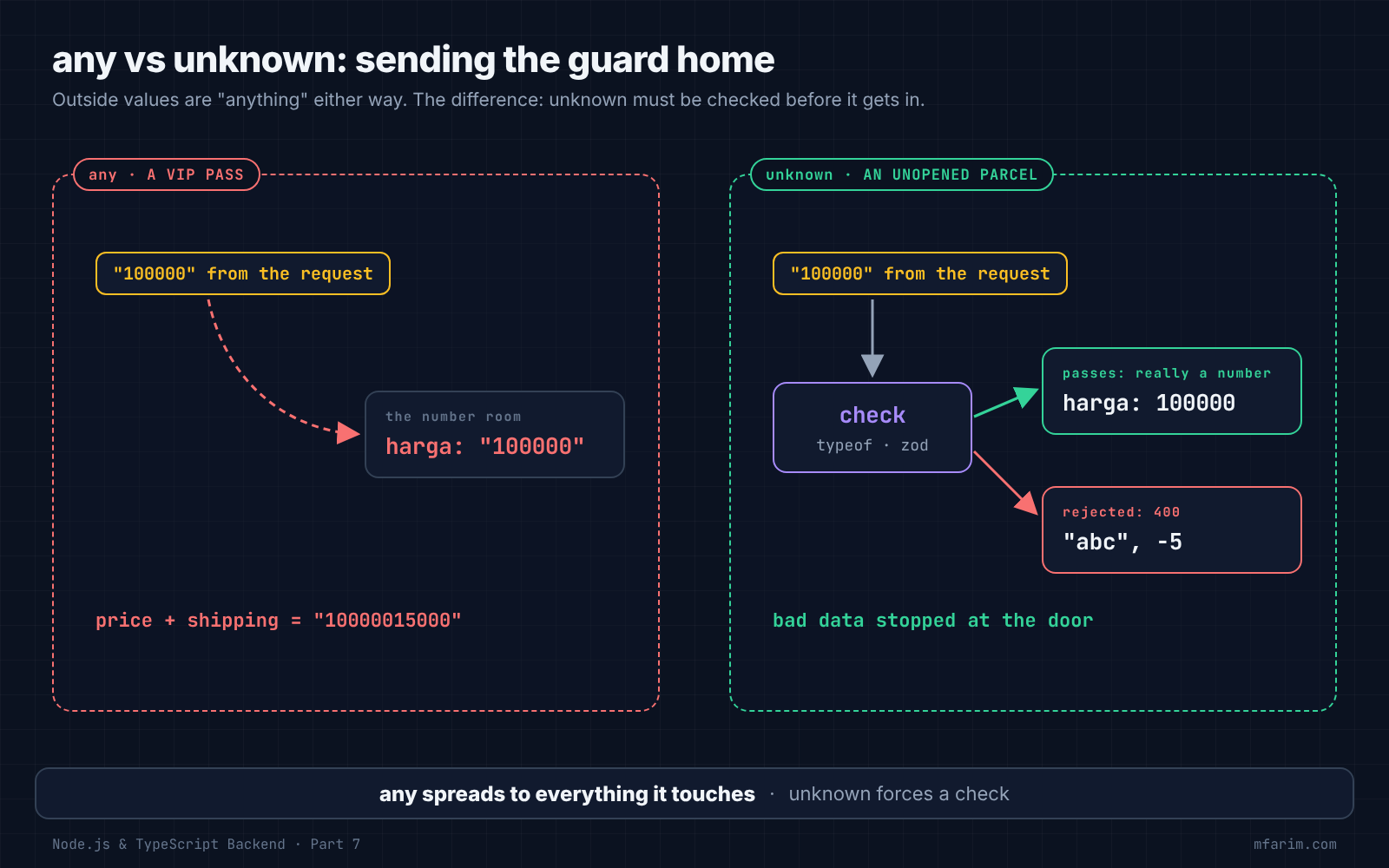
any is a VIP pass. The guard checks nothing:
- an
anyvalue can go into a variable of any type, - you can read any property or call any method on it,
- and the result is
anytoo.
The third point is the dangerous one. any is contagious. In the opening example, body.harga is any, so it flows into the harga: number parameter unchecked. Inside the function, TypeScript is sure harga is a number, but it holds "100000". In JavaScript, "100000" + 15000 joins text: "10000015000".
One any at the entrance breaks trust along the whole path after it.
2. unknown: A Parcel You Have Not Opened
unknown can also hold any value. The difference is that the guard keeps working: you must check what is inside before you use it.
Picture a parcel from a courier. You know something is in there, but not what. You would not plug it into the wall before opening it and looking.
any | unknown | |
|---|---|---|
| Can hold anything | Yes | Yes |
| Can go into a variable of another type | Yes, unchecked | No, check it first |
| Can read properties / call methods | Yes, unchecked | No, check it first |
| Good for | Almost nothing | Outside data that has not been validated yet |
Click the diagram to see it full size.
The rule of thumb: if you do not know the type yet, use unknown, not any.
3. Opening the Parcel: Checking an unknown
The most basic way is a type guard: a function that checks, then tells TypeScript the result through x is Pesanan.
type Pesanan = { id: string; total: number };   // Pesanan = order

// A type guard: a function that checks, and tells TypeScript the result.
function isPesanan(x: unknown): x is Pesanan {
  return (
    typeof x === 'object' && x !== null &&
    'id' in x && typeof x.id === 'string' &&
    'total' in x && typeof x.total === 'number'
  );
}

function parseJson(teks: string): unknown {
  return JSON.parse(teks);
}

for (const teks of ['{"id":"INV-1","total":15000}', '{"id":"INV-2","total":"15000"}']) {
  const data = parseJson(teks);
  if (!isPesanan(data)) {
    console.log('ditolak:', teks);
    continue;
  }
  console.log(data.id, data.total.toFixed(2)); // here data is a Pesanan
}
INV-1 15000.00
ditolak: {"id":"INV-2","total":"15000"}
(ditolak = rejected.) Look at parseJson. This tiny function turns the any from JSON.parse into unknown, so whoever uses it is forced to check first.
For catch, the pattern is:
try {
  JSON.parse('{rusak');
} catch (err) {
  const pesan = err instanceof Error ? err.message : String(err);
  console.log('gagal parse:', pesan);
}
gagal parse: Expected property name or '}' in JSON at position 1 (line 1 column 2)
Writing a type guard by hand for every object gets tiring fast, and it is easy to miss a field. In Part 8 we use a tidier approach: a validation schema with zod or NestJS DTOs. Checking with typeof, in and instanceof gets a deeper look in Part 9.
4. Where any Sneaks In
You may never type the word any and still end up with it. These are the usual places:
| Source | Its default type |
|---|---|
JSON.parse(text) | any |
await res.json() from fetch | any |
req.body in Express | any |
| A JavaScript library with no types | any (or an error when noImplicitAny is on) |
catch (err) without strict | any |
All of them are data from outside the program: from users, from the network, from files. The data that most needs checking is exactly the data that arrives unchecked.
The safe pattern: turn it into unknown at the entrance, then validate. Once it passes validation, the data has a type you can trust.
5. as Is Not Validation
That is question 5. as is a popular shortcut:
const user = JSON.parse(raw) as User;
It looks safer than any, because afterwards user is a User. But nothing checks the contents. If the data does not match, the program crashes somewhere else, far from the real cause, and the stack trace points to an innocent line.
If you see as unknown as Something in a codebase, treat it as a warning sign: someone is forcing TypeScript to be quiet.
as still has its place, for example when you genuinely know more than TypeScript does (document.getElementById('form') as HTMLFormElement). For outside data, though, as is a promise nobody checks.
6. Automatic Fences
Do not rely on memory. Put the fences in your config:
// tsconfig.json
{
  "compilerOptions": {
    "strict": true
  }
}
strict turns on, among others, noImplicitAny (a parameter without a type cannot silently become any) and useUnknownInCatchVariables (question 3).
Then in ESLint, typescript-eslint's recommended-type-checked config enables rules such as:
no-explicit-any: no writingany,no-unsafe-assignment,no-unsafe-member-access,no-unsafe-argument: no lettinganyflow into typed variables, properties or arguments.
The no-unsafe-* rules are the ones that catch the opening example: body.harga, an any, going into a number parameter.
When is any still OK?
- During a gradual migration from JavaScript, as a "not done yet" marker.
- In test code for fake objects, when the details really do not matter.
In both cases, leave a comment explaining why, and keep the any from leaking out of the function.
Summary
anyswitches checks off, and spreads to everything it touches. Oneanyat the entrance can put a string inside anumber.unknownaccepts anything, but must be checked before use.- Where
anygets in:JSON.parse,res.json(),req.body, untyped libraries. Turn it intounknown, then validate. catch (err)isunknownunderstrict. Useerr instanceof Error ? err.message : String(err).asis not validation. Nothing is checked at runtime.- Fences:
strict: trueand typescript-eslint'sno-unsafe-*rules.
Closing & What's Next
The Rp10 billion receipt from the opening could not happen if body were unknown. TypeScript would reject body.harga before the code ever ran.
But rejecting is not enough. We need a tidy way to check outside data, refuse bad input with a clear message, and get the right type for whatever passes. That is the next part: runtime validation with zod and NestJS DTOs.
Grab your coffee, see you in the next part!

Written by Muhammad Fari Madyan
Senior Backend Engineer and co-founder of LampungDev. I write up what I build so others can learn from it.