Opening: Three Seconds That Made Everyone Wait
An admin clicks Download report. The Node.js server starts crunching numbers.
At the same moment, a hundred ticket buyers are opening an event page. Nothing errors. They all just watch a spinner for three seconds.
Only one person asked for the report. So why is everyone waiting?
The answer is the event loop, the small engine at the heart of Node.js. Once you know how it works, you can spot bugs like this before they ship.
Warm-Up Quiz: Do You Still Remember?
Answer first, without running the code. If you get everything right, feel free to jump to the Summary. If you miss one, perfect: let's refresh the material.
Question 1. What is the output order of this code?
console.log('A: sync pertama');
setTimeout(() => console.log('E: setTimeout 0'), 0);
Promise.resolve().then(() => console.log('D: promise'));
process.nextTick(() => console.log('C: nextTick'));
console.log('B: sync terakhir');
- A. A, B, C, D, E
- B. A, C, D, B, E
- C. A, B, E, D, C
- D. A, B, D, C, E
Show the answer to question 1
A: A, B, C, D, E. Sync code always runs to the end first. Then Node.js empties the process.nextTick queue, then the Promise queue, and only then the timers. I lettered the lines in output order on purpose. (The strings are in Indonesian: pertama means first, terakhir means last.)
Question 2. Inside a Promise, we schedule a nextTick and another Promise. Which one prints first?
Promise.resolve().then(() => {
  console.log('1: promise pertama');
  process.nextTick(() => console.log('?: nextTick dari dalam promise'));
  Promise.resolve().then(() => console.log('?: promise kedua'));
});
- A.
nextTick dari dalam promise(nextTick from inside the promise), becausenextTickalways goes first - B.
promise kedua(the second promise)
Show the answer to question 2
B: promise kedua. Once Node.js starts emptying the Promise queue, it drains it until it is really empty, including Promises added along the way. The nextTick queue is checked again only after that. "nextTick goes first" holds when both queues are about to be checked, not halfway through one of them.
Question 3. The /report route runs a sync CPU calculation for 3 seconds. Another user calls /health 0.2 seconds later. What happens?
- A.
/healthanswers right away, because Node.js is async - B.
/healthwaits until/reportis done - C.
/healthgets a 503 error
Show the answer to question 3
B. Our JavaScript runs on one thread. While that thread is busy calculating, no other callback can run, including the /health handler.
Question 4. We wrap the heavy calculation like this. Does /health become fast?
function hitungAsync(batas) {
  return new Promise((resolve) => resolve(hitungPrima(batas)));
}
- A. Yes, because it is async now
- B. No, it still blocks
Show the answer to question 4
B: it still blocks. The function inside new Promise(...) runs right away, on the same thread. A Promise changes how we receive the result. It does not move the work anywhere else. You will see the numbers in section 4.
What is your score? Whatever it is, let's take these apart one by one.
1. One Thread, One Cook
Picture a kitchen with one cook and many waiters.
- The cook = the main thread that runs our JavaScript.
- The waiters = the operating system and libuv's thread pool. They wait for the database to answer, read files, or wait for data from the network.
- The order board = the callback queues.
The cook never stands around waiting for water to boil. They hand the pot to a waiter and move on to the next order. When the water boils, the waiter pins a note on the board. That is why one Node.js process can serve thousands of connections that are waiting.
But if the cook has to grind chilli paste for three seconds, nobody can take over. The board fills up. That is exactly what happened with the Download report button.
Waiting (I/O) is cheap in Node.js. Computing (CPU) blocks everyone.
A small note: libuv has a thread pool (4 threads by default, set with UV_THREADPOOL_SIZE) for work such as reading files, crypto.pbkdf2 and async zlib. So Node.js is not completely single-threaded. What runs on a single thread is our JavaScript.
The code in this article uses Indonesian names, because the series is written in both languages. You will see hitung (calculate), prima (prime), batas (limit), jumlah (count) and laporan (report).
2. The Queue Order: sync, nextTick, Promise, timers
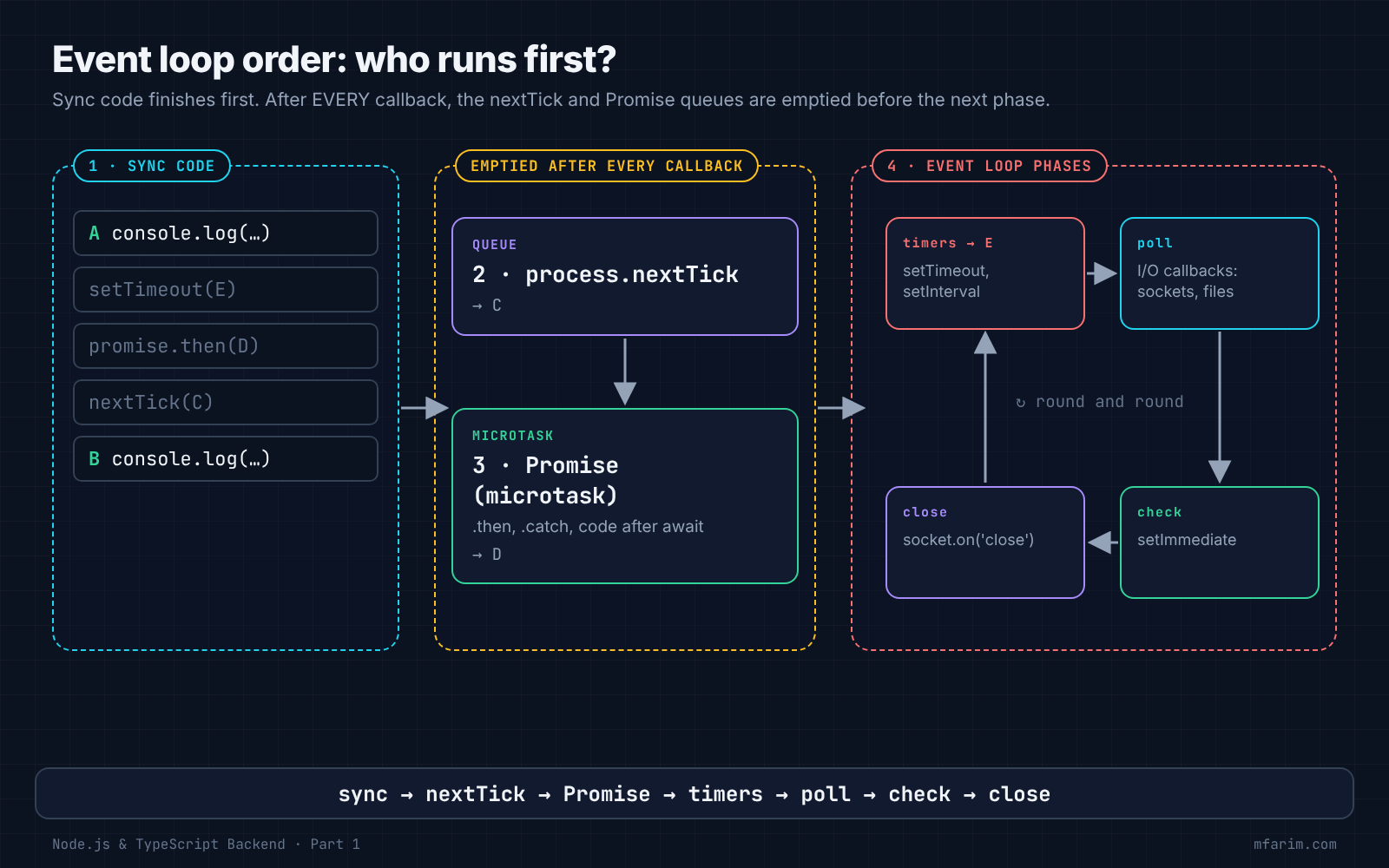
Click the diagram to see it full size.
From most urgent to least:
- The sync code that is running. It always finishes first.
- The
process.nextTickqueue. - The Promise queue (microtasks):
.then,.catch, and the code after anawait. - The event loop phases (macrotasks), going round and round:
- timers:
setTimeoutandsetIntervalcallbacks that are due, - poll: I/O callbacks, such as data from a socket or the result of reading a file,
- check:
setImmediate, - close: close callbacks, such as
socket.on('close').
- timers:
The key rule: every time one callback finishes, Node.js empties the nextTick queue and the Promise queue before taking the next callback.
That explains question 1:
A: sync pertama
B: sync terakhir
C: nextTick
D: promise
E: setTimeout 0
setTimeout(fn, 0) does not mean "run now". It means "put this in the timers phase as soon as possible", and that phase is only checked after every microtask is done.
What about setImmediate?
Inside an I/O callback, setImmediate always runs before setTimeout(fn, 0), because the check phase comes right after the poll phase:
const fs = require('node:fs');

fs.readFile(__filename, () => {
  setTimeout(() => console.log('timeout'), 0);
  setImmediate(() => console.log('immediate'));
});
// immediate
// timeout
Outside an I/O callback, for example at the top level of a file, the Node.js documentation says the order of the two is not guaranteed. Do not write code that depends on it.
3. Proof: One Heavy Calculation Makes Everyone Wait
Here is a small server with two routes. /laporan (report) counts prime numbers, which is pure CPU work. /health just answers ok.
// hitung.js
function hitungPrima(batas) {
  let jumlah = 0;
  for (let n = 2; n <= batas; n++) {
    let prima = true;
    for (let d = 2; d * d <= n; d++) {
      if (n % d === 0) { prima = false; break; }
    }
    if (prima) jumlah++;
  }
  return jumlah;
}
module.exports = { hitungPrima };
// server-blok.js
const http = require('node:http');
const { hitungPrima } = require('./hitung');

http.createServer((req, res) => {
  if (req.url === '/laporan') {
    const jumlah = hitungPrima(8_000_000); // CPU busy for a few seconds
    res.end(`prima: ${jumlah}\n`);
  } else if (req.url === '/health') {
    res.end('ok\n');
  }
}).listen(3000, () => console.log('siap di :3000'));
Now we call /laporan, and /health 0.2 seconds later:
curl -s localhost:3000/laporan -o /dev/null -w 'laporan: %{time_total}s\n' &
sleep 0.2
curl -s localhost:3000/health -o /dev/null -w 'health:  %{time_total}s\n'
wait
On my machine (Node.js 22):
laporan: 2.849147s
health:  2.646768s
/health, which only says ok, took 2.6 seconds. It is not slow. It is queuing behind the prime count.
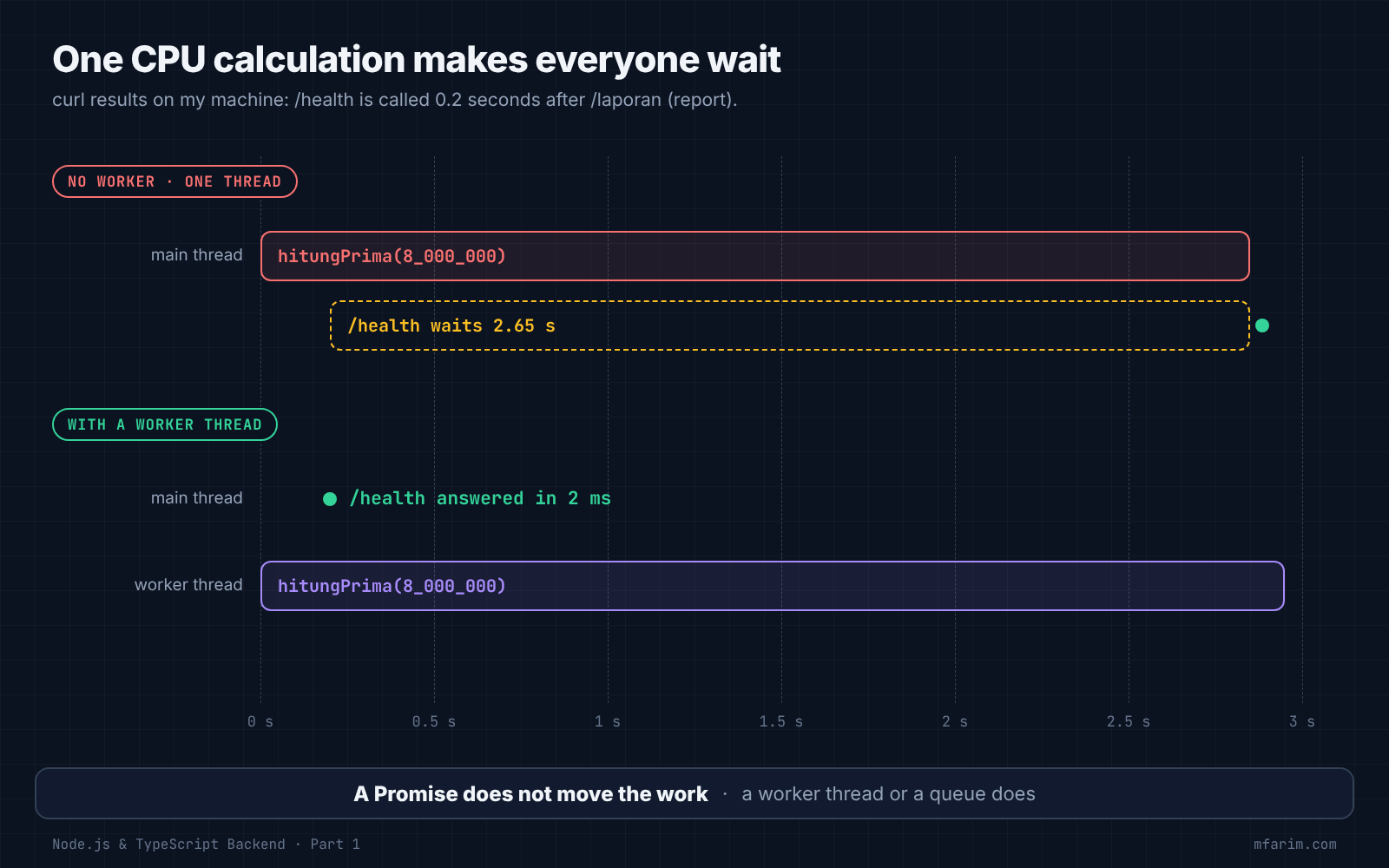
Click the diagram to see it full size.
4. "Wrap It in a Promise to Make It Async" Does Not Help
Here is question 4 again, now with numbers:
function hitungAsync(batas) {
  return new Promise((resolve) => resolve(hitungPrima(batas)));
}
// ...
const jumlah = await hitungAsync(8_000_000);
laporan: 2.924743s
health:  2.707664s
No difference. The function inside new Promise(...) runs right away, on the main thread. async and await control when you receive a result, not where the work happens.
5. Measure Before Users Complain
Node.js has a built-in tool that measures how long the event loop is held up: monitorEventLoopDelay.
const { monitorEventLoopDelay } = require('node:perf_hooks');
const { hitungPrima } = require('./hitung');

const delay = monitorEventLoopDelay({ resolution: 20 });
delay.enable();

setInterval(() => {
  console.log(`p99 lag: ${(delay.percentile(99) / 1e6).toFixed(0)} ms`);
  delay.reset();
}, 1000);

setTimeout(() => hitungPrima(8_000_000), 1500); // one heavy job
setTimeout(() => process.exit(0), 6500);
p99 lag: 20 ms
p99 lag: 2898 ms
p99 lag: 20 ms
p99 lag: 20 ms
20 ms is the floor set by the resolution we chose, so it means "normal". 2,898 ms means something held the thread for almost 3 seconds. Send this number to a dashboard or your logs and put an alert on it. You will know a route is blocking before a user tells you.
6. The Fix: Take the Work Away from the Cook
Option 1: a worker thread
worker_threads runs JavaScript on another thread, with its own event loop. The main cook stays free.
// worker-prima.js
const { parentPort, workerData } = require('node:worker_threads');
const { hitungPrima } = require('./hitung');
parentPort.postMessage(hitungPrima(workerData.batas));
// server-worker.js
const http = require('node:http');
const { Worker } = require('node:worker_threads');

function hitungDiWorker(batas) {
  return new Promise((resolve, reject) => {
    const worker = new Worker('./worker-prima.js', { workerData: { batas } });
    worker.once('message', resolve);
    worker.once('error', reject);
  });
}

http.createServer(async (req, res) => {
  if (req.url === '/laporan') {
    const jumlah = await hitungDiWorker(8_000_000);
    res.end(`prima: ${jumlah}\n`);
  } else if (req.url === '/health') {
    res.end('ok\n');
  }
}).listen(3000, () => console.log('siap di :3000'));
health:  0.002317s
laporan: 2.946189s
/laporan still takes almost 3 seconds, because that is how long the calculation takes. The difference is that /health answers in 2 milliseconds.
The example above creates a new worker per request so it stays easy to read. Starting a worker has a cost, so in production use a pool of reused workers, for example with the piscina library, and cap it at the number of CPUs.
Option 2: a queue
If the work is long (tens of seconds to minutes), needs retries when it fails, or does not have to finish while the user waits, move it to a queue:
- The API takes the request, stores a job in the queue (for example BullMQ on Redis, or Cloud Tasks), and answers
202 Acceptedwith the job ID straight away. - A separate worker process picks up the job and runs it.
- The user checks the status, or gets a notification when it is done.
This way the API server never does the calculation. When the queue grows, you add workers, not API servers.
| Situation | Choice |
|---|---|
| CPU work of a few hundred milliseconds to a few seconds, result needed right now | Worker thread (use a pool) |
| Long work, needs retries, or can finish later | A queue plus a separate worker process |
| I/O work (a query, calling another API, reading a file) | Just await, nothing else needed |
7. Three Event Loop Traps
Trap 1: sync APIs inside a handler
Functions that end in Sync block the main thread until they finish:
app.post('/register', (req, res) => {
  const hash = crypto.pbkdf2Sync(req.body.password, salt, 600_000, 32, 'sha256'); // blocks
  // ...
});
Use the async version (crypto.pbkdf2, fs.promises.readFile), which runs on libuv's thread pool. readFileSync while the app is starting up is fine. Inside a request handler, it is a problem.
Trap 2: big data processed in one go
JSON.parse on a 50 MB body, array.sort on a million rows, or a regex that can backtrack forever (ReDoS) are all CPU work. Limit body size (for example express.json({ limit: '1mb' })), paginate, and test any regex that takes user input.
Trap 3: a nextTick that calls itself
function again() {
  process.nextTick(again); // the nextTick queue is never empty
}
again();
Because the nextTick queue is always emptied before the event loop moves on, this code means I/O never gets a turn. The server looks alive, CPU is at 100%, and it answers no one. If you need "carry on later", use setImmediate.
Summary
- Our JavaScript runs on one thread. Waiting for I/O is cheap. CPU work blocks every request.
- Order: sync code →
process.nextTick→ Promise → the timers, poll, check (setImmediate) and close phases. After each callback, thenextTickand Promise queues are emptied first. - Wrapping in a Promise does not move the work.
asynccontrols when you get the result, not where the work runs. - Measure with
monitorEventLoopDelayand alert on it. - The fix for heavy CPU work: a worker thread (with a pool) or a queue with a separate worker process.
Closing & What's Next
The admin from the opening can still download the report. The difference is that the calculation now runs in a worker, and the hundred ticket buyers never notice a thing.
In the next part we get into something we write every day: async and await. Why Promise.all can make another user wait a full second, why try/catch sometimes catches nothing, and what happens when a Promise fails and nobody is listening.
Grab your coffee, see you in the next part!

Written by Muhammad Fari Madyan
Senior Backend Engineer and co-founder of LampungDev. I write up what I build so others can learn from it.