Opening: "We Have 30 Million Members, So We Need 300 Instances"
A planning meeting. Someone opens a slide: the app has 30 million members, so the proposal is to provision 300 Cloud Run instances and the biggest database available.
The first question should have been: how many requests per second are 30 million members?
With reasonable assumptions, the answer is around 7,000 requests per second at peak. In theory that fits in about 9 instances. And the thing to really worry about is not the instance count, but how many connections those instances open to the database.
The final part of this series is about thinking in numbers when talking about scale: rough maths, Little's Law, layering from the outside in, and keeping the bill sensible.
Warm-Up Quiz: Do You Still Remember?
Answer first. All correct? Jump to the Summary. Missed one? Let's refresh the material.
Question 1. 30 million members, 10% active per day, each making 50 API requests per day. What is the average number of requests per second?
- A. About 1,700
- B. About 17,000
- C. About 30 million
Show the answer to question 1
A: about 1,700. 3 million users × 50 = 150 million requests per day, divided by 86,400 seconds ≈ 1,736 per second. The peak is usually 3–5 times the average.
Question 2. By Little's Law, with 5,000 requests per second and 100 ms per request, how many requests are in progress at any moment?
- A. 50
- B. 500
- C. 5,000
Show the answer to question 2
B: 500. Concurrent requests = rate × time = 5,000 × 0.1 seconds. At a concurrency of 80 per instance, that is about 7 instances in theory.
Question 3. --max-instances=100, a pool of 10 connections per instance, Cloud SQL max_connections of 400. Safe?
- A. Safe, the average is only 9 instances
- B. No: during a spike, 100 × 10 = 1,000 connections
Show the answer to question 3
B. What matters is the worst case, not the average. A spike, or a bug that makes clients retry forever, can start all 100 instances. Shrink the pool, lower max-instances, or add a pooler.
Question 4. The "popular tracks" cache expires at exactly 10:00. In that second, 500 requests arrive. With naive cache code, how many queries reach the database?
- A. 1
- B. 500
Show the answer to question 4
B: 500. Every request finds the cache empty and every one goes to the database. That is a cache stampede. With single-flight, it is 1. Section 3 has the test.
Question 5. Which one is still billed with no traffic at all?
- A. Requests to Cloud Run with min instances at 0
- B. Cloud Run with
--min-instances=5
Show the answer to question 5
B. Instances kept warm are billed even while idle (at a lower idle rate with request-based billing). That is the price of avoiding cold starts.
What did you score? Let's take them apart.
1. Rough Maths, Assumptions Said Out Loud
"30 million members" does not mean "30 million requests at once". What drives the design is requests per second at peak. The first step in any scale question: do rough maths, and say your assumptions out loud, so others can correct the assumptions rather than the arithmetic.
// Every number below is an ASSUMPTION. Swap in your own data.
const member = 30_000_000;
const aktifHarian = 0.10;             // 10% of members active per day
const requestPerUser = 50;            // API requests per active user per day
const faktorPuncak = 4;               // peak = 3–5× the average, take 4
const latensiDetik = 0.1;             // 100 ms per request
const concurrencyPerInstance = 80;    // Cloud Run default (console); with gcloud: 80 × vCPUs
const poolPerInstance = 5;            // database connections per instance

const userHarian = member * aktifHarian;
const requestHarian = userHarian * requestPerUser;
const rpsRata = requestHarian / 86_400;
const rpsPuncak = rpsRata * faktorPuncak;
const bersamaan = rpsPuncak * latensiDetik;                       // Little's Law
const instance = Math.ceil(bersamaan / concurrencyPerInstance);
const koneksiDb = instance * poolPerInstance;
user aktif harian      : 3.000.000
request per hari       : 150.000.000
rata-rata              : 1.736 request/detik
puncak (×4)            : 6.944 request/detik
request bersamaan      : 694 (Little's Law)
instance (teori)       : 9 × concurrency 80
koneksi database       : 45 (instance × pool 5)
audio per sesi         : 9.6 MB
audio per hari         : 28.8 TB  ← ini tugas CDN, bukan Cloud Run
(The output is in Indonesian, with Indonesian number formatting: daily active users 3,000,000; 150,000,000 requests per day; an average of 1,736 requests per second; a peak of 6,944; 694 concurrent requests; 9 instances in theory; 45 database connections; 9.6 MB per audio session; 28.8 TB of audio per day, "a job for the CDN, not Cloud Run".)
The last two lines use one more assumption: one 10-minute audio session per active user per day, at 128 kbps. The result is 28.8 TB per day. The biggest byte count in an app like this does not come from the API, but from audio files. That is the CDN's job.
2. Little's Law: How Many Instances Do You Need?
concurrent requests = requests per second × latency
Picture a checkout queue. If 10 people arrive per minute and each takes 3 minutes to serve, there are on average 30 people in the checkout area. However long the queue looks, this holds for any stable system.
For our API: 6,944 × 0.1 seconds ≈ 694 concurrent requests. At a concurrency of 80, that is 9 instances in theory.
Three things make the real number differ:
- CPU and memory, not concurrency, are usually the limit. If each request needs 20 ms of pure CPU, one vCPU can only manage about 50 requests per second, whatever the concurrency.
- Latency rises with load. Little's Law uses the current latency, and latency gets worse as the database fills up.
- The final number comes from a load test, not a formula. The formula gives you a starting point and tells you which numbers are absurd.
The key point: compute is rarely the problem. The database usually is.
3. Layers for Large Scale, from the Outside In
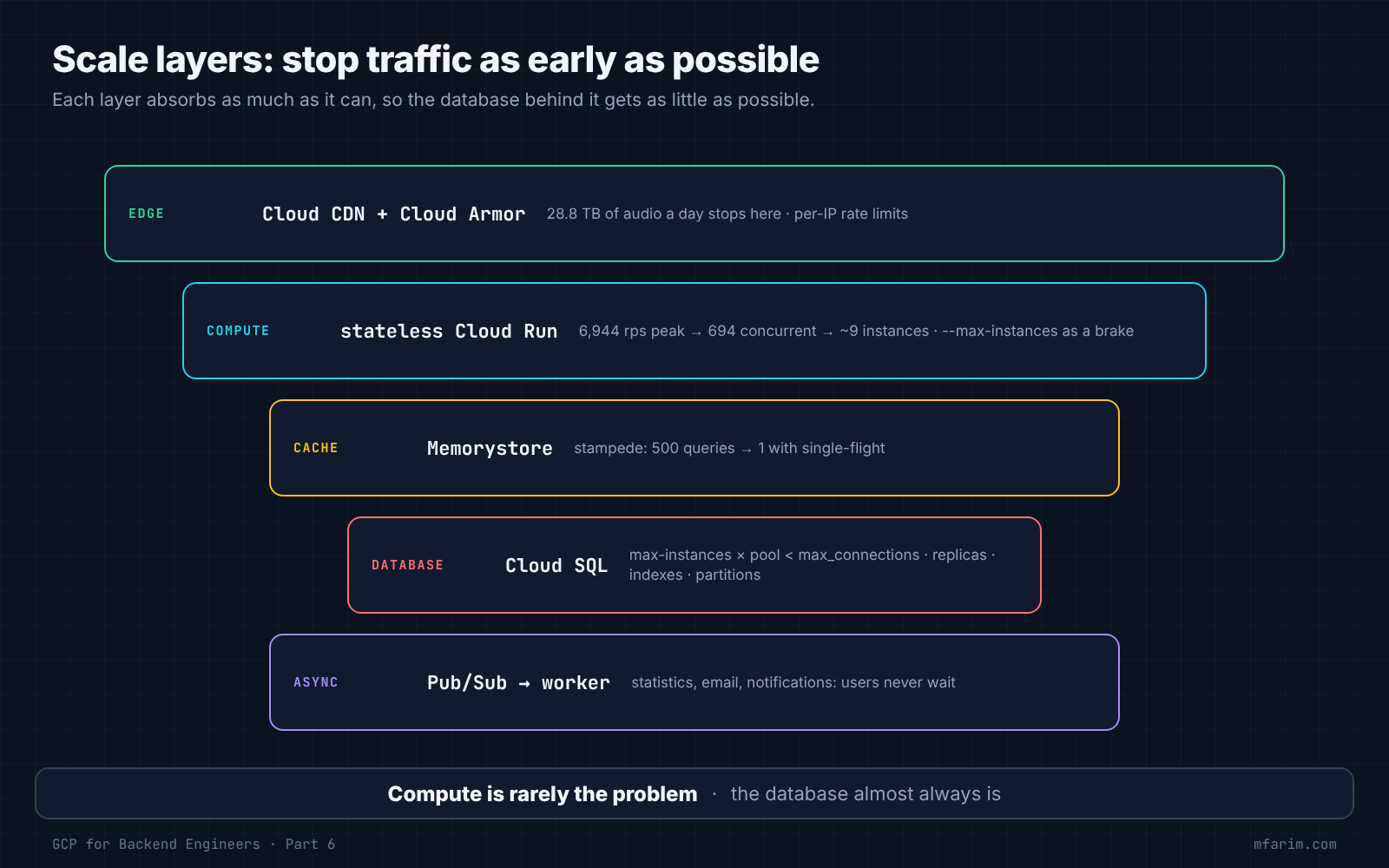
Click the diagram to see it full size.
The principle: each layer absorbs as much traffic as it can, so the layer behind it, which is more expensive and harder to scale, gets as little as possible.
1. The edge: stop traffic as early as possible
- Cloud CDN for audio, images and cacheable public responses.
- Cloud Armor for WAF and per-IP rate limiting, before a request ever reaches Cloud Run:
gcloud compute security-policies rules create 1000 \
  --security-policy=api-policy \
  --expression="request.path.matches('/live/join')" \
  --action=throttle \
  --rate-limit-threshold-count=20 \
  --rate-limit-threshold-interval-sec=60 \
  --conform-action=allow \
  --exceed-action=deny-429 \
  --enforce-on-key=IP
This is rate limiting at the network edge, different from app-level rate limiting with Redis (Part 3 of the Node.js series). They complement each other: Cloud Armor for per-IP floods, the app for per-user rules.
2. Stateless compute
Cloud Run adds instances on its own. Your job is to set --max-instances as a brake, based on how many connections the database can take, not on how much you would like to serve.
3. The cache, and the stampede danger
Memorystore for hot, frequently read data: popular tracks, teacher profiles. But there is one dangerous moment: when the cache expires and hundreds of requests arrive together.
// Naive: every request that finds the cache empty goes straight to the database.
let cacheNaif = null;
async function trackPopulerNaif() {
  if (cacheNaif) return cacheNaif;
  cacheNaif = await ambilTrackPopulerDariDb();
  return cacheNaif;
}

// Single-flight: requests that arrive together wait on the same single query.
let cacheSf = null, sedangDiambil = null;
async function trackPopulerSingleFlight() {
  if (cacheSf) return cacheSf;
  sedangDiambil ??= ambilTrackPopulerDariDb().then((hasil) => { cacheSf = hasil; sedangDiambil = null; return hasil; });
  return sedangDiambil;
}
naif          : 500 request saat cache kosong → 500 query database
single-flight : 500 request saat cache kosong → 1 query database
(naif = naive; "500 requests while the cache is empty → 500 database queries" vs "→ 1".) Single-flight holds back a stampede within one instance. With many instances, each one still sends one query. For very hot data, add one of these:
- A short lock in Redis (
SET NX PX, as in Part 3 of the Node.js series) so only one instance rebuilds. - Stale-while-revalidate: keep serving the old data briefly while one process refreshes it.
- Randomised expiry (for example 300 seconds ± 30), so keys do not all expire in the same second.
4. The database: usually where you hit the wall
- Connection pooling:
max-instances × pool < max_connections(Part 2). - Read replicas for read load.
- The right indexes, and no N+1 queries. One endpoint running 50 queries per request multiplies the database load by 50.
- Partition very large tables, such as meditation session history by month.
- Move reports to BigQuery, never run them on the transactional database.
5. Async
Whatever does not have to finish right now (statistics, notifications, email, search sync) goes to Pub/Sub and is handled by workers (Part 3). The API stays fast, and workers can be paced to what the database can take.
4. Live Event Spikes: Thousands of People in the Same Minute
A live meditation session with a well-known teacher starts at 7 p.m. At 6:59, tens of thousands of people open the app at once. This is not the daily pattern, it is a predictable spike. The preparation:
-
Numbers first. Expected attendees, requests per second in the first minute, and which endpoints get hit.
-
Load-test that path with k6, with cold caches, against a tagged revision.
-
Raise min instances before it starts, lower them afterwards:
BASHgcloud run services update api --region=asia-southeast2 --min=30 # at 6:30 p.m. gcloud run services update api --region=asia-southeast2 --min=1 # at 8:30 p.m.(These commands can be scheduled with Cloud Scheduler.)
-
Cache ticket or access checks in Redis, so the join endpoint does not hit the database for every person.
-
Rate-limit the join endpoint in Cloud Armor and in the app.
-
Cap
--max-instancesso database connections do not run out. -
Let a dedicated service handle video (a streaming CDN or a real-time video provider), so the backend only handles tokens, chat and payments.
The same pattern, at a smaller scale, is the CahTix real-time seat map I tested in Part 3 of the Node.js series: before adding processes, measure what happens with many clients at once.
5. Cost: Because the Bill Is Part of the Design
| Cost source | Why it grows | Control |
|---|---|---|
| Min instances | Billed even while idle | Only for important endpoints, lower them off-peak |
| Instance-based billing | CPU billed for the whole instance lifetime | Only for steady traffic or background work |
| Egress | Big files sent millions of times | A CDN, long Cache-Control, watch the cache hit ratio |
| Log volume | Errors in loops, DEBUG in production | Log levels, sampling, exclusion filters (Part 5) |
| BigQuery | SELECT * on big tables | Select columns, partition, cluster |
On request-based vs instance-based billing (Part 1): the Cloud Run docs recommend request-based for sporadic, bursty or spiky traffic, and instance-based for steady, slowly changing traffic. The Cloud Run Recommender can even suggest switching when it would be cheaper.
And set budget alerts from day one:
gcloud billing budgets create \
  --billing-account=XXXXXX-XXXXXX-XXXXXX \
  --display-name="production" \
  --budget-amount=500USD \
  --threshold-rule=percent=0.5 \
  --threshold-rule=percent=0.9 \
  --threshold-rule=percent=1.0,basis=forecasted-spend
The last rule warns you when this month's forecast will pass the budget, not after it already has. Google Cloud also offers budget spend caps that apply to Cloud Run, if you want a brake that actually stops spending.
6. Plan from Cold Numbers
A load test repeated with the same data looks great, because after the first round everything is in the cache. In the real world, the cache can be empty: after a deploy, after a Redis restart (Part 2), or when new content nobody has requested before suddenly goes viral.
The rule: plan capacity from numbers without the cache. Cached numbers are a bonus, not a promise.
7. Three Scale Traps
Trap 1: counting members instead of requests per second
30 million members can mean 1,700 or 17,000 requests per second, depending on how many are active and how often they use the app. Start from stated assumptions, then correct them with real data from Cloud Monitoring.
Trap 2: adding instances for a database problem
When latency rises, the first reflex is often to raise --max-instances. If the bottleneck is the database, more instances just open more connections and make the queue worse. Look at database saturation first (Part 5).
Trap 3: forgetting the biggest bytes are not the API
In an audio or video app, the egress bill can be far larger than compute. Design the CDN and caching from the start, not after the first bill arrives.
Summary
- Do rough maths and state your assumptions. 30 million members → 3 million active → 150 million requests a day → about 1,700 per second on average, about 7,000 at peak.
- Little's Law: concurrent requests = rate × latency. 694 concurrent → about 9 instances in theory. The final number comes from a load test.
- Compute is rarely the problem, the database almost always is.
max-instances × pool < max_connections. - Layers from the outside in: CDN + Cloud Armor → Cloud Run with a brake → a cache with stampede protection → the database → async.
- Cache stampede: 500 queries vs 1 with single-flight. Add a Redis lock or randomised expiry for many instances.
- Live events: numbers, a cold-cache load test, raise
--minbefore it starts, rate limiting, cap--max-instances. - Cost: min instances, egress, logs, BigQuery. Budget alerts with forecasted spend from day one.
Closing the Series
The 300-instance proposal from the opening can now be answered with numbers: about 9 in theory, final from a load test, with the main attention on database connections and a CDN for 28.8 TB of audio a day.
This is the final part of GCP for Backend Engineers. In short:
- Choosing compute: Cloud Run as the starting point, with a clear way out.
- Choosing data: every store has a role, and the cache may fail without taking requests down.
- Messaging: separate what must happen now from what can wait.
- Availability: three layers, and code changes as the number one cause of outages.
- Observability: p99, structured logs, alerts on symptoms.
- Scale and cost: think in numbers.
Every part opens with a quiz. If one day you feel unsure, open that part and try the quiz first. All correct? No need to reread. Missed one? You know exactly which part to refresh.
Grab your coffee, and thank you for following this series to the end!

Written by Muhammad Fari Madyan
Senior Backend Engineer and co-founder of LampungDev. I write up what I build so others can learn from it.