Opening: 73 Seconds Because of a Cache
Redis was added to speed things up. The meditation list page went from 120 ms to 8 ms. Everyone was happy.
One night, the Memorystore instance restarted for maintenance. That should have been fine: the data is still in the database, so just read it from there.
In reality, every request to that page hung. I reproduced it: Redis turned off, then one request sent through cache code using the default ioredis settings. The result:
bawaan: 73451 ms, ERROR Reached the max retries per request limit (which is 20).
73 seconds. Not because the database was slow, but because the Redis client kept trying to reconnect before giving up.
This part is about choosing where data lives on GCP. And about the rule that keeps the story above from happening: every store has a role, and none of them may take another one down.
Warm-Up Quiz: Do You Still Remember?
Answer first. All correct? Jump to the Summary. Missed one? Let's refresh the material.
Question 1. A Memorystore for Redis Basic tier instance restarts. What happens to its data?
- A. Safe, there is a replica in another zone
- B. Gone, because Basic is a single node with no replication
Show the answer to question 1
B. Basic is a single-node cache, meant for apps that can survive a cold restart and an empty cache. The Standard tier has a replica in another zone and automatic failover (usually around 30 seconds), though its own documentation warns that HA does not guarantee every last write survives.
Question 2. Cloud Run can scale to 50 instances, and each instance has a pool of 10 connections to Cloud SQL. Cloud SQL's max_connections is 100. Any problem?
- A. No, Cloud SQL adds connections automatically
- B. Yes: 50 × 10 = 500 connections, far above the limit of 100
Show the answer to question 2
B. Cloud SQL's connection limit is set by the instance's memory (and can be tuned with the max_connections flag). It does not grow by itself. The formula that must always hold: max-instances × pool size < max_connections, with headroom left for admin connections and migrations.
Question 3. Payment, ticket and member data that are related to each other, with transactions and reports that join several tables. What is the starting choice?
- A. Firestore
- B. Cloud SQL for PostgreSQL
Show the answer to question 3
B. Relational data with transactions and joins is PostgreSQL territory. Firestore shines for document data with real-time listeners to mobile apps, but its design follows your query patterns, not the other way round.
Question 4. In BigQuery on-demand mode, you run SELECT * FROM session_history LIMIT 10 on a 2 TB table. How much data is read and billed?
- A. Very little, because of
LIMIT 10 - B. Every column in that table
Show the answer to question 4
B. The BigQuery documentation says LIMIT on a SELECT * does not reduce the amount of data read. What does reduce it: selecting only the columns you need, and filtering partitioned or clustered tables.
Question 5. A 10 MB meditation audio file is played millions of times a day. Where should it be served from?
- A. From Cloud Run, through an
/audio/:idendpoint - B. From Cloud Storage behind Cloud CDN
Show the answer to question 5
B. Serving big files through Cloud Run means paying for CPU, memory and instances just to copy bytes. A CDN keeps copies close to users, so most requests never reach a server at all.
What did you score? Let's take them apart.
1. One Map, Six Roles
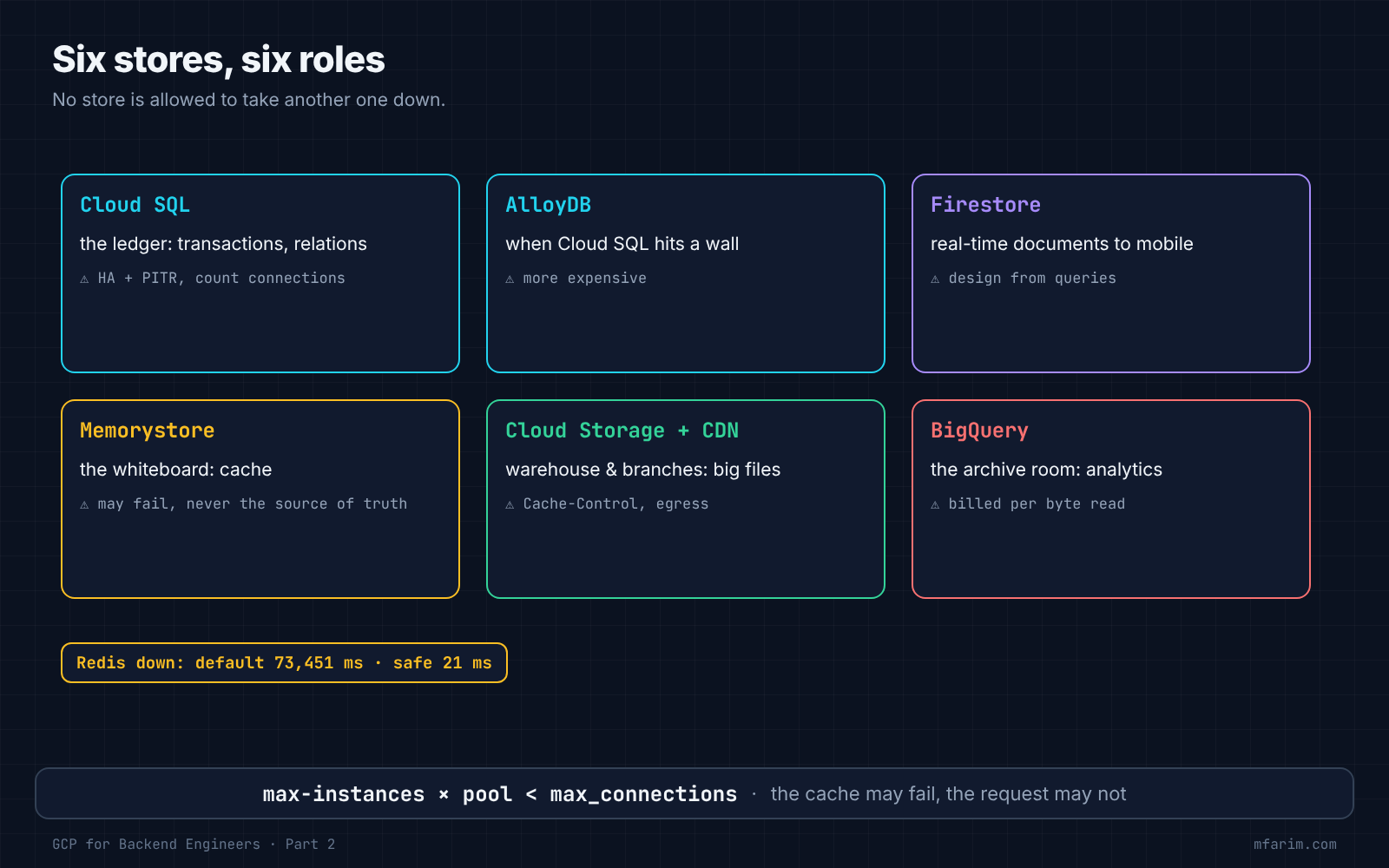
Click the diagram to see it full size.
Picture a big shop:
- Cloud SQL is the ledger: every transaction recorded carefully, and it must always be right.
- Memorystore is the whiteboard at the till: quick to read, fine to wipe at any time, because the original is in the ledger.
- Cloud Storage + CDN is a warehouse with branches in every city: big goods stored in the warehouse and copied to the nearest branch.
- BigQuery is the archive room for analysts: where years of data get read without bothering the till.
| Service | Use it for | Watch out for |
|---|---|---|
| Cloud SQL (PostgreSQL) | Relational data, transactions: payments, tickets, members | Connection limits from serverless, needs pooling; writes scale vertically |
| AlloyDB | PostgreSQL for heavy workloads, especially reads | More expensive; choose it when Cloud SQL hits a wall |
| Firestore | Document data with real-time listeners to mobile apps | Design follows query patterns; a document written very often becomes a hotspot |
| Memorystore (Redis) | Cache, rate limits, sessions, fast Pub/Sub | Basic has no replication; never the only source of truth |
| Cloud Storage + Cloud CDN | Big files: audio, images, video | Set cache headers; egress can become the biggest cost |
| BigQuery | Analytics and reports | Billed per byte read; use partitions and clustering |
2. Cloud SQL: The Ledger That Must Always Be Right
For transactional data, start with Cloud SQL for PostgreSQL. Three settings decide whether it holds up:
- High availability (regional). A standby in another zone with synchronous replication, and automatic failover when the primary stops responding. The standby cannot serve reads. Without HA, Cloud SQL does not recover the instance automatically when its zone goes down.
- Automated backups + point-in-time recovery. To recover from human mistakes, such as a
DELETEwith noWHERE. HA does not protect you here, because the mistake is replicated too. - Read replicas to move read load off the primary.
gcloud sql instances create main-db \
  --database-version=POSTGRES_16 \
  --region=asia-southeast2 \
  --availability-type=REGIONAL \
  --enable-point-in-time-recovery \
  --cpu=2 --memory=8GiB
The classic serverless problem: connections
Cloud Run can add instances in seconds. PostgreSQL cannot add connections that easily, because each connection costs memory on the database side.
max connections from the app = max-instances × pool size per instance
The rule to keep: that number stays below max_connections, with room left for admin tools, migrations and jobs. If there is not enough room:
- shrink the pool per instance (Node.js at concurrency 80 is often fine with a pool of 5–10, because not every request touches the database at the same moment),
- set
--max-instancesas a brake, - put a connection pooler such as PgBouncer in front of the database, or use Cloud SQL's managed connection pooling feature (check which editions support it),
- only then, size up the machine.
Remember Part 2 of the Node.js series too: a Promise.all with 500 queries can fill a 10-connection pool, and another user logging in ends up waiting.
When AlloyDB?
AlloyDB is Google's PostgreSQL for heavy workloads, with much higher read performance and read pools you can grow. It also costs more. The rule of thumb: optimise Cloud SQL first (indexes, queries, read replicas, pooling). Move to AlloyDB when all of that is done and the database still hits a wall.
3. Firestore: When the App Needs Data That Moves by Itself
Firestore stores JSON documents in collections, and a mobile app can subscribe to changes in a document. When the data changes, the user's screen changes too, without polling.
It fits:
- the status of a live session watched by thousands of people,
- a user's favourites synced across devices,
- data that is read far more often than it is written.
What differs from SQL: you design the data structure from the queries. There are no joins. If the profile screen needs the teacher's name and the titles of their last three tracks, that data is often copied (denormalised) into the profile document so one read is enough.
Also watch out for a single document written very often, such as a global "people meditating right now" counter. A single document has a write rate limit. The pattern: split it into several counter documents (a distributed counter), and add them up when reading.
4. Memorystore: The Whiteboard You Can Wipe
Memorystore is managed Redis. The two most common tiers:
| Basic | Standard | |
|---|---|---|
| Nodes | One | Primary + a replica in another zone |
| Automatic failover | No | Yes, usually around 30 seconds |
| On restart or maintenance | Data is lost | Data is kept (with a small risk of losing the last writes) |
| Fits | Pure cache | Sessions, rate limits, data that is expensive to rebuild |
The tier cannot be changed after creation. Going from Basic to Standard means creating a new instance and moving the data.
The golden rule: the cache may fail, the request may not
Here is the code from the opening, the default version and the safe version. Redis is down:
// Version 1: default ioredis settings.
const redisBawaan = new Redis({ host: '127.0.0.1', port: 6379 });
async function ambilTrackBawaan(id) {
  const ada = await redisBawaan.get(`track:${id}`);
  return ada ? JSON.parse(ada) : dariDatabase(id);
}

// Version 2: the cache may fail, the request may not.
const redisCepat = new Redis({ host: '127.0.0.1', port: 6379, maxRetriesPerRequest: 0, enableOfflineQueue: false, connectTimeout: 200 });
async function cacheGet(kunci) {
  try {
    return await Promise.race([redisCepat.get(kunci), tunggu(50).then(() => null)]); // 50 ms at most
  } catch {
    return null; // Redis is down: treat it as a cache miss
  }
}
async function ambilTrackAman(id) {
  const ada = await cacheGet(`track:${id}`);
  return ada ? JSON.parse(ada) : dariDatabase(id);
}
(bawaan = default, aman = safe, ambil = get, dariDatabase = from the database, tunggu = wait.)
bawaan: 73451 ms, ERROR Reached the max retries per request limit (which is 20). Refer to "max
aman  : 21 ms, {"id":"t1","judul":"Meditasi Pagi"}
The default version held the request for 73 seconds: the GET went into the offline queue and was retried 20 times while waiting to connect. The safe version gives up after at most 50 ms, treats it as a cache miss, and reads from the database in 21 ms.
Three settings make the difference:
enableOfflineQueue: false: do not queue commands while disconnected, fail straight away.maxRetriesPerRequest: 0: do not retry a failed command.Promise.racewith a 50 ms limit: a slow cache is as bad as a dead one.
When the cache is down, the database takes all the load the cache normally absorbs. That is why the database must still cope, even if more slowly, and why cache stampedes need guarding against (Part 6).
5. Cloud Storage + Cloud CDN: Big Bytes Skip the Server
Audio, images and video are stored in Cloud Storage, then served through Cloud CDN behind a load balancer. What to set:
Cache-Controlon every object. Files whose names carry a version or hash (napas-dalam.v3.mp3) can be cached for a very long time, for examplepublic, max-age=31536000, immutable. Files whose content can change need a shorter cache life.- Signed URLs or signed cookies for paid content, so only entitled users can download, without routing the file through a server.
- Egress (data leaving to the internet) is billed per GB. With millions of plays a day, it can become the biggest bill, bigger than compute. The CDN cache hit ratio is a number worth watching.
6. BigQuery: The Archive Room for Analysts
A report such as "minutes meditated per country per week over a year" should not run on Cloud SQL. Queries like that read millions of rows and can slow down user transactions. Send the data to BigQuery (for example through Datastream or periodic exports) and analyse it there.
The cost model is completely different: in on-demand mode, you pay per byte read, not per machine hour. Three habits keep the bill down:
- Select only the columns you need. BigQuery stores data by column, so
SELECT date, durationis far cheaper thanSELECT *. And remember question 4:LIMITdoes not reduce the data read. - Partition by date, and always filter on it. A query for one week only reads that week's partitions.
- Cluster by columns you filter on often, such as
countryoruser_id.
7. Three Data Traps
Trap 1: the cache as the only source of truth
Keeping balances, quotas or payment status only in Redis means one restart can wipe them. Redis may speed things up or count things, but the source of truth stays in a database with backups.
Trap 2: forgetting to count connections
That is question 2. Every time you raise --max-instances, recompute max-instances × pool. The symptom often shows up exactly when traffic is highest: too many connections, and then every instance fails at once.
Trap 3: reports on the transactional database
A monthly report an admin runs at peak time can lock tables or eat the database's CPU. Keep them apart: Cloud SQL for transactions, BigQuery for analysis.
Summary
- Cloud SQL for relational data and transactions. Use regional HA, backups + PITR, and read replicas.
- The connection formula:
max-instances × pool < max_connections. Use pooling and--max-instances. - AlloyDB once Cloud SQL is optimised and still hits a wall.
- Firestore for real-time documents. Design from queries, avoid one document written too often.
- Memorystore: Basic has no replication, Standard fails over in around 30 seconds. The cache may fail, the request may not: 73 seconds vs 21 ms in the test.
- Cloud Storage + CDN for big files. Set
Cache-Controland watch egress. - BigQuery bills per byte read. Select columns, partition, cluster.
LIMITsaves nothing.
Closing & What's Next
The Redis from the opening is now just a whiteboard. If it goes down, the meditation page still loads in tens of milliseconds, straight from the database.
So far we have a place to run code and places to store data. In the next part we connect them with messages: Pub/Sub, Cloud Tasks, Cloud Scheduler and Eventarc, and then draw one reference architecture that ties everything together.
Grab your coffee, see you in the next part!

Written by Muhammad Fari Madyan
Senior Backend Engineer and co-founder of LampungDev. I write up what I build so others can learn from it.