Opening: Four Doors for the Same Code
You have a Node.js API running on your laptop. You open the Google Cloud console, and there are four doors to run it through: Cloud Run, Cloud Run functions, GKE and Compute Engine.
All of them work. That is the problem.
A team that picks GKE for one small API spends its first week looking after a cluster, not the product. A team that forces everything into functions ends up with 60 tiny functions calling each other, impossible to trace.
The first part of this series is not about memorising service names. It is about one sentence you can use for every architecture decision:
"I pick X because Y, and I move to Z if W happens."
Warm-Up Quiz: Do You Still Remember?
Answer first. All correct? Jump to the Summary. Missed one? Let's refresh the material.
Question 1. How many requests can one Cloud Run instance handle at the same time, if it was created in the console with default settings?
- A. 1, like AWS Lambda
- B. 80
- C. Unlimited
Show the answer to question 1
B: 80. The default is 80 concurrent requests per instance, and it can go up to 1,000. When created with gcloud or Terraform, the default is 80 × the number of vCPUs. That is a big difference from the "one request, one instance" model: for an API that mostly waits on I/O, one Cloud Run instance can serve dozens of users at once.
Question 2. What is the service once called Cloud Functions called now?
- A. Cloud Run functions
- B. Cloud Lambda
- C. The name did not change
Show the answer to question 2
A: Cloud Run functions. Since 2024, second-generation functions run on Cloud Run's infrastructure, and the name changed with it. You will still hear the old name a lot.
Question 3. A backend team has 3 people. The product is 4 APIs and 2 workers. What is the most sensible starting point?
- A. GKE Standard, to be ready for scale
- B. Cloud Run
- C. Compute Engine with Docker Compose
Show the answer to question 3
B: Cloud Run. No nodes to manage, automatic scaling, and every deploy is kept as a revision you can roll back to. A small team should spend its time on the product. GKE only makes sense when there is a need Cloud Run cannot meet well.
Question 4. When does Cloud Run functions fit better than a Cloud Run service?
- A. For an API with 30 endpoints
- B. For a small piece of code triggered by one kind of event, such as a new file in Cloud Storage
Show the answer to question 4
B. A function is the "glue" between events: one trigger, one job. Once the logic grows and needs many endpoints, move it to a Cloud Run service.
Question 5. What must a container do to run on Cloud Run?
- A. Listen on the port from the
PORTvariable - B. Keep sessions on local disk
- C. Run as root
Show the answer to question 5
A. Cloud Run sets the PORT variable (8080 by default) and sends requests there. Keeping sessions on local disk breaks the stateless rule, because an instance can be replaced at any time.
What did you score? Let's take them apart.
1. A Map of the Four Doors
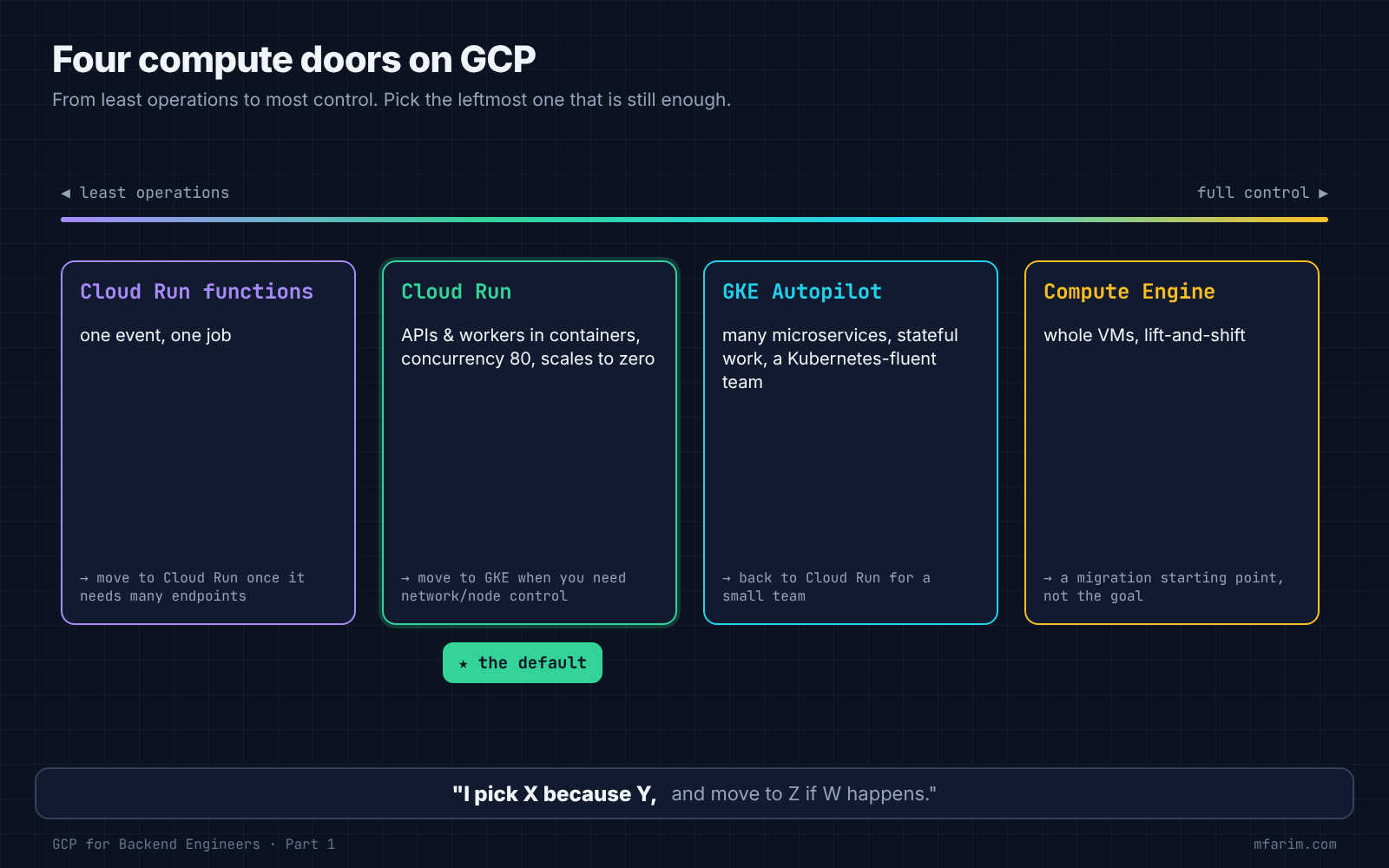
Click the diagram to see it full size.
Picture four ways to get around:
- Cloud Run functions is a ride-hailing app: book one short trip, pay per trip.
- Cloud Run is a rental car with a driver: you pick the destination, the fleet grows by itself when it is busy, and nothing needs servicing by you.
- GKE is running your own fleet with a workshop: you can tune anything, but someone has to run the workshop.
- Compute Engine is buying a car: everything is in your hands, oil changes included.
| Service | Use it for | Move to something else when |
|---|---|---|
| Cloud Run functions | Small event-triggered code: Pub/Sub messages, new files in Storage, Firestore changes, schedules | The logic grows and needs many endpoints → a Cloud Run service |
| Cloud Run | Whole APIs and services in a container, autoscaling to zero, many requests per instance | You need fine-grained network and node control, or many services that talk constantly → GKE |
| GKE (Autopilot) | Many microservices, stateful workloads, or a team already fluent in Kubernetes | A small team that wants minimal operations → Cloud Run |
| Compute Engine | Plain VMs, lift-and-shift, software that needs a whole machine | Almost always better to move to something managed |
Look at the third column. That is the "move to Z if W happens" part. A good architecture choice always has a clear way out.
2. Cloud Run: The Starting Point for Almost Every API
Cloud Run runs any container that listens for HTTP. The contract is simple:
- Listen on the port from
PORT. Cloud Run sets it. - Be stateless. Do not keep sessions, uploads or queues in memory or on local disk (see Part 3 of the Node.js series).
- Handle
SIGTERM. An instance can be shut down at any time, with a 10-second grace period (see Part 4 of the Node.js series).
The smallest example:
const http = require('node:http');

const port = Number(process.env.PORT ?? 8080); // Cloud Run sets PORT
const server = http.createServer((req, res) => {
  if (req.url === '/healthz') return res.end('ok');
  res.setHeader('content-type', 'application/json');
  res.end(JSON.stringify({ pesan: 'halo dari Cloud Run', revision: process.env.K_REVISION ?? 'lokal' }));
});
server.listen(port, () => console.log(`siap di :${port}`));
process.on('SIGTERM', () => server.close(() => process.exit(0))); // see Node.js series Part 4
Run locally with the same variables Cloud Run sets:
$ PORT=9090 K_REVISION=api-00042-abc node server.js
siap di :9090
$ curl localhost:9090/
{"pesan":"halo dari Cloud Run","revision":"api-00042-abc"}
(pesan = message, siap = ready, lokal = local.) K_REVISION is one of the variables Cloud Run fills in automatically, handy for logging which version answered a request.
The settings you touch most
gcloud run deploy api \
  --image=asia-southeast2-docker.pkg.dev/PROJECT/app/api:1.4.0 \
  --region=asia-southeast2 \
  --concurrency=80 \
  --min-instances=1 \
  --max-instances=20 \
  --timeout=60 \
  --cpu-boost
| Setting | Meaning | When to change it |
|---|---|---|
--concurrency | Concurrent requests per instance | Lower it if your code is CPU-heavy or not safe to run in parallel |
--min-instances | Instances kept warm | Important endpoints that must not hit a cold start. These are billed even with no traffic |
--max-instances | The upper brake | Always set it, so a spike does not exhaust database connections or the budget |
--timeout | Time limit per request | Up to 60 minutes. Longer work moves to Cloud Run jobs or a queue |
--cpu-boost | Extra CPU while a new instance starts | Cuts cold start time |
One important cost note: by default Cloud Run uses request-based billing, meaning CPU is only allocated, and billed, while a request is being processed. There is also instance-based billing (formerly called CPU always allocated): CPU stays available for the whole life of the instance, which suits steady traffic or background work after the response is sent. We come back to this choice in Part 6.
3. Cloud Run functions: The Glue Between Events
Functions fit "when this happens, do that". For example: a new audio file is uploaded to Cloud Storage, so make a thumbnail or work out its duration.
const functions = require('@google-cloud/functions-framework');

// Triggered by an event: a new file in a Cloud Storage bucket (through Eventarc).
functions.cloudEvent('buatThumbnail', (event) => {
  const file = event.data;
  console.log(JSON.stringify({ severity: 'INFO', message: 'file baru', bucket: file.bucket, nama: file.name, ukuran: file.size }));
  // ...make the thumbnail, save it to another bucket
});
(buatThumbnail = make thumbnail, file baru = new file, nama = name, ukuran = size.) The Functions Framework runs locally, and you can simulate an event in CloudEvents format:
npx functions-framework --target=buatThumbnail --signature-type=cloudevent --port=8083

curl localhost:8083 -X POST -H "Content-Type: application/json" \
  -H "ce-id: 1234" -H "ce-specversion: 1.0" \
  -H "ce-type: google.cloud.storage.object.v1.finalized" \
  -H "ce-source: //storage.googleapis.com/projects/_/buckets/audio-meditasi" \
  -d '{"bucket":"audio-meditasi","name":"pagi/napas-dalam.mp3","size":"9600000"}'
HTTP 204
{"severity":"INFO","message":"file baru","bucket":"audio-meditasi","nama":"pagi/napas-dalam.mp3","ukuran":"9600000"}
The sign you have outgrown a function: you start writing a router inside it, or one function calls another in a chain. At that point, merge them into one Cloud Run service.
4. GKE: When Full Control Is Worth the Cost
GKE is managed Kubernetes. Autopilot mode has Google manage the nodes, and you pay for the resources your Pods request. That is far lighter than Standard mode, but you still deal with Kubernetes concepts: Deployments, Services, Ingress, HPA and friends.
GKE makes sense when:
- many services talk to each other constantly and need a service mesh,
- some workloads really are stateful or run for a very long time,
- you need fine control over networking, sidecars or scheduling,
- the team is already fluent in Kubernetes, so the learning cost is close to zero.
If none of these are true, Cloud Run is almost always cheaper, especially in team hours.
5. Compute Engine: When You Need the Machine
VMs still have a place: legacy software that needs full access to the operating system, licences tied to a machine, or the first step of a lift-and-shift from an old server. But every VM brings work: security patches, disk monitoring, backups and manual scaling.
Use a VM as a starting point for migration, not the destination.
6. Traps When Choosing
Trap 1: choosing for scale you do not have yet
"Once we hit a million users" is not a reason to run GKE today. Cloud Run handles very large traffic, and the way out to GKE stays open because both run the same containers.
Trap 2: functions for everything
Dozens of tiny functions look tidy at first. Then every change needs many deploys, logs are scattered, and cold starts happen in many places. One service with several endpoints is often easier to maintain.
Trap 3: forgetting --max-instances
Autoscaling with no upper brake means a traffic spike, or a bug that makes clients retry forever, can start hundreds of instances. Each one opens connections to the database. The database falls over first.
Summary
- The answer pattern: "I pick X because Y, and I move to Z if W happens."
- Cloud Run: the starting point for APIs and workers. Default concurrency 80 per instance (up to 1,000), timeout up to 60 minutes.
- The Cloud Run contract: listen on
PORT, stay stateless, handleSIGTERM. - Cloud Run functions (formerly Cloud Functions): one event, one job.
- GKE Autopilot: when you need Kubernetes control, or the team is already fluent.
- Compute Engine: a starting point for migration, not the destination.
- Always set
--max-instances, and remember--min-instancesis billed.
Closing & What's Next
The four doors from the opening now each have a reason. For almost every new API, the door is Cloud Run, with GKE as a clear way out.
But compute is rarely the hardest part. What usually hits a wall first is where the data lives. In the next part we choose data storage: Cloud SQL, AlloyDB, Firestore, Memorystore, Cloud Storage and BigQuery. Including one test where a request waited 73 seconds just because Redis was down.
Grab your coffee, see you in the next part!

Written by Muhammad Fari Madyan
Senior Backend Engineer and co-founder of LampungDev. I write up what I build so others can learn from it.