Opening: The Payment That Vanished During a Deploy
Picture this: at two in the afternoon you deploy a new version. Cloud Run starts replacing the old instances with new ones.
In that same second, a buyer presses Pay. The request is running on an old instance: it has already called the payment gateway and only has to write the result to the database.
Then that instance is shut down.
The money is taken, but the order is never recorded. The logs show no error, because the process is no longer around to write one.
In Part 3 we agreed that an instance can be shut down at any time. This part is about dying politely: graceful shutdown.
Warm-Up Quiz: Do You Still Remember?
Answer first. All correct? Jump to the Summary. Missed one? Let's refresh the material.
Question 1. When Cloud Run shuts down an instance, what does the container receive?
- A.
SIGKILLright away - B.
SIGTERM, thenSIGKILL10 seconds later if it has not stopped - C.
SIGINT, then a 30-second wait
Show the answer to question 1
B. Cloud Run sends SIGTERM and gives the container 10 seconds. If the process has not exited by then, it sends SIGKILL. SIGKILL cannot be caught or delayed.
Question 2. A server without a SIGTERM handler is in the middle of a 2-second request when SIGTERM arrives. What happens to that request?
- A. It finishes first, then the process stops
- B. It is cut off, and the client gets an empty reply
Show the answer to question 2
B. Without a handler, the default action for SIGTERM is to end the process on the spot. In my test, curl exited with code 52 (empty reply from server), and the process exited with code 143.
Question 3. What does server.close() do on a Node.js HTTP server?
- A. Drops every connection immediately
- B. Stops accepting new connections, then waits for the requests in flight to finish
Show the answer to question 3
B. Its callback only runs once every connection is done. Since Node.js 19, server.close() also closes idle keep-alive connections, so it is not held up by connections nobody is using.
Question 4. Which order is right?
- A. Close the database connection → close the HTTP server → exit
- B. Close the HTTP server and wait for requests → close the database and Redis → exit
Show the answer to question 4
B. The requests in flight still need the database. Close it first and those requests fail halfway, which is exactly what we are trying to prevent.
Question 5. In NestJS, you close the database connection in onModuleDestroy(). Is there a problem?
- A. No, that is the right place
- B. Yes, because
onModuleDestroyruns before the HTTP server is closed
Show the answer to question 5
B. The order is: onModuleDestroy → beforeApplicationShutdown → the HTTP server closes and waits for requests → onApplicationShutdown. Close the database in onApplicationShutdown. Section 6 shows the order in a real run.
What did you score? Let's take them apart.
1. Why Instances Get Shut Down, and How
Instances are shut down far more often than we think:
- on every deploy, old instances are replaced,
- when traffic drops, extra instances are removed,
- when the platform moves load around for infrastructure reasons.
The way it happens is almost always the same: the platform sends SIGTERM ("please stop"), waits a little, then sends SIGKILL ("stop now"). Only the wait differs:
| Platform | Time before SIGKILL |
|---|---|
| Cloud Run | 10 seconds |
docker stop | 10 seconds (default, change it with -t) |
| Kubernetes | 30 seconds (default terminationGracePeriodSeconds) |
That window is what we use to finish our work cleanly.
2. Proof: Without a Handler, Requests Are Cut Off
// server-kasar.js
const http = require('node:http');
const tunggu = (ms) => new Promise((r) => setTimeout(r, ms));

http.createServer(async (req, res) => {
  await tunggu(2000);              // pretend this is a 2-second payment
  res.end('pembayaran tercatat\n');
}).listen(3000);
(kasar = rough, tunggu = wait, pembayaran tercatat = payment recorded.) We send one request, send SIGTERM 0.3 seconds later, then try a new request:
node server-kasar.js & PID=$!; sleep 0.6
curl -s -w '[klien] status %{http_code}\n' localhost:3000/bayar || echo "[klien] koneksi putus (curl exit $?)" &
sleep 0.3; kill -TERM $PID; sleep 0.2
curl -s -m 1 localhost:3000/bayar >/dev/null || echo "[klien baru] ditolak (curl exit $?)"
wait $PID; echo "proses keluar dengan kode $?"
[klien] status 000
[klien] koneksi putus (curl exit 52)
[klien baru] ditolak (curl exit 7)
proses keluar dengan kode 143
(klien = client, koneksi putus = connection dropped, ditolak = refused, proses keluar dengan kode = process exited with code.) The payment in progress is cut off halfway. Code 143 means the process died from signal 15 (SIGTERM): 128 + 15.
3. Four Steps to a Polite Exit
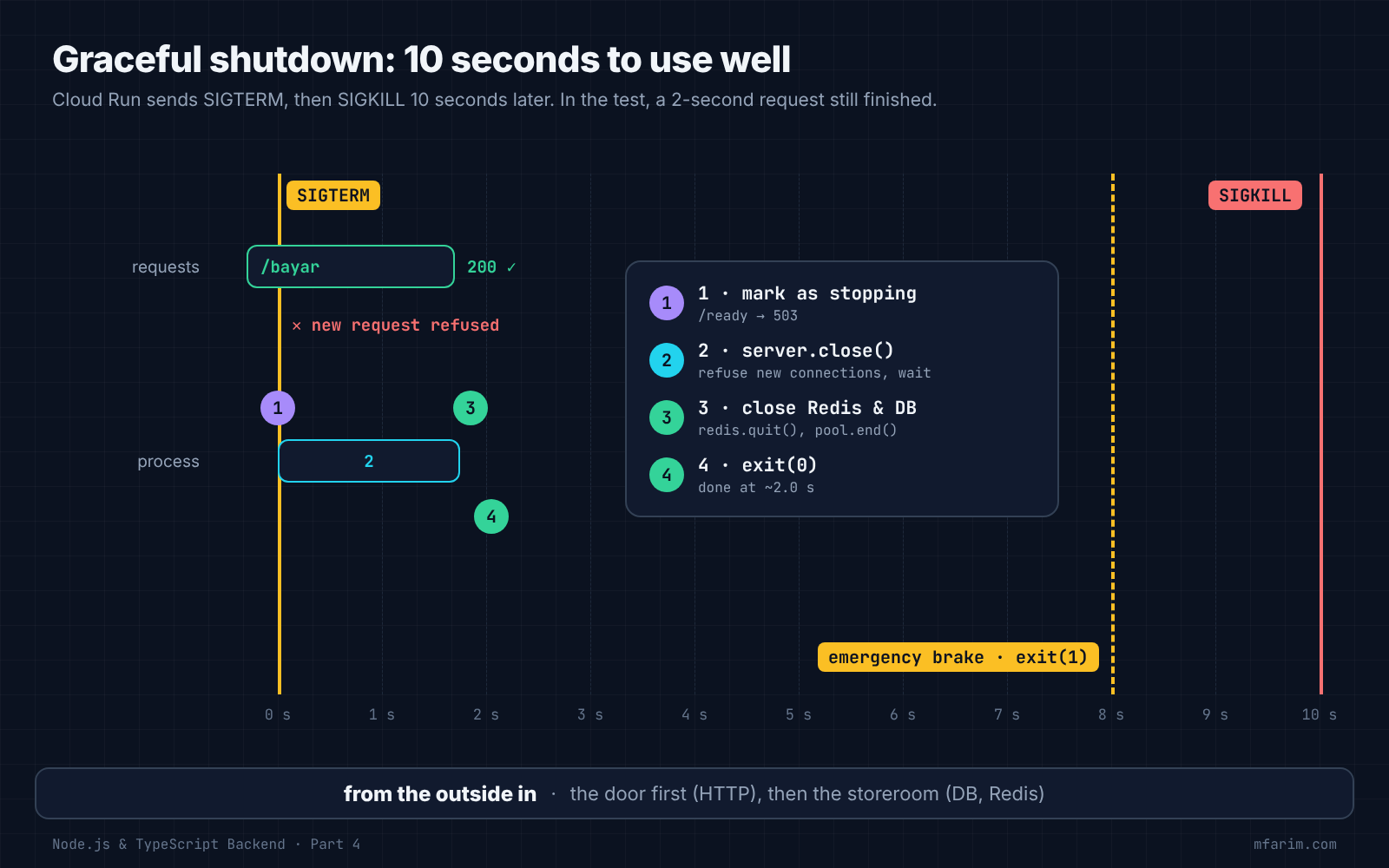
Click the diagram to see it full size.
Picture a restaurant closing for the night:
- Hang the "Closed" sign on the door. No new guests come in.
- Let the guests who are already seated finish their meal.
- Turn off the stove and lock the storeroom once the kitchen is no longer in use.
- Lock the door and go home.
In code:
- Mark the app as stopping, and make the readiness endpoint answer
503. server.close(): refuse new connections, wait for the requests in flight.- Close outside connections: the database, Redis, the message broker.
- Exit with code 0.
Plus one safety net: an emergency brake. If a request is stuck, we exit on our own before SIGKILL arrives, so the shutdown logs still get written.
4. The Code
// server-rapi.js
const http = require('node:http');
const Redis = require('ioredis');
const tunggu = (ms) => new Promise((r) => setTimeout(r, ms));

const redis = new Redis(process.env.REDIS_URL ?? 'redis://localhost:6379');
let sedangBerhenti = false;        // "is stopping"

const server = http.createServer(async (req, res) => {
  if (req.url === '/ready') {
    res.statusCode = sedangBerhenti ? 503 : 200;
    return res.end(sedangBerhenti ? 'berhenti\n' : 'siap\n');
  }
  await tunggu(2000);              // pretend this is a 2-second payment
  await redis.incr('pembayaran:tercatat');
  res.end('pembayaran tercatat\n');
});
server.listen(3000, () => console.log('siap di :3000'));

async function shutdown(sinyal) {
  if (sedangBerhenti) return;      // ignore a second signal
  sedangBerhenti = true;
  console.log(`${sinyal} diterima, mulai berhenti dengan rapi`);

  // Emergency brake: if something hangs, exit before SIGKILL arrives (Cloud Run: 10 seconds).
  setTimeout(() => {
    console.error('terlalu lama, keluar paksa');
    process.exit(1);
  }, 8000).unref();

  // 1. Stop taking new connections, wait for the requests in flight.
  await new Promise((resolve, reject) => server.close((err) => (err ? reject(err) : resolve())));
  console.log('server HTTP tertutup, semua request selesai');

  // 2. Close outside connections once nothing uses them anymore.
  await redis.quit();
  console.log('Redis tertutup');

  // 3. Exit with code 0: we stopped because we were asked to, not because of an error.
  process.exit(0);
}

process.on('SIGTERM', () => shutdown('SIGTERM'));
process.on('SIGINT', () => shutdown('SIGINT'));
The same test script now prints:
siap di :3000
SIGTERM diterima, mulai berhenti dengan rapi
[klien baru] ditolak (curl exit 7)
pembayaran tercatat
[klien] status 200, 2.009840s
server HTTP tertutup, semua request selesai
Redis tertutup
proses keluar dengan kode 0
Read the order: new clients are refused from the moment SIGTERM arrives, the payment request in flight still finishes with status 200, and only then is Redis closed and the process exits.
A few details that are easy to miss:
.unref()on the emergency timer. Withoutunref, the timer itself keeps the process alive. Withunref, it does not stop the process from exiting when everything finishes sooner.- Eight seconds, not ten. Leave room under the platform's limit.
- A second signal is ignored. Sometimes
SIGTERMandSIGINTarrive one after the other. Without the guard,server.close()runs twice. - The
unhandledRejectionhandler from Part 2 sendsSIGTERMto its own process. Now you know why: so every way out goes through the sameshutdownfunction.
5. The Harder Cases
WebSockets and long-lived connections
server.close() waits for every connection to finish. A WebSocket never "finishes" on its own. So for long-lived connections:
- tell the clients the server is stopping, so they reconnect to another instance,
- close their connections from the server side,
- if any are left close to the deadline, call
server.closeAllConnections().
Clients that reconnect load the latest state from the database, just like the seat map in Part 3.
Queue workers
A process that takes jobs from a queue must stop taking new jobs, finish the job it holds, then exit. Libraries such as BullMQ provide worker.close() for this. A job that gets cut off halfway must be safe to run again, and that is the idempotency part later in this series.
Kubernetes and readiness
On Kubernetes, SIGTERM and removing the pod from the endpoint list happen at the same time, not one after the other. For a few seconds, new requests can still reach a pod that is stopping. The common pattern: on SIGTERM, make readiness answer 503, wait a few seconds, then call server.close(). On Cloud Run you do not need this step, because Cloud Run itself stops sending new requests to an instance it is shutting down.
6. NestJS: enableShutdownHooks and the Hook Order
NestJS does not listen for SIGTERM unless you ask:
async function bootstrap() {
  const app = await NestFactory.create(AppModule);
  app.enableShutdownHooks();       // without this, the hooks below never run on SIGTERM
  await app.listen(3000);
}
Then a provider can register hooks:
@Injectable()
class RedisConnection implements OnModuleDestroy, BeforeApplicationShutdown, OnApplicationShutdown {
  onModuleDestroy() { console.log('1. onModuleDestroy'); }
  beforeApplicationShutdown(signal?: string) { console.log(`2. beforeApplicationShutdown (${signal})`); }
  async onApplicationShutdown(signal?: string) {
    console.log(`3. onApplicationShutdown (${signal}): the HTTP server is closed, close Redis here`);
  }
}
I sent SIGTERM while a 2-second /bayar (pay) request was running:
1. onModuleDestroy
2. beforeApplicationShutdown (SIGTERM)
   request /bayar selesai
[klien] 200 2.008813s
3. onApplicationShutdown (SIGTERM): the HTTP server is closed, close Redis here
That is the answer to question 5. onModuleDestroy and beforeApplicationShutdown run while the request is still in flight. Close the database there and /bayar fails. The safe place to close connections is onApplicationShutdown.
7. Docker: Make Sure the Signal Arrives
The best handler in the world is useless if SIGTERM never reaches Node.js.
# Avoid: the shell form. Docker runs it through /bin/sh -c,
# and the shell may not pass SIGTERM on to node.
CMD node dist/main.js

# Good: the exec form. Node.js receives the signal directly.
CMD ["node", "dist/main.js"]
One more thing: on Linux, a process running as PID 1 has no default action for SIGTERM. If Node.js runs as PID 1 without a handler, SIGTERM is ignored, and the container only stops when SIGKILL arrives. The Node.js Docker best practices recommend a small init such as tini, or docker run --init. If you already have a handler like the one in section 4, Node.js still receives and handles the signal.
To check on your laptop:
docker run --name try-it -p 3000:3000 your-app
# in another terminal
docker kill -s SIGTERM try-it
If the container stops straight away with complete shutdown logs, the signal is getting through.
8. Three Graceful Shutdown Traps
Trap 1: process.exit() right inside the handler
process.on('SIGTERM', () => process.exit(0)); // looks tidy, same result as no handler
Requests in flight are still cut off. The only difference is that the exit code becomes 0, so the problem is now hidden.
Trap 2: no emergency brake
One request waiting on a third-party API with no timeout means server.close() never finishes. The process is eventually killed by SIGKILL, and step 3 (closing the database) never runs.
Trap 3: closing the database first
That is questions 4 and 5. Always go from the outside in: the front door first (the HTTP server), then the storeroom (the database, Redis).
Summary
- Platforms send
SIGTERM, thenSIGKILL. Cloud Run gives 10 seconds,docker stop10 seconds, Kubernetes 30 seconds. - Without a handler, requests in flight are cut off (
curlexit 52, process exit 143). - Four steps: mark as stopping and make readiness
503→server.close()and wait for requests → close the database and Redis → exit with code 0. - An emergency brake below the platform limit, with
.unref(). - NestJS:
app.enableShutdownHooks(), and close connections inonApplicationShutdown, notonModuleDestroy. - Docker: the exec form of
CMD, and considertinior--init.
Closing & What's Next
The payment from the opening now gets recorded before the old instance stops.
But the Cloud Run documentation itself warns that graceful shutdown is not always guaranteed. Sometimes a process dies without a chance to clean up anything. So graceful shutdown is only half the answer. The other half is making operations safe to repeat, which we will cover in the part on idempotency.
Before that, the next part looks at a quieter problem: memory that keeps climbing until the process dies on its own. Memory leaks.
Grab your coffee, see you in the next part!

Written by Muhammad Fari Madyan
Senior Backend Engineer and co-founder of LampungDev. I write up what I build so others can learn from it.