Opening: Redis Is Full, Every Request Fails
Your team adds Memorystore for Redis to speed up the API. Every key is written with SET, without a TTL, because "we delete it when the data changes".
Three months later Redis memory is full. You expect Redis to evict old keys, like caches usually do. It does not. Every new SET fails with:
OOM command not allowed when used memory > 'maxmemory'.
The cause is one configuration line that few people read: Memorystore's default policy is volatile-lru, which only evicts keys that have a TTL. Keys without a TTL are never evicted. Section 5 has the test.
A cache makes a system fast and cheap. But every cache is a copy of data that may already be stale, with rules of its own. This part covers where to put caches and how data flows into them. The next part covers how to keep them correct.
Warm-Up Quiz: Do You Still Remember?
Answer first. All correct? Jump to the Summary. Missed one? Let's refresh the material.
Question 1. Where should a 20 MB meditation audio file be cached?
- A. Redis, so it is fast
- B. A CDN, with a URL that contains the version so it can be cached for a very long time
- C. The application's process memory
Show the answer to question 1
B. Big bytes should not pass through the application server at all. A CDN keeps them close to users. With a versioned URL (say /audio/123/v7.mp3), the file can be cached for years, because a new version means a new URL.
Question 2. The correct order for the cache-aside pattern is...
- A. Write to the cache, the database follows in the background
- B. Read the cache; if empty, read the database and store the result in the cache
- C. Every read goes straight to the database, the cache is only for writes
Show the answer to question 2
B. That is cache-aside, the most common pattern. Option A is write-behind, which risks losing data. The test is in section 4.
Question 3. What is the main risk of write-behind (write to the cache first, the database follows)?
- A. Reads become slow
- B. Data already answered with "OK" to the user can be lost if the process or cache dies before it is written to the database
- C. None, because Redis always saves to disk
Show the answer to question 3
B. In the test in section 4, 1,173 writes were answered OK, but only 933 reached the database after the process was killed. About 20% were lost.
Question 4. The server replies 304 Not Modified. That means...
- A. The request failed and must be retried
- B. The client's copy still matches the server's version, so the body is not sent again
- C. The server is under maintenance
Show the answer to question 4
B. The client sends If-None-Match with the ETag it kept. If it still matches, the server replies 304 with no body. In section 2, a 6,008-byte catalog becomes a reply with no body.
Question 5. Memorystore for Redis with the default policy is full, and every key was written without a TTL. What happens to the next SET?
- A. The oldest key is evicted automatically
- B. The
SETfails with an OOM error - C. Memorystore adds capacity automatically
Show the answer to question 5
B. Memorystore's default policy is volatile-lru: only keys with a TTL may be evicted. With no TTL keys, it behaves exactly like noeviction. The test is in section 5.
1. Cache Layers, from Closest to the User
The best cache is the one that stops a request from ever reaching your server. The closer to the user, the cheaper and faster.
| Layer | Example in a meditation app | How to control it |
|---|---|---|
| Mobile app | Downloaded tracks, the last home screen | Cache-Control and ETag headers, local storage |
| CDN | Audio files, images, the public catalog | Versioned URLs, long Cache-Control: max-age |
| Redis (Memorystore) | Popular track details, teacher profiles, popular search results, rate limits | TTL + delete the key when data changes |
| Process memory | Configuration, feature flags, one very hot key | Short TTL, each instance has its own copy |
| Database | Source of truth | Not a cache |
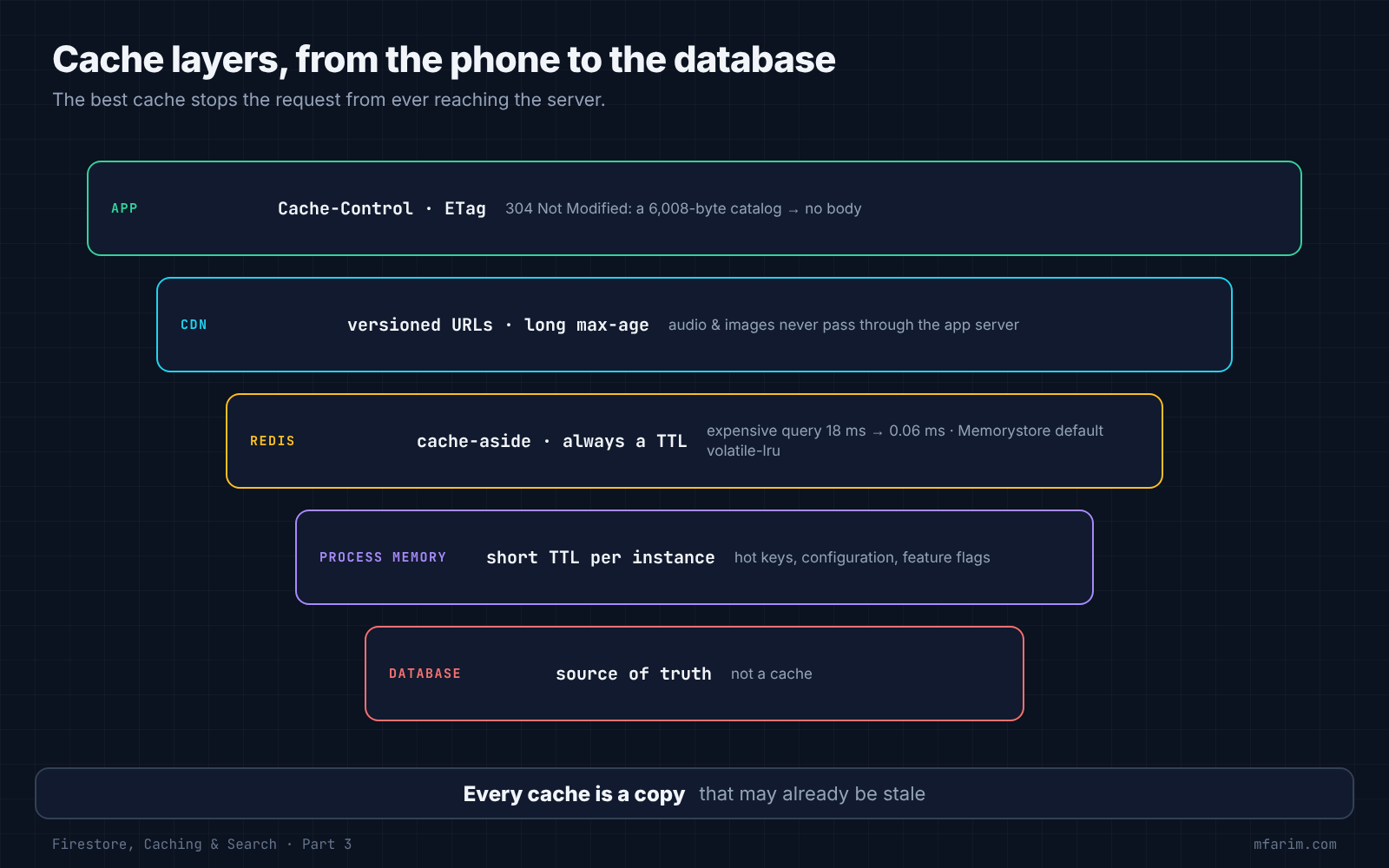
How big is the difference? I measured two kinds of reads from PostgreSQL, Redis, and process memory on the same machine (no network in between, so production numbers will be larger):
detail track (JOIN berdasarkan primary key), 5.000 kali:
PostgreSQL      p50 0.150 ms   p99 0.551 ms
Redis           p50 0.047 ms   p99 0.115 ms
memori proses   p50 0.000 ms   p99 0.002 ms

20 track terpopuler (urut 100.000 baris tanpa index pada kolom plays), 300 kali:
PostgreSQL  p50 18.21 ms   p99 32.81 ms
Redis       p50 0.06 ms   p99 0.45 ms
(First block: track details by primary key with a JOIN, 5,000 times; memori proses = process memory. Second block: the 20 most popular tracks, sorting 100,000 rows with no index on plays, 300 times.)
Two lessons from these numbers:
- For cheap reads by primary key, a healthy database is already fast. The value of a cache here is not the latency of one request but reducing load when thousands of requests arrive at once, and saving scarce database connections (remember the connection formula in Part 2 of the GCP series).
- For expensive reads, a cache cuts latency by hundreds of times: 18 ms down to 0.06 ms. A home screen that builds a popular list is a prime candidate.
2. The HTTP Cache: The Most Forgotten Layer
Before adding Redis, check whether API responses already tell clients and CDNs how to store them. An example catalog endpoint:
const http = require('http');
const crypto = require('crypto');

const katalog = JSON.stringify({ version: 7, tracks: [/* 200 tracks */] });
const etag = `"${crypto.createHash('sha1').update(katalog).digest('hex').slice(0, 16)}"`;

http.createServer((req, res) => {
  res.setHeader('Cache-Control', 'public, max-age=60, stale-while-revalidate=300');
  res.setHeader('ETag', etag);
  if (req.headers['if-none-match'] === etag) { res.statusCode = 304; return res.end(); }
  res.setHeader('Content-Type', 'application/json');
  res.end(katalog);
}).listen(3200);
Two requests in a row with curl:
--- request pertama
HTTP/1.1 200 OK
Cache-Control: public, max-age=60, stale-while-revalidate=300
ETag: "e48b6996ddc52faa"
Content-Length: 6008
--- request kedua dengan If-None-Match
HTTP/1.1 304 Not Modified
ETag: "e48b6996ddc52faa"
(request pertama = first request, request kedua = second request.)
What each header means:
| Header | Meaning |
|---|---|
max-age=60 | For 60 seconds, clients and CDNs may use their copy without asking |
stale-while-revalidate=300 | After that, the stale copy may be served for up to 300 seconds while it refreshes in the background |
ETag | A version fingerprint. The client sends it back with If-None-Match |
304 Not Modified | The client's version is still current, no body is sent |
Cloud CDN honors stale-while-revalidate from the origin, and has its own serve-while-stale setting when that header is missing. Personal data (profile, progress) uses Cache-Control: private or no-store, so a CDN never stores it.
For big static files, the pattern is even simpler: versioned URLs + a very long max-age. There is no need to purge the CDN, because a new version always comes with a new URL.
3. Three Patterns for Filling a Cache
| Pattern | How it works | Strength | Risk |
|---|---|---|---|
| Cache-aside | Read the cache; if empty, read the database and store it in the cache | Simple, only data that is read enters the cache | The first request after a miss is slow; there is a race covered in Part 4 |
| Write-through | Every write to the database also updates the cache right away | The cache is fresh right after a write | Rarely read data fills the cache too; writes get a little slower |
| Write-behind | Write to the cache first, the database follows in batches | Very fast writes | Data can be lost before it is written |
A clean cache-aside in Node.js:
async function getTrack(id) {
  const key = `track:${id}`;
  const hit = await redis.get(key);
  if (hit) return JSON.parse(hit);

  const { rows } = await pool.query('SELECT id, title, teacher_name, seconds FROM tracks WHERE id = $1', [id]);
  if (rows[0]) await redis.set(key, JSON.stringify(rows[0]), 'EX', 300);   // always with a TTL
  return rows[0] ?? null;
}
In practice, most systems use cache-aside for reads plus deleting the key when data changes. Write-through is for data that is read right after it is written. Write-behind is rarely used for important data, and the next section shows why.
One more thing: if Redis is having trouble, requests must keep working by reading the database. Part 2 of the GCP series has a test: a Redis client with default settings held requests for 73 seconds when Redis was down, the safe version only 21 ms.
4. Test: How Much Is Lost with Write-Behind?
The scenario is listening progress: every few seconds the app sends the last position. The write-behind code keeps it in a memory buffer, answers "OK", and writes to PostgreSQL every second. After 2.5 seconds I killed the process with SIGKILL, like an instance that suddenly dies:
const buffer = new Map();
let acked = 0;

setInterval(async () => {                          // write to the database every second
  const batch = [...buffer.entries()]; buffer.clear();
  for (const [key, seconds] of batch) { /* INSERT ... ON CONFLICT DO UPDATE */ }
}, 1000);

let i = 0;
setInterval(() => { buffer.set(`${i % 400}:${i}`, 30); acked++; i++; }, 2);   // "OK" to the client

setTimeout(() => { console.log(`dijawab OK ke klien: ${acked}`); process.kill(process.pid, 'SIGKILL'); }, 2500);
dijawab OK ke klien: 1173
tersimpan di database: 933
(dijawab OK ke klien = answered OK to the client, tersimpan di database = stored in the database.)
240 writes, about 20%, were answered "OK" to users but never reached the database.
For listening progress, losing a few seconds of position may be acceptable. For purchases, subscriptions or balances, never. If you really need to absorb fast writes, use a durable queue like Pub/Sub, not a buffer in memory.
5. Test: Redis Memory Policies
A full Redis must decide what to evict, or reject new writes. That is controlled by maxmemory-policy. I filled a 2 MB Redis with keys of about 1 KB without a TTL, under three policies:
for policy in noeviction volatile-lru allkeys-lru; do
  redis-cli CONFIG SET maxmemory 2mb
  redis-cli CONFIG SET maxmemory-policy $policy
  # SET track:1 .. track:3000, 1,000 bytes each, stop at the first error
done
noeviction: tersimpan 1011 key, evicted 0, error: OOM command not allowed when used memory > 'maxmemory'.
volatile-lru: tersimpan 989 key, evicted 0, error: OOM command not allowed when used memory > 'maxmemory'.
allkeys-lru: tersimpan 989 key, evicted 2034
(tersimpan = stored.)
volatile-lru, the default policy of Memorystore for Redis, behaves exactly like noeviction when no key has a TTL. Only allkeys-lru keeps accepting writes by evicting the least recently used keys.
Safe choices:
| What Redis holds | Policy |
|---|---|
| Pure cache | allkeys-lru (or allkeys-lfu), and still set TTLs |
| A mix of cache and data that must not be lost (say, locks or queues) | volatile-lru, and every cache key must have a TTL |
Better still, put the cache and the data that must not be lost on separate instances. Also watch memory and evicted-key metrics in Cloud Monitoring.
6. Three Caching Traps
Trap one: keys without a TTL. With Memorystore's default policy, keys without a TTL are never evicted, and a full Redis rejects writes. A TTL is also the safety net if a key deletion fails.
Trap two: caching personal data on a CDN. A response with user data and no Cache-Control: private can be stored on a CDN and served to someone else. Personal data gets private or no-store.
Trap three: write-behind for important data. Test: 20% of writes already answered OK were lost when the process died. Important data is written to the database first.
Summary
- The best cache stops the request from reaching the server: app → CDN → Redis → process memory → database.
- The value of a cache: for expensive reads, latency drops by hundreds of times (18 ms → 0.06 ms). For cheap reads, the value is less load and fewer connections.
- HTTP cache:
Cache-Control,ETag, and304 Not Modified. Static files use versioned URLs and longmax-age. Personal data isprivate. - Three patterns: cache-aside (most common), write-through (fresh after writes), write-behind (fast but risky). Test: 1,173 answered OK, 933 stored.
- Maxmemory policy: Memorystore's default
volatile-lrurejects writes when no key has a TTL. Pure cache →allkeys-lru, and always use TTLs.
Closing & What's Next
The Redis from the opening will be fine with one change: give every cache key a TTL, or switch the policy to allkeys-lru.
The cache now sits in the right places. But there is a harder question: how do you make sure its contents stay correct? The next part covers the race that keeps old data in the cache for an hour even after the key was deleted, random TTLs, stale-while-revalidate, hot keys, and how to measure whether your cache really helps.
Grab your coffee, see you in the next part!

Written by Muhammad Fari Madyan
Senior Backend Engineer and co-founder of LampungDev. I write up what I build so others can learn from it.