Opening: 40 Reads for One Screen
Picture the home screen of a meditation app: 20 tracks, each with a title, a duration, and the teacher's name.
If you come from SQL, the first reflex is to keep teachers in their own table and JOIN. In Firestore, that reflex turns into one query for the 20 tracks, plus one read per teacher. For a single screen, that can reach 40 reads. Multiply by millions of app opens a day, and the bill multiplies too.
The problem is not that Firestore is expensive. The problem is designing data the PostgreSQL way and then running it on a database with different rules.
This series covers three things that always show up in read-heavy apps: Firestore, caching, and search. Part one holds on to one sentence:
In Firestore, data design starts from the queries you will run, not from the relations between your data.
Warm-Up Quiz: Do You Still Remember?
Answer first. All correct? Jump to the Summary. Missed one? Let's refresh the material.
Question 1. A track list screen needs to show the teacher's name. In Firestore, the most common approach is...
- A. JOIN the
tracksandteacherscollections inside the query - B. Store a copy of the teacher's name in every track document
- C. Store all tracks inside the teacher document
Show the answer to question 1
B. Firestore has no JOIN. Data that is always read together is usually copied into the document being read (denormalization). Option C makes the teacher document keep growing toward the document size limit. Section 3 covers the price of option B: keeping the copies up to date.
Question 2. You read the document users/rani. It has a favorites subcollection with 300 documents. How many documents are read?
- A. 1
- B. 301
- C. It depends on the size of the subcollection
Show the answer to question 2
A: 1. Firestore queries are shallow. Reading a document does not read its subcollections. That is exactly what makes subcollections a good fit for data that keeps growing.
Question 3. What is the maximum size of one Firestore document (Standard edition)?
- A. 1 MiB
- B. 16 MiB
- C. Unlimited, as long as you pay for storage
Show the answer to question 3
A: 1 MiB (1,048,576 bytes). The 16 MiB figure applies to Firestore Enterprise edition with MongoDB compatibility, a different edition. Section 4 calculates when a history array hits this limit.
Question 4. Each user's listening history keeps growing. Where should it go?
- A. As an array in the profile document, so one read gets everything
- B. As a subcollection
users/{uid}/plays, with the full events also sent to BigQuery for analytics - C. As one giant document
plays/all
Show the answer to question 4
B. An array in the profile makes every profile read pull the whole history, and one day it hits 1 MiB. One document for everyone becomes a write hotspot. A subcollection can be read partially (say, the last 20), and analytics fits better in BigQuery.
Question 5. You are starting the Firestore design for a new feature. The best first step is...
- A. Draw an entity relationship diagram, then copy it into collections
- B. List the screens and the queries they run, then shape documents that answer those queries
- C. Create one collection per table in the old database
Show the answer to question 5
B. In Firestore, the shape of a document is decided by how the data is read. A relationship diagram still helps you understand the domain, but it is not a mold for collections. Section 2 shows how.
1. The Firestore Data Model in One Minute
Firestore is a NoSQL document database fully managed by Google. Two things set it apart from other databases on GCP, and both live in the mobile and web SDKs: real-time listeners (the screen updates itself when data changes) and offline support (the app can still read and write without a signal, then syncs).
The structure has only three layers:
| Term | Meaning | Example |
|---|---|---|
| Collection | A group of documents | tracks |
| Document | One record with fields | tracks/aB3dE5fG7hJ9kL1mN3pQ |
| Subcollection | A collection under one document | users/{uid}/favorites |
Think of a filing cabinet. A collection is a drawer, a document is a folder inside the drawer, and a subcollection is a small drawer attached to one folder. Opening a folder does not open its small drawer.
What is missing: JOINs, foreign keys, and queries that combine two different collections into one answer. If a screen needs data from two places, you read twice, or you store that data in one place from the start.
2. Start from Screens, Not Tables
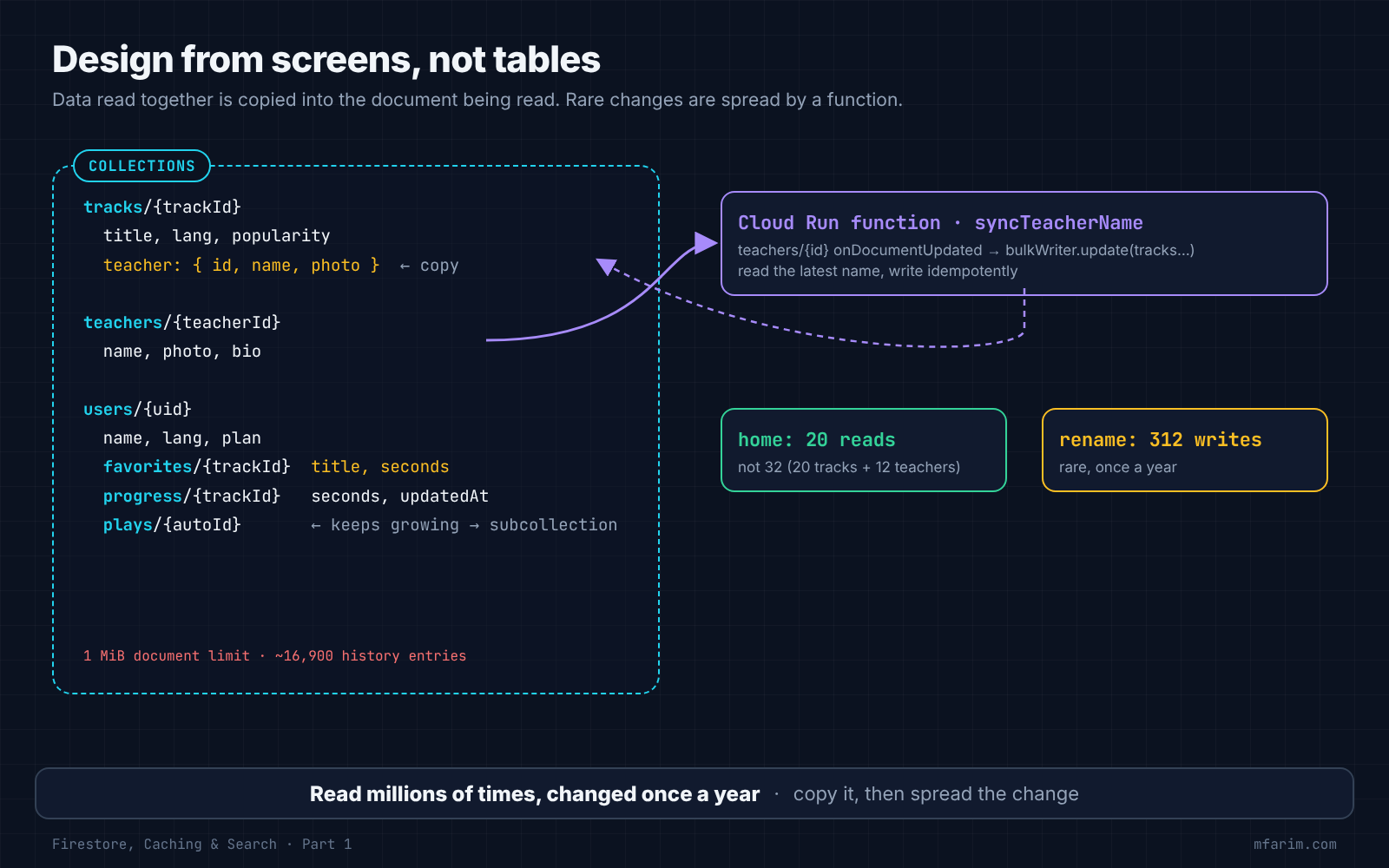
The most practical method: list the screens, then list the queries each screen needs. The document shapes follow that list.
| Screen | Query | Document shape that answers it |
|---|---|---|
| Home: popular tracks | 20 tracks by popularity, per language | tracks/{id} with lang, popularity, and copies of teacher.name, teacher.photo |
| Teacher page | Profile + their 20 latest tracks | teachers/{id}, then tracks where teacher.id == X ordered by publishedAt |
| My favorites | Tracks the user saved | users/{uid}/favorites/{trackId} with a copy of the title and duration |
| Continue listening | Last position per track | users/{uid}/progress/{trackId} with seconds and updatedAt |
Notice the patterns:
- Data owned by one user lives under that user's document (
users/{uid}/...). That also makes the Security Rules in Part 2 easy: "you may only read your own path". - Data read together is copied into the document being read. A favorite card stores the title and duration so the favorites screen does not need to read 50
tracksdocuments again. - The favorite's document ID is the track ID. Saving the same favorite twice just overwrites the same document, so it is idempotent by design.
Do the maths for the home screen from the opening. Say the 20 tracks come from 12 different teachers:
| Design | Reads per screen open | Reads per 1 million opens |
|---|---|---|
| Normalized (teachers in their own collection, read separately) | 20 + 12 = 32 | 32 million |
| Denormalized (teacher name inside the track document) | 20 | 20 million |
Firestore bills per document read, so this difference shows up directly on the bill. Latency drops too, because the app does not wait for a second round trip for 12 teacher documents.
3. The Price of Denormalization: Spreading Changes
Copies always have a price. If a teacher changes their display name, all their tracks still hold the old name.
The good news: reads and writes in an app like this are very lopsided. A teacher's name is read millions of times a day but changes maybe once a year. Paying 312 writes when a teacher with 312 tracks changes their name is far cheaper than 12 extra reads on every home screen open.
The spreading happens on the backend, usually in a Cloud Run function triggered by the document change:
// functions/index.js
import { onDocumentUpdated } from 'firebase-functions/v2/firestore';
import { initializeApp } from 'firebase-admin/app';
import { getFirestore } from 'firebase-admin/firestore';

initializeApp();
const db = getFirestore();

export const syncTeacherName = onDocumentUpdated('teachers/{teacherId}', async (event) => {
  const before = event.data.before.data();
  const after = event.data.after.data();
  if (before.name === after.name) return;              // other changes do not need spreading

  // Read the LATEST name, do not trust the event: events can arrive twice and out of order.
  const teacherId = event.params.teacherId;
  const latest = (await db.doc(`teachers/${teacherId}`).get()).get('name');

  const tracks = await db.collection('tracks').where('teacher.id', '==', teacherId).get();
  const writer = db.bulkWriter();
  tracks.forEach((doc) => writer.update(doc.ref, { 'teacher.name': latest }));
  await writer.close();
});
Two things in this code are deliberate:
- It reads the latest name, not the name from the event. The Firestore docs list two trigger limitations: events are delivered at least once, and ordering is not guaranteed. If a teacher renames twice in quick succession, the second event can be processed before the first. Reading the latest document makes processing order irrelevant.
- The result is idempotent. Writing the same name twice produces the same data. Same principle as Part 12 of the Node.js series.
A rule of thumb for what to copy:
| Copy | Do not copy |
|---|---|
| Small data read on many screens: name, photo, duration | Data that changes often: play count, online status |
| Data that may be a few seconds late | Data that must always be exact: price, access rights |
A play count that changes thousands of times an hour must not be copied into other documents. Even keeping it in a single document has its own problem, and that is a topic for Part 2.
4. Data That Keeps Growing: When to Move to a Subcollection
A common temptation: "Just keep the listening history as an array in the profile document. One read, everything."
I calculated the size using the storage size rules from the Firestore docs. I first checked my calculator against the example in the docs (it must come out to 147 bytes), then used it on a profile with a history array of trackId, playedAt, and seconds:
contoh dokumentasi: 147 byte
satu entri riwayat: 62 byte
entri sampai lewat 1 MiB: 16.910
dokumen profil dengan 100 entri: 6.2 KiB
dokumen profil dengan 1000 entri: 60.7 KiB
dokumen profil dengan 5000 entri: 302.9 KiB
(The output is in Indonesian: the docs example is 147 bytes, one history entry is 62 bytes, the document passes 1 MiB after 16,910 entries, and a profile with 100, 1,000 and 5,000 entries weighs 6.2, 60.7 and 302.9 KiB.)
About 16,900 entries before the document is rejected. That sounds like a lot, but the trouble starts much earlier:
- Every profile read pulls the whole history. A settings screen that only needs the user's name downloads 300 KiB for an active user.
- Every new play rewrites a big document, including updating its indexes.
- A real-time listener on the profile fires on every new play, even though the screen listening to it does not care about history.
The rule is simple: lists with a small, clear bound may live in the document (say, 3 preferred languages, 5 tags). Lists that keep growing move to a subcollection:
import { FieldValue } from 'firebase-admin/firestore';

// Write one play: one small document, automatic ID
await db.collection(`users/${uid}/plays`).add({ trackId, playedAt: FieldValue.serverTimestamp(), seconds });

// "Recently played" screen: the last 20 is enough
const recent = await db.collection(`users/${uid}/plays`).orderBy('playedAt', 'desc').limit(20).get();
For analytics such as "which tracks were completed most this week", the raw events fit better in BigQuery, as covered in Part 2 of the GCP series. Firestore serves the app, BigQuery serves the analysts.
5. When to Use a Subcollection, When a Top-Level Collection
Both are valid. The deciding question: is this data always read in the context of one parent?
| Choose a subcollection when | Choose a top-level collection when |
|---|---|
| It is always read per parent: one user's favorites | It is read across parents: all tracks from all teachers |
| Access rules follow the parent | Access rules stand on their own |
| The count per parent can be large | You need frequent global queries |
If you ever need a query across all subcollections with the same name (say, all reviews of all tracks), Firestore has collection group queries. But if that is your app's main query, the data probably belonged in a top-level collection from the start.
6. Three Firestore Design Traps
Trap one: copying the SQL schema as is. One collection per table, and the app does "manual JOINs" with many reads. Slow and expensive. Start from the list of screens.
Trap two: copying data that changes often. Copies of the play count in favorites, teacher profiles, and search results mean one play triggers many writes. Only copy what rarely changes.
Trap three: treating the event content as the truth. Triggers can arrive twice and out of order. Read the latest document inside the handler, and make the write idempotent.
Summary
- Firestore: a managed document database with real-time listeners and offline support. The structure is collection → document → subcollection. No JOINs.
- Design starts from screens and queries, not from a relationship diagram.
- Denormalization trades frequent reads for rare writes. Home screen example: 32 down to 20 reads per open.
- Spread changes with a Cloud Run function that reads the latest data and writes idempotently. Trigger events can be duplicated and out of order.
- 1 MiB document limit. Calculation: about 16,900 history entries before rejection, but size problems appear long before that. Lists that keep growing move to a subcollection.
- Shallow queries: reading a document does not read its subcollections.
Closing & What's Next
The home screen from the opening now needs 20 reads, and teacher names stay correct even when they change.
But document design is only half the story. The next part covers what surprises people when the bill arrives or when traffic grows: composite indexes, pagination that bills skipped documents, a single document that cannot be written without limit, transactions, and Security Rules that are not filters. There is also a test that shows why one popular counter can become a hotspot.
Grab your coffee, see you in the next part!

Written by Muhammad Fari Madyan
Senior Backend Engineer and co-founder of LampungDev. I write up what I build so others can learn from it.