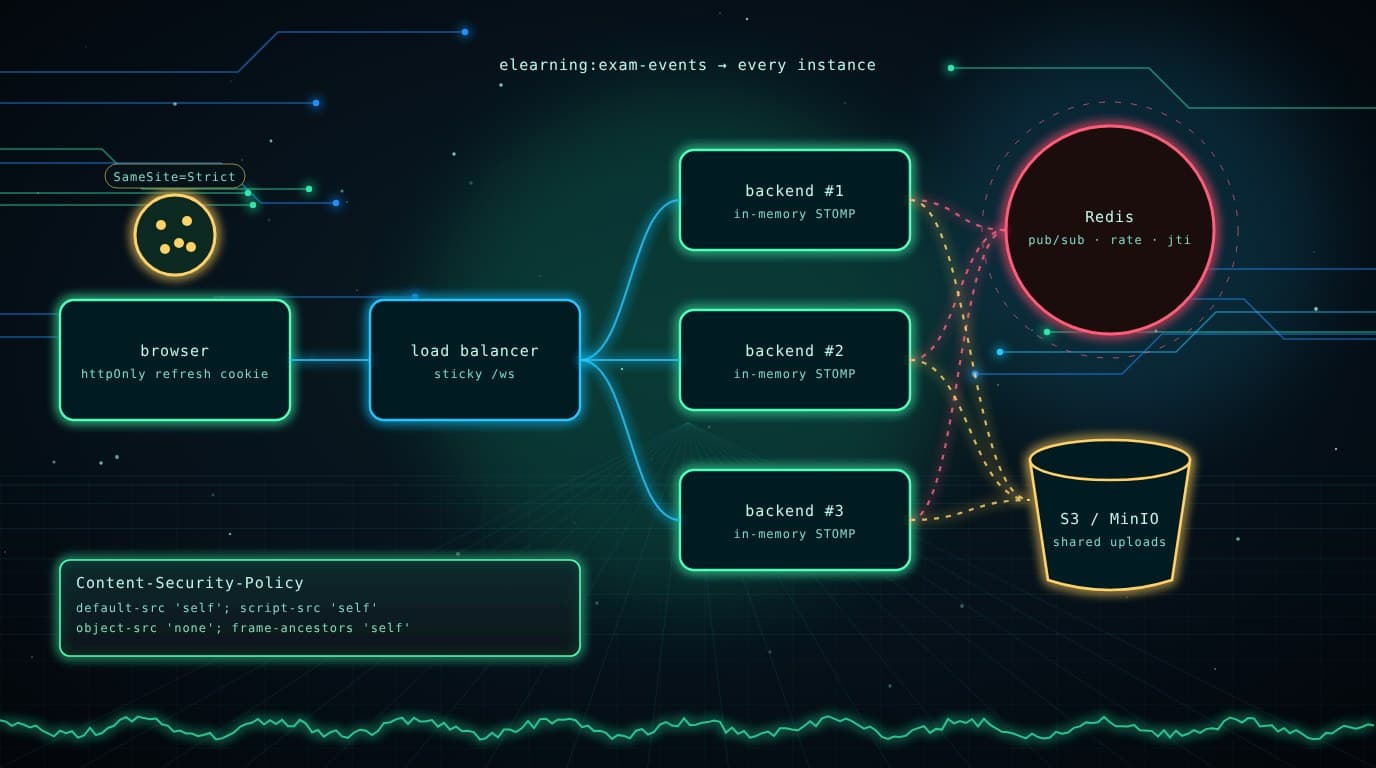
Introduction: Two Leftovers From Part 5
In Part 5 I made refresh tokens single-use and revocable. Still, two things kept bothering me.
First, where the refresh token lived. It came back in the JSON body and I stored it in localStorage. Rotation limits the damage of a stolen token, but an XSS bug could still read it and race the real user for the next refresh. To me, the safest place for a long-lived credential is somewhere JavaScript can't read at all.
Second, my backend could only run as one instance. Rate-limit counters, the STOMP broker and uploaded files all lived inside one JVM or one Docker volume. Start a second instance behind a load balancer and the limits double, teachers miss live events, and half the files return 404.
I tackled both in Pull Request #25: feat/roadmap-hardening, the same PR as the exam integrity work in Part 6.
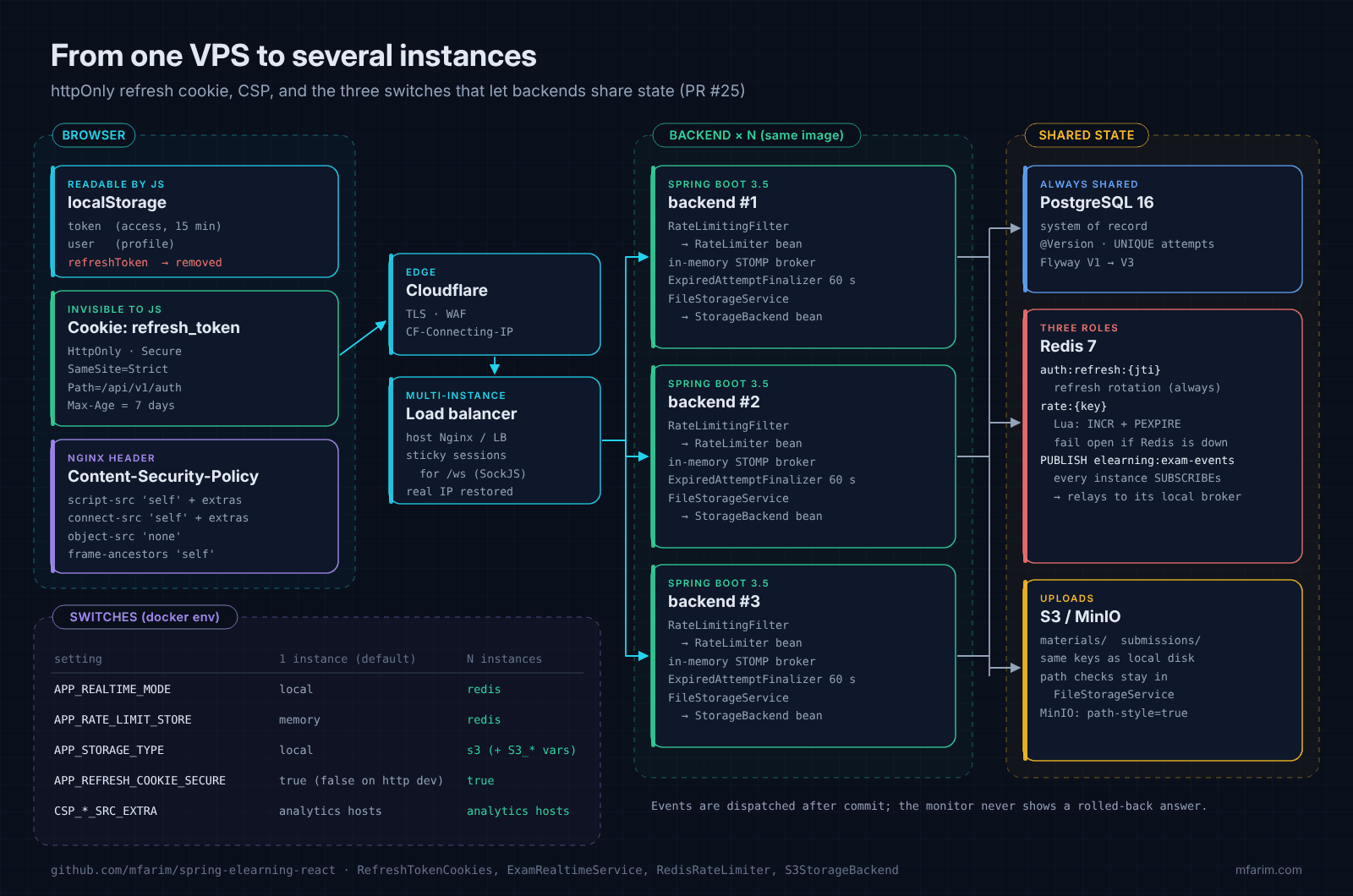
Click the diagram to open it at full size.
1. The Refresh Token Moves Into an httpOnly Cookie
Backend: one helper for every endpoint that issues tokens
Login, refresh, change password, register, impersonate and stop-impersonate all return tokens. Instead of touching six controllers in six different ways, I wrote one component that moves the refresh token from the body into a Set-Cookie header:
@Component
public class RefreshTokenCookies {

    public static final String COOKIE_NAME = "refresh_token";
    /** Only the auth endpoints (refresh, logout) ever receive the cookie. */
    public static final String COOKIE_PATH = "/api/v1/auth";

    public ResponseCookie issue(String refreshToken) {
        return base(refreshToken).maxAge(maxAge).build();
    }

    public ResponseCookie clear() {
        return base("").maxAge(Duration.ZERO).build();
    }

    /** The refresh token is moved from the JSON body into a Set-Cookie header. */
    public ResponseEntity<ApiResponse<AuthResponse>> respond(AuthResponse auth, String message) {
        String refreshToken = auth.getRefreshToken();
        auth.setRefreshToken(null);
        ResponseEntity.BodyBuilder builder = ResponseEntity.ok();
        if (refreshToken != null && !refreshToken.isBlank()) {
            builder.header(HttpHeaders.SET_COOKIE, issue(refreshToken).toString());
        }
        return builder.body(ApiResponse.ok(auth, message));
    }

    private ResponseCookie.ResponseCookieBuilder base(String value) {
        return ResponseCookie.from(COOKIE_NAME, value)
                .httpOnly(true)
                .secure(secure)        // app.security.refresh-cookie.secure (default true)
                .sameSite(sameSite)    // app.security.refresh-cookie.same-site (default Strict)
                .path(COOKIE_PATH);
    }
}
Each attribute has its own job:
| Attribute | Value | Why |
|---|---|---|
HttpOnly | always | document.cookie can't read it, so injected scripts can't steal it |
Secure | true (configurable) | Never sent over plain HTTP |
SameSite | Strict | Not sent on cross-site requests, which blocks CSRF against refresh and logout |
Path | /api/v1/auth | Only the auth endpoints receive it, not every API call or static file |
Max-Age | refresh TTL (7 days) | Matches the jti TTL in Redis |
The controller reads the cookie first but still accepts the old JSON body, so browsers that had loaded the previous frontend kept working during the deploy:
/** Cookie first; the JSON body is still accepted so older clients keep working during the switch. */
private static RefreshTokenRequest resolveRefreshToken(String cookieToken, RefreshTokenRequest body) {
    String token = cookieToken != null && !cookieToken.isBlank()
            ? cookieToken
            : (body != null ? body.getRefreshToken() : null);
    return RefreshTokenRequest.builder().refreshToken(token).build();
}

@PostMapping("/auth/refresh")
public ResponseEntity<ApiResponse<AuthResponse>> refreshToken(
        @CookieValue(name = RefreshTokenCookies.COOKIE_NAME, required = false) String cookieToken,
        @RequestBody(required = false) RefreshTokenRequest body) {
    AuthResponse response = authService.refreshToken(resolveRefreshToken(cookieToken, body));
    return refreshTokenCookies.respond(response, "Token refreshed successfully");
}

@PostMapping("/auth/logout")
public ResponseEntity<ApiResponse<Void>> logout(
        @CookieValue(name = RefreshTokenCookies.COOKIE_NAME, required = false) String cookieToken,
        @RequestBody(required = false) RefreshTokenRequest body) {
    authService.logout(resolveRefreshToken(cookieToken, body));
    return ResponseEntity.ok()
            .header(HttpHeaders.SET_COOKIE, refreshTokenCookies.clear().toString())
            .body(ApiResponse.ok(null, "Logged out"));
}
Frontend: less code, not more
The Axios interceptor no longer reads or stores the refresh token. It just calls the endpoint and lets the browser attach the cookie:
-      const refreshToken = localStorage.getItem('refreshToken');
-      if (!refreshToken) {
+      // The refresh token lives in an httpOnly cookie that JavaScript cannot read,
+      // so the access token tells us whether the user was logged in.
+      if (!localStorage.getItem('token')) {
         // redirect to /login
       }
-      const response = await axios.post('/api/v1/auth/refresh', { refreshToken });
+      // The browser sends the httpOnly refresh cookie (path /api/v1/auth) and stores the rotated one.
+      const response = await axios.post('/api/v1/auth/refresh', null, { withCredentials: true });
Logout posts with credentials: 'same-origin' and keepalive: true (so the request survives the redirect to /login), and initAuth deletes any refreshToken an older build left behind in localStorage:
// Older builds stored the refresh token in localStorage; remove it so it cannot be stolen.
const removeLegacyRefreshToken = () => localStorage.removeItem('refreshToken');
Local development
One gotcha: Secure cookies are not sent over http://localhost in every browser (Safari is strict about it). So my development docker-compose.yml sets APP_REFRESH_COOKIE_SECURE=false, while production keeps the default true.
What's still exposed
I'll admit the 15-minute access token is still in localStorage. Keeping it in memory with a silent refresh on page load would close that gap, and I've listed it as an open item in the roadmap. In the meantime, the Content-Security-Policy in the next section narrows the window.
2. A Content-Security-Policy for the SPA
A CSP tells the browser which sources may run scripts, load styles, open connections or frame the page. Even if an attacker manages to inject markup, a strict script-src stops the browser from executing it.
# frontend/nginx.conf (rendered as a template, see below)
add_header Content-Security-Policy "default-src 'self'; script-src 'self' ${CSP_SCRIPT_SRC_EXTRA}; style-src 'self' 'unsafe-inline'; img-src 'self' data: blob:; font-src 'self' data:; media-src 'self' blob:; connect-src 'self' ${CSP_CONNECT_SRC_EXTRA}; frame-src 'self' blob:; frame-ancestors 'self'; object-src 'none'; base-uri 'self'; form-action 'self'" always;
Here are the choices I made, and why:
script-src 'self'with no'unsafe-inline': no inline<script>and noeval.style-src 'unsafe-inline': React and several UI libraries set inlinestyleattributes. Allowing inline styles is a much smaller risk than inline scripts.img-src/media-src/frame-src blob:: protected files from Part 5 open asblob:URLs, and PDFs preview in an iframe.connect-src 'self': Axios and the WebSocket (/ws) are same-origin.frame-ancestors 'self'andobject-src 'none': no clickjacking, no plugins.
One inline script had to go
My index.html had a tiny inline script because some browser builds of SockJS expect a Node-style global. With script-src 'self' it would be blocked, so I moved it to a static file:
<!-- before -->
<script>window.global = window; var global = window;</script>
<!-- after -->
<script src="/global-shim.js"></script>
Analytics without editing the config
My live demo uses analytics, which need extra hosts in script-src and connect-src. The official nginx image renders files from /etc/nginx/templates/ with envsubst at startup, so the Dockerfile copies the config there:
COPY nginx.conf /etc/nginx/templates/default.conf.template
# only variables that start with CSP_ are substituted, so nginx's own $uri, $host, ... stay untouched
ENV NGINX_ENVSUBST_FILTER="^CSP_"
ENV CSP_SCRIPT_SRC_EXTRA=""
ENV CSP_CONNECT_SRC_EXTRA=""
NGINX_ENVSUBST_FILTER matters here: without it, envsubst would also replace $uri and $host with empty strings and break routing. Turning analytics on is now a single environment variable:
CSP_SCRIPT_SRC_EXTRA="https://www.googletagmanager.com"
CSP_CONNECT_SRC_EXTRA="https://*.google-analytics.com"
If you want to check a policy, open DevTools: every blocked resource shows up in the console as a CSP violation, along with the directive that blocked it.
3. What Breaks With Two Backend Instances
Before writing any code, I made a list of what was stored inside one instance:
| State | Where it lived | What happens with 2+ instances |
|---|---|---|
Refresh-token jti | Redis | Already shared ✔ |
| Access token | Stateless JWT | Works anywhere ✔ |
| Expired-attempt job | Each instance | Safe thanks to @Version from Part 6 ✔ |
| Rate-limit counters | In-memory Bucket4j | Each instance counts separately: the limit is multiplied by N |
| STOMP broker | In-memory simple broker | A teacher on instance A misses events produced on instance B |
| Uploaded files | Docker volume | A file uploaded to A returns 404 when requested from B |
The last three needed a shared home. Redis was already deployed, and S3-compatible storage is easy to add, so I gave each of them an interface with a local and a shared implementation, selected by one setting.
4. Rate Limits Shared Through Redis
public interface RateLimiter {

    /** Records one request for key; returns false when more than capacity happened within window. */
    boolean tryAcquire(String key, int capacity, Duration window);

    /** Forgets the history of key (e.g. after a successful login). */
    void reset(String key);
}
InMemoryRateLimiter keeps the Bucket4j + Caffeine code from Part 5. RedisRateLimiter uses a fixed window, with the increment and the expiry in one Lua script:
static final DefaultRedisScript<Long> INCREMENT_SCRIPT = new DefaultRedisScript<>(
        "local current = redis.call('INCR', KEYS[1]) "
                + "if current == 1 then redis.call('PEXPIRE', KEYS[1], ARGV[1]) end "
                + "return current",
        Long.class);

@Override
public boolean tryAcquire(String key, int capacity, Duration window) {
    try {
        Long count = redis.execute(INCREMENT_SCRIPT, List.of(KEY_PREFIX + key), String.valueOf(window.toMillis()));
        return count == null || count <= capacity;
    } catch (RuntimeException e) {
        log.warn("Rate-limit store unavailable, allowing request for {}: {}", key, e.getMessage());
        return true;
    }
}
Why a script? With two separate commands (INCR, then PEXPIRE), a crash between them leaves a key without an expiry, and that client is blocked forever. Redis runs a Lua script atomically, so either both happen or neither does.
There are two trade-offs I accepted on purpose:
- Fail open. If Redis is down, requests are allowed and a warning is logged. During an exam, letting 500 students keep working matters more to me than strict limiting for a few minutes. A bank's login endpoint would choose differently.
- Fixed window. A client can send up to 2× the capacity across a window boundary (end of one minute, start of the next). For abuse protection that's acceptable, and it costs one Redis call per request.
The implementation is picked at startup:
@Bean
@ConditionalOnProperty(name = "app.rate-limit.store", havingValue = "memory", matchIfMissing = true)
public RateLimiter inMemoryRateLimiter() { return new InMemoryRateLimiter(); }

@Bean
@ConditionalOnProperty(name = "app.rate-limit.store", havingValue = "redis")
public RateLimiter redisRateLimiter(StringRedisTemplate redisTemplate) { return new RedisRateLimiter(redisTemplate); }
Now RateLimitingFilter and LoginRateLimiterService depend only on the interface.
5. Live Exam Events Across Instances
Say a student's answer is handled by instance B, but the teacher's WebSocket is connected to instance A. With an in-memory broker, A never hears about it.
The usual answer is a STOMP broker relay (RabbitMQ or ActiveMQ). I went with a lighter approach that reuses Redis: each instance keeps its own in-memory broker, and events travel between instances through Redis pub/sub.
public void broadcastExamEvent(Long examId, String eventType, Object payload) {
    Envelope envelope = new Envelope("/topic/exams/" + examId + "/monitor",
            Map.of("eventType", eventType, "timestamp", System.currentTimeMillis(), "data", payload));

    if (TransactionSynchronizationManager.isSynchronizationActive()) {
        TransactionSynchronizationManager.registerSynchronization(new TransactionSynchronization() {
            @Override
            public void afterCommit() { dispatch(envelope); }
        });
    } else {
        dispatch(envelope);
    }
}

private void dispatch(Envelope envelope) {
    if (!redisFanout) {
        sendLocally(envelope);
        return;
    }
    try {
        redisTemplate.convertAndSend(REDIS_CHANNEL, objectMapper.writeValueAsString(envelope));
    } catch (Exception e) {
        // Live monitoring is best effort: fall back to this instance rather than lose the event.
        sendLocally(envelope);
    }
}
Every instance subscribes to the channel and relays whatever it receives to its own broker:
@Configuration
@ConditionalOnProperty(name = "app.realtime.mode", havingValue = "redis")
public class RealtimeRedisConfig {

    @Bean
    public RedisMessageListenerContainer examEventsListenerContainer(
            RedisConnectionFactory connectionFactory, ExamRealtimeService realtimeService) {
        RedisMessageListenerContainer container = new RedisMessageListenerContainer();
        container.setConnectionFactory(connectionFactory);
        container.addMessageListener(
                (message, pattern) -> realtimeService.deliverFromRedis(new String(message.getBody(), StandardCharsets.UTF_8)),
                new ChannelTopic(ExamRealtimeService.REDIS_CHANNEL));   // "elearning:exam-events"
        return container;
    }
}
So why this design instead of a broker relay?
- No new infrastructure. Redis is already there for refresh tokens.
- Same code path in both modes.
localmode skips the publish;redismode publishes and every instance (including the sender) delivers throughdeliverFromRedis. - Best effort is enough. The monitor can always be rebuilt from
GET /exams/{id}/monitor, so a lost event is a cosmetic issue, not data loss. That's why a Redis failure falls back to local delivery instead of failing the request.
If message volume ever grows past what pub/sub handles comfortably, the relay is still an option. I wrote that decision down in docs/ARCHITECTURE.md (see Part 8).
6. Uploads on S3 or MinIO
FileStorageService used to write to disk directly. Now it validates first and then delegates:
public interface StorageBackend {
    void put(String key, InputStream content, long size, String contentType) throws IOException;
    /** Returns the file, or throws a RuntimeException when it does not exist. */
    Resource get(String key);
    /** Deletes the file if it exists; missing files are ignored. */
    void delete(String key);
}
The important part is what didn't move. Extension allow-lists, random UUID names and path traversal checks stay in FileStorageService, in front of every backend:
/** Rejects absolute paths, backslashes and any key that climbs out of the storage root. */
static void validateKey(String key) {
    if (key.contains("\\") || key.startsWith("/")) {
        throw new SecurityException("Invalid file path: " + key);
    }
    Path normalized = Paths.get(key).normalize();
    if (normalized.isAbsolute() || normalized.startsWith("..") || normalized.toString().isEmpty()) {
        throw new SecurityException("Access to path outside upload directory is forbidden: " + key);
    }
}
That way the defenses from Part 2 apply to S3 too, and the S3 backend can stay simple. S3StorageBackend (AWS SDK v2) works with AWS and with MinIO:
public static S3StorageBackend create(String bucket, String region, String endpoint,
                                      String accessKey, String secretKey, boolean pathStyle) {
    if (bucket == null || bucket.isBlank()) {
        throw new IllegalStateException("app.storage.s3.bucket is required when app.storage.type=s3");
    }
    AwsCredentialsProvider credentials = accessKey == null || accessKey.isBlank()
            ? DefaultCredentialsProvider.create()          // env vars, instance role, ...
            : StaticCredentialsProvider.create(AwsBasicCredentials.create(accessKey, secretKey));

    S3ClientBuilder builder = S3Client.builder()
            .region(Region.of(region))
            .credentialsProvider(credentials)
            .serviceConfiguration(S3Configuration.builder().pathStyleAccessEnabled(pathStyle).build());
    if (endpoint != null && !endpoint.isBlank()) {
        builder.endpointOverride(URI.create(endpoint));   // e.g. http://minio:9000
    }
    return new S3StorageBackend(builder.build(), bucket);
}
Object keys are the same relative paths as on disk (materials/3f2a….pdf), so I didn't have to change the authorization rules in FileAccessService at all.
7. Turning It On
One instance stays the default, so nothing changes for my current single-VPS deploy. To run several instances, you set three switches:
| Setting | 1 instance (default) | N instances |
|---|---|---|
APP_REALTIME_MODE | local | redis |
APP_RATE_LIMIT_STORE | memory | redis |
APP_STORAGE_TYPE | local | s3 plus APP_STORAGE_S3_BUCKET, _REGION, _ENDPOINT, _ACCESS_KEY, _SECRET_KEY, _PATH_STYLE |
APP_REFRESH_COOKIE_SECURE | true (false only for HTTP dev) | true |
The repo ships the switches, not a load balancer. A minimal example with MinIO and an Nginx upstream could look like this (it's not part of the repository, so adapt it to your platform):
# docker-compose.scale.yml (example override)
services:
  backend:
    container_name: !reset null      # a fixed name prevents scaling
    environment:
      APP_REALTIME_MODE: redis
      APP_RATE_LIMIT_STORE: redis
      APP_STORAGE_TYPE: s3
      APP_STORAGE_S3_BUCKET: elearning-uploads
      APP_STORAGE_S3_ENDPOINT: http://minio:9000
      APP_STORAGE_S3_PATH_STYLE: "true"
      APP_STORAGE_S3_ACCESS_KEY: ${MINIO_ROOT_USER}
      APP_STORAGE_S3_SECRET_KEY: ${MINIO_ROOT_PASSWORD}
  minio:
    image: minio/minio               # pin a release tag in production
    command: server /data
    environment:
      MINIO_ROOT_USER: ${MINIO_ROOT_USER}
      MINIO_ROOT_PASSWORD: ${MINIO_ROOT_PASSWORD}
    volumes:
      - minio_data:/data
volumes:
  minio_data:
upstream elearning_backend {
    ip_hash;   # sticky: SockJS fallback transports keep session state on one instance
    server backend-1:8080;
    server backend-2:8080;
    server backend-3:8080;
}
Native WebSocket connections are long-lived and naturally stay on one instance. Stickiness matters for the SockJS fallbacks (XHR streaming and polling), which spread one logical session over many HTTP requests.
8. Checklist
| Area | Before | After PR #25 |
|---|---|---|
| Refresh token storage | localStorage | httpOnly, Secure, SameSite=Strict cookie on /api/v1/auth |
| Old clients during deploy | — | Cookie first, JSON body still accepted |
| Inline scripts | Allowed | Blocked by CSP; shim moved to /global-shim.js |
| Analytics hosts | Hard-coded | CSP_SCRIPT_SRC_EXTRA / CSP_CONNECT_SRC_EXTRA |
| Rate limits | Per instance | RateLimiter interface; Redis Lua fixed window, fails open |
| Live events | One instance only | After-commit dispatch, Redis pub/sub fan-out, local fallback |
| Uploads | Docker volume | StorageBackend: local or S3/MinIO, validation unchanged |
Conclusion & What's Next
The refresh token is now out of reach of JavaScript, the SPA refuses inline scripts, and the backend can run as several instances just by changing environment variables. Every switch has a safe default, so the single-VPS deployment from Part 4 keeps working exactly as before.
After three large pull requests, my README no longer described the system accurately. In the final part, Part 8, I talk about docs/ARCHITECTURE.md, the 55 backend tests that came with these changes, and JaCoCo coverage in CI.
- Live demo: https://spring-elearning.mfarim.com
- Source code: github.com/mfarim/spring-elearning-react
- Pull request: #25

Written by Muhammad Fari Madyan
Senior Full Stack Engineer and co-founder of LampungDev. I write up what I build so others can learn from it.